EasyManua.ls Logo

LG 42PC1D - Page 111

LG 42PC1D
128 pages
Print Icon
To Next Page IconTo Next Page
To Previous Page IconTo Previous Page
Loading...
APPENDIX
110
EXTERNAL CONTROL DEVICE SETUP
APPENDIX
RS-232C Setup
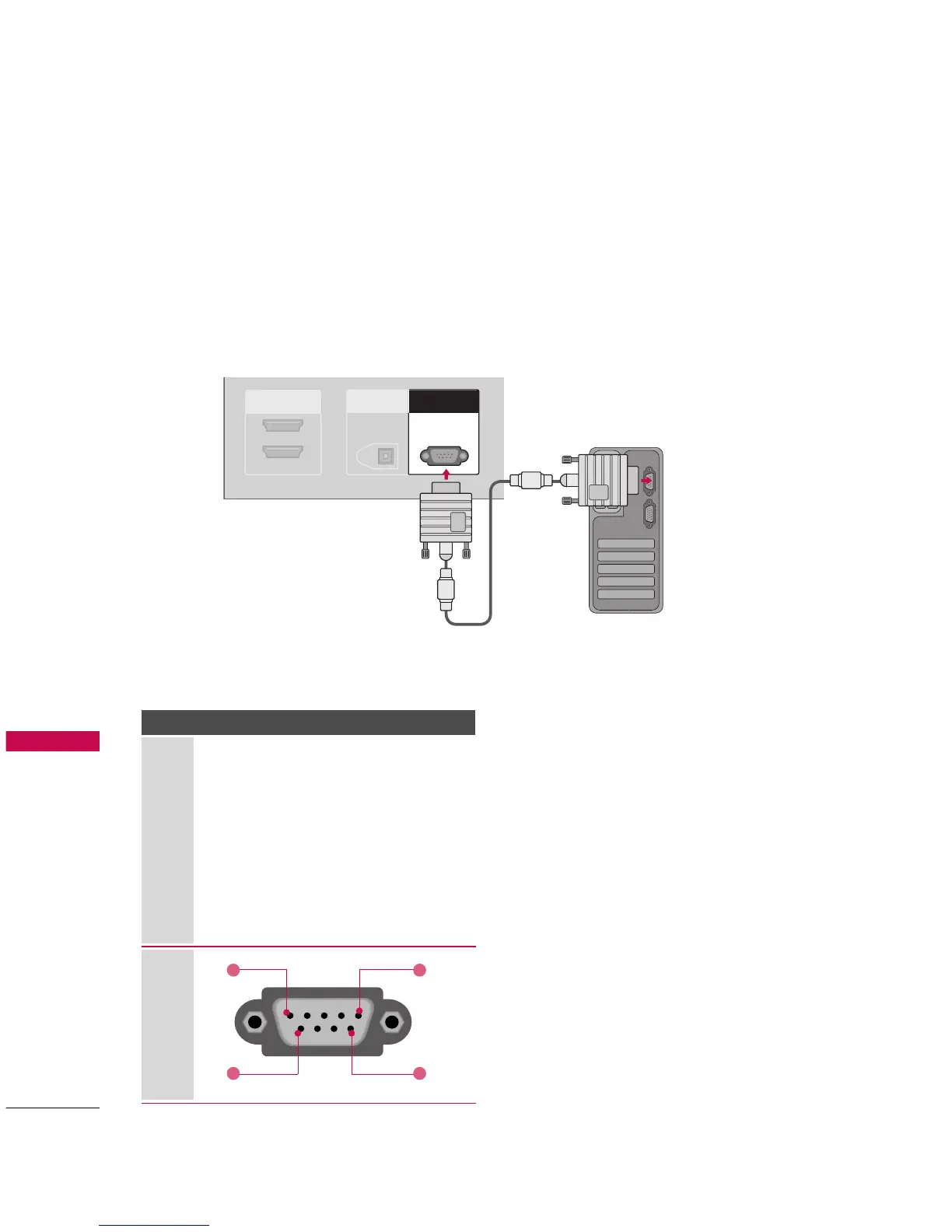
Connect the RS-232C (serial port) input jack to an external control device (such as a computer or an A/V
control system) to control the product’s functions externally.
Connect the serial port of the control device to the RS-232C jack on the product back panel.
Note: RS-232C connection cables are not supplied with the product.
HDMI IN
2
1(DVI)
DIGITAL AUDIO
OUT
OPTICAL
RS-232C INRS-232C IN
(CONTROL(CONTROL
&
SERVICE)SERVICE)
Type of Connector; D-Sub 9-Pin Male
No. Pin Name
1 No connection
2 RXD
(
Receive data
)
3 TXD
(
Transmit data
)
4 DTR
(
DTE side ready
)
5 GND
6 DSR
(
DCE side ready
)
7RTS
(
Ready to send
)
8 CTS
(
Clear to send
)
9 No Connection
1
6
5
9

Other manuals for LG 42PC1D

Related product manuals