EasyManua.ls Logo

LG 42PC1D - Page 69

LG 42PC1D
128 pages
Print Icon
To Next Page IconTo Next Page
To Previous Page IconTo Previous Page
Loading...
TV MENU
/
SETUP
(
CHANNEL
)
68
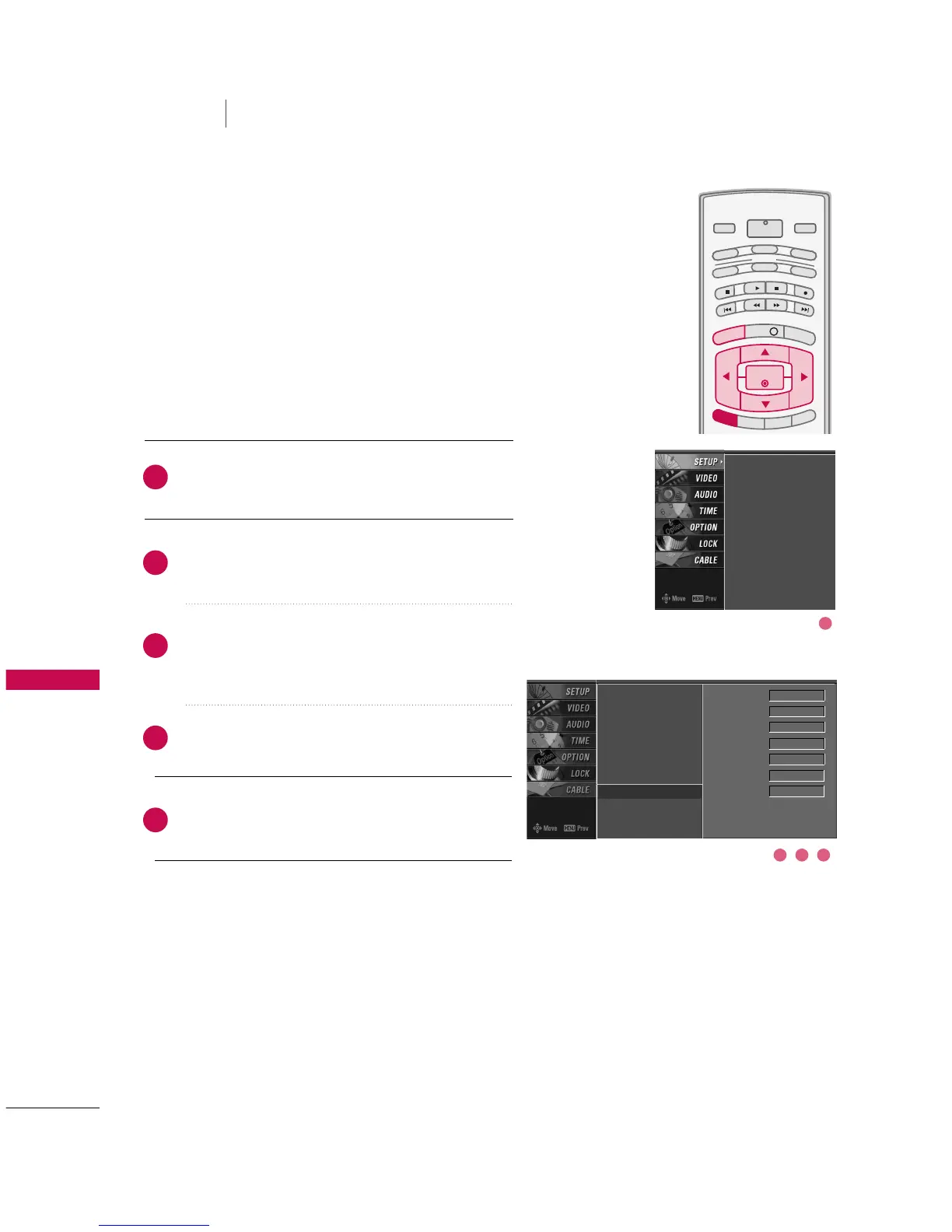
INPUT LABEL
TV MENU
SETUP(Channel)
Sets a label to each input source which is not in use when
you press the INPUT button.
Press the
MMEENNUU
button and then use
DD
or
EE
but-
ton to select the
SSEETTUUPP
menu.
Press the
GG
button and then use
DD
or
EE
button to
select
IInnppuutt LLaabbeell
.
Press the
GG
button and then use
DD
or
EE
button to
select the source:
AAVV11
,
AAVV22
,
CCoommppoonneenntt11
,
CCoommppoonneenntt22
,
RRGGBB
,
HHDDMMII11//DDVVII
or
HHDDMMII22
.
Press the
FF
or
GG
button to select the label.
Press
EEXXIITT
button to return to TV viewing or press
MMEENNUU
button to return to the previous menu.
INFO i
T
V GUIDE
ENTERENTER
SAP
CC
RATIO
POWER
DAY -
DAY+
VCR
TV
DVD
AUDIO
CABLE
STB
MODE
TV INPUT
INPUT
MENUMENU
EXIT
EZ Scan
Manual Scan
Channel Edit
DTV Signal
Main Input
Sub Input
Input Label
G
Set ID
AV1 Cable Box
AV2 VCR
Component1 DVD
Component2 Set Top Box
RGB PC
HDMI1/DVI Game
HDMI2 Satellite
EZ Scan
Manual Scan
Channel Edit
DTV Signal
Main Input
Sub Input
Input Label
Set ID
2
3
4
5
1
1
3 42