EasyManua.ls Logo

LG 42PC1DG - TV Menu: Audio Adjustment; TV Speaker On;Off Control

LG 42PC1DG
103 pages
Print Icon
To Next Page IconTo Next Page
To Previous Page IconTo Previous Page
Loading...
TV MENU
/
AUDIO ADJUSTMENT
66
AUTO VOLUME LEVELLER (AVL)
TV MENU
AUDIO ADJUSTMENT
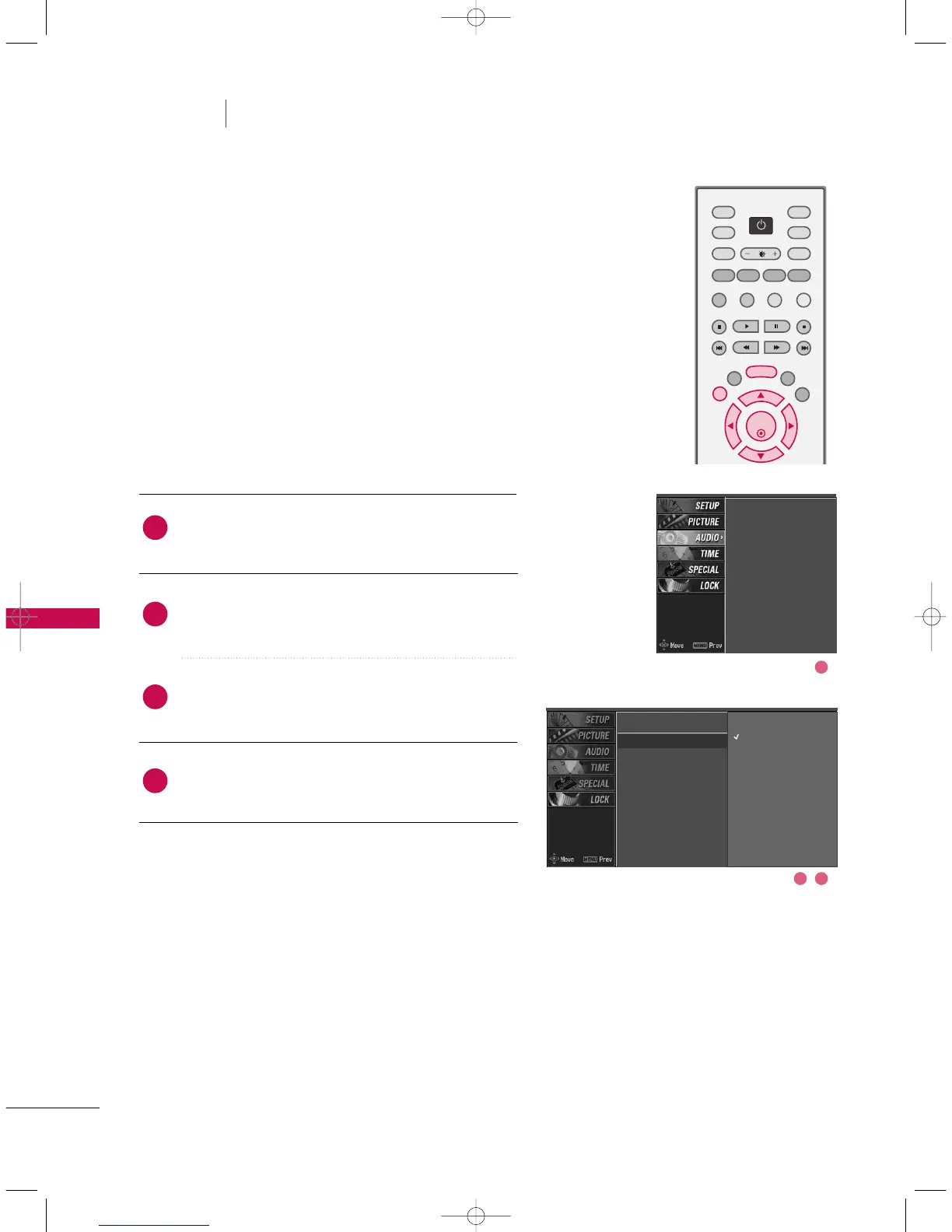
AVL automatically keeps on an equal volume level even if
you change programmes.
Press the
MMEENNUU
button and then use
DD
or
EE
button
to select the
AAUUDDIIOO
menu.
Press the
GG
button and then use
DD
or
EE
button to
select
AAVVLL
.
Press the
GG
button and then use
DD
or
EE
button to
select
OOffff
or
OOnn
.
Press
EEXXIITT
button to return to normal TV viewing.
SSM
AVL
G
Balance
TV Speaker
2
3
4
1
SSM
AVL
Balance
TV Speaker
OK
TVD/A
INPUT
INPUT
DVD
ARC
EXIT
SLEEP
LIST
I/II
MENU
TEXT PIP
GUIDE
VCR
POWER
INFO
2 3
1
Off
On
9U0569A-2 Rev05-ING 06/8/23 3:29 PM Page 66