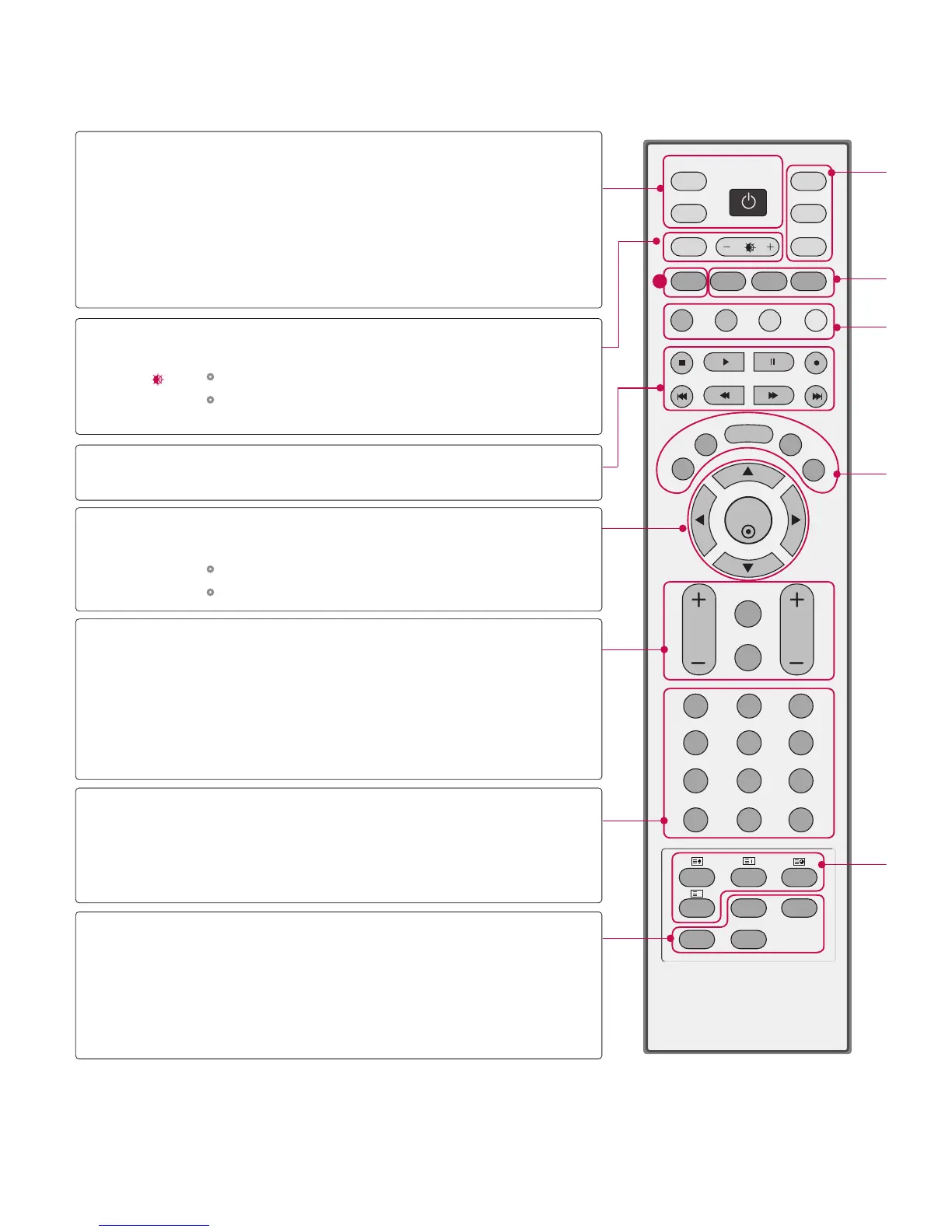
D/A INPUT
(Digital TV /
Analogue TV)
INPUT
POWER
ARC
+/-
OK
THUMBSTICK
(Up/Down/Left
Right/OK)
VOLUME +/-
Q.VIEW
MUTE
Programme +/-
APM
FAV
(FAVOURITE)
PIP PR +/-
PIP INPUT
SWAP
Selects digital or analogue mode.
External input modes rotate in regular sequence:
Digital, Analogue, AV1-2, Component 1-2, RGB-
DTV (or RGB-PC), HDMI/DVI.
Switches the set between ON and STANDBY.
Selects your desired picture format.
Adjusts brightness on screen.
It returns to the default settings brightness by
changing mode source.
Control some video cassette recorders or DVD players
("RECORD" button is not available for DVD player).
Accepts your selection or displays the current
mode.
Adjusts menu settings.
Selects menu item.
Increase/decrease the sound level.
Returns to the previously viewed programme.
Switches the sound on or off.
Selects a programme.
Concurrently, compare with the Dynamic, Standard,
Mild, User1 and User2 on the screen.
Displays the selected favourite programmes.
Selects a programme for the sub picture.
Selects the input mode for the sub picture.
Alternates between main and sub picture in
PIP/Twin picture mode.
NUMBER button
VCR/DVD
control buttons
1



 To Next Page