- 18 -
LGE Internal Use OnlyCopyright©2007 LG Electronics. Inc. All right reserved.
Only for training and service purposes
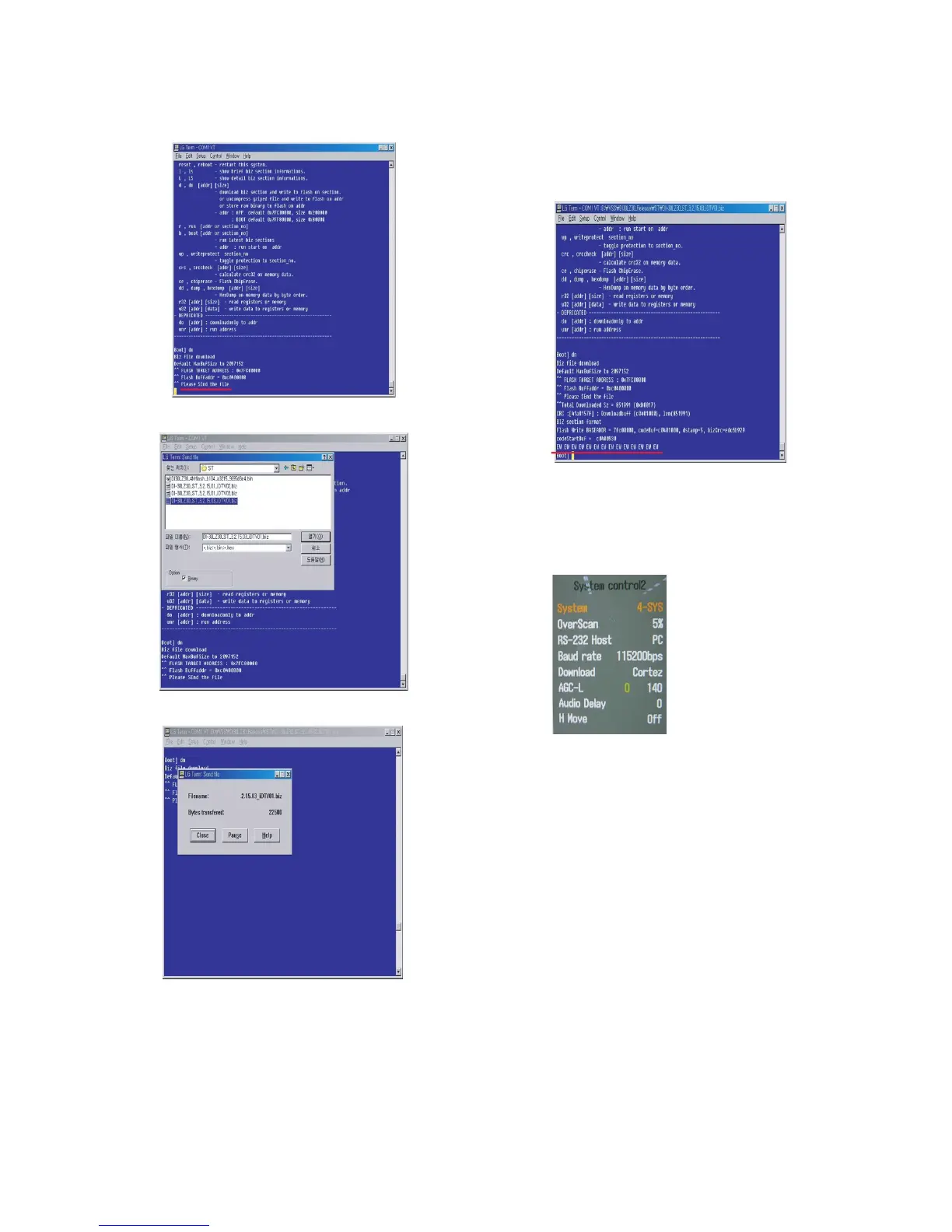
7) When ‘Please Send the file’ appears, Press ‘ctrl’ + ‘s’.
8) When ‘Please Send the file’ appears, Press ‘ctrl’ + ‘s’.
9) Download takes 60sec ~ 120sec.
10) The End of DOWNLOAD
1. After Download successfully, you can see ‘EW EW
EW EW.
2. You can remove RS232 Cable and TV Power SET
OFF => ON
11) Change the mode.
1. Press the ‘ADJ’ button.
2. Press the ‘System Control 2’ menu.
3. Enter the ‘PC’ on the ‘RS-232 Host’.
4. Enter ‘115200bps’ on the ‘Baud Rate’.
5. Enter the ‘Cortez’ on the ‘Download.



 To Next Page