- 13 -
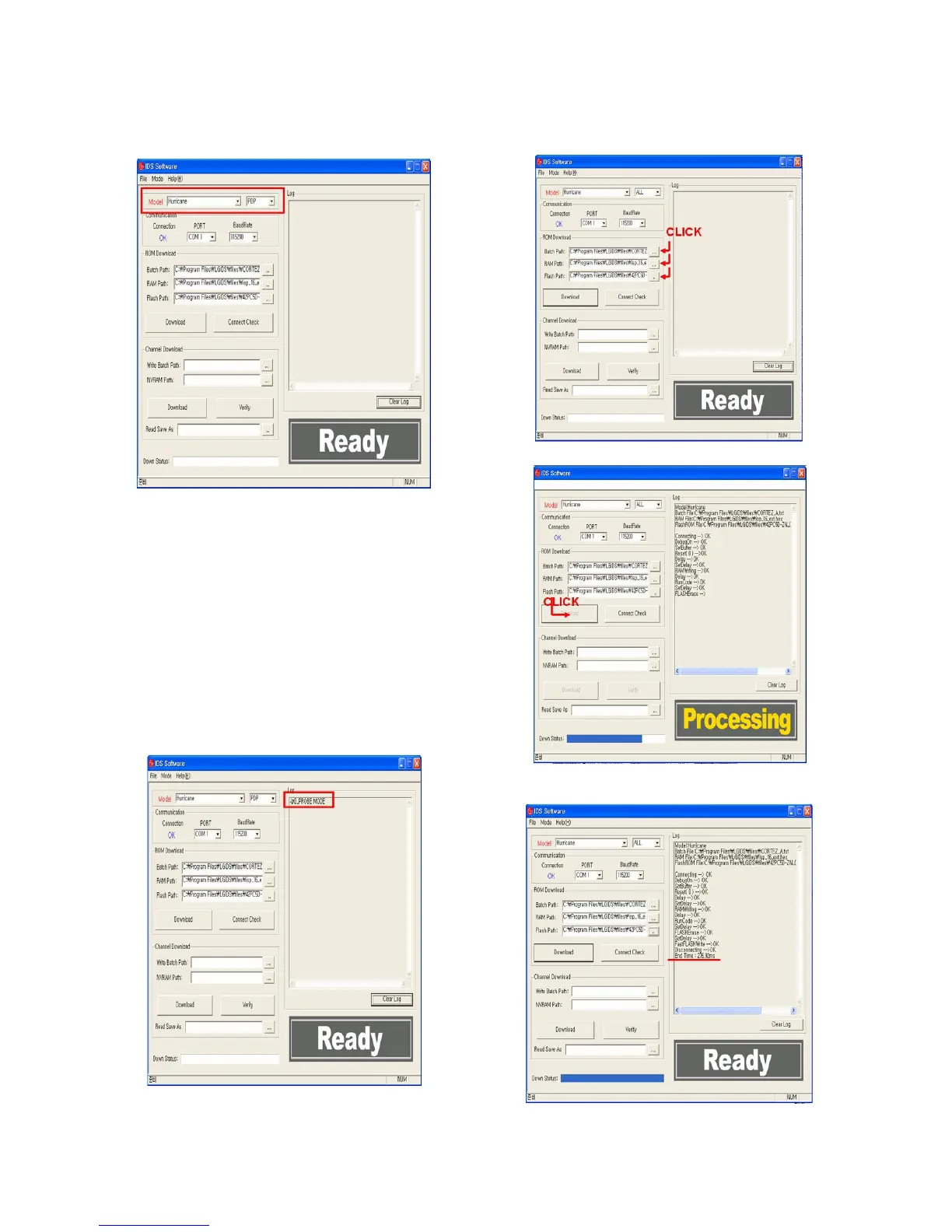
3) Execute the LGIDS Program - 1
1. Check a ‘PDP’ & ‘Hurricane’ on the ‘Model’ MENU
*
If your connection is ‘NG’, then set your PORT(COM1,2,3...)
correctly.
4) SVC MENU Setting for CORTEZ DOWNLOAD.
case 1. Press the ‘tilt’ button on the Adjustment Remote
Control.
case 2. Press the ‘ADJ’ button
1) Press the ‘System Control 2’ menu
2) Enter the ‘GProbe’ on the ‘RS-232Host menu’
3) Enter ‘115200bps’ on the ‘Baud Rate menu’
4) Enter the ‘Cortez’ on the ‘Download menu’
* If you don’t have a Adjustment Remote Control
‘Menu’ button on the Remote Control + ‘Menu’ button on
the Local Key during 7~8sec
After Change a mode, you can see ‘GPROBE MODE’
5) Execute the LGIDS Program - 2
1. Open a Batch file, RAM file and Flash file.
6) Execute the LGIDS Program - 3
7) Wait the final message.
1. After DOWNLOAD, Turn off the TV after download -> Turn
on.



 To Next Page