MULTIMEDIA
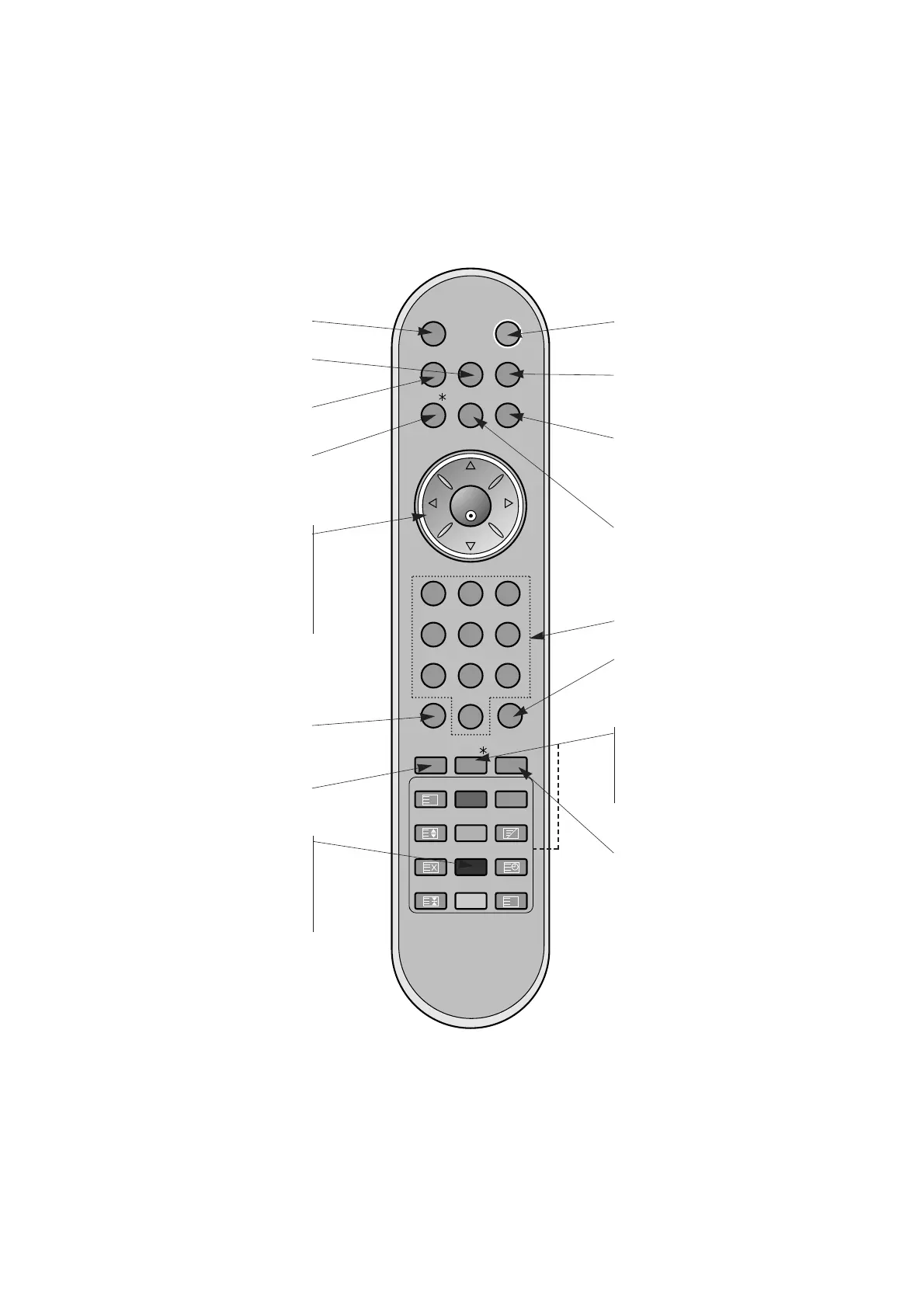
selects the Component, RGB or
HDMI modes.
POWER
switches the set on from standby or
off to standby.
ARC
changes the picture format.
MENU
displays on screen menus one by one.
exits the current menu.
memorizes menu changes.
SSM
to select the sound appropriate to
your viewing programme character.
NUMBER buttons
SLEEP
sets the sleep timer.
I/II (option)
selects the language during dual lan-
guage broadcast.
selects the sound output.
TEXT/
*
(option)
These buttons are used for teletext.
For further details, see the ‘Teletext’
section.
COLOURED BUTTONS :
These buttons are used for teletext.
LIST (option)
displays the programme table.
INPUT
MUTE
switches the sound on or off.
DD
/
EE
Selects a menu option.
FF
/
GG
(Volume Up/Down)
Increases/decreases sound level.
Adjusts menu settings.
OK
accepts your selection or displays the
current mode.
PSM
adjusts the factory preset picture
according to the room.
SPLIT ZOOM
enlarge the screen with regular
ration.
Q.VIEW (option)
Returns to the previously viewed
programme.
Note : This function works only when
Favourite prog. is set to Off.
Otherwise each press of this button
will select a stored favorite
programme.



 To Next Page