9
ENGLISH
Installing on a Wall
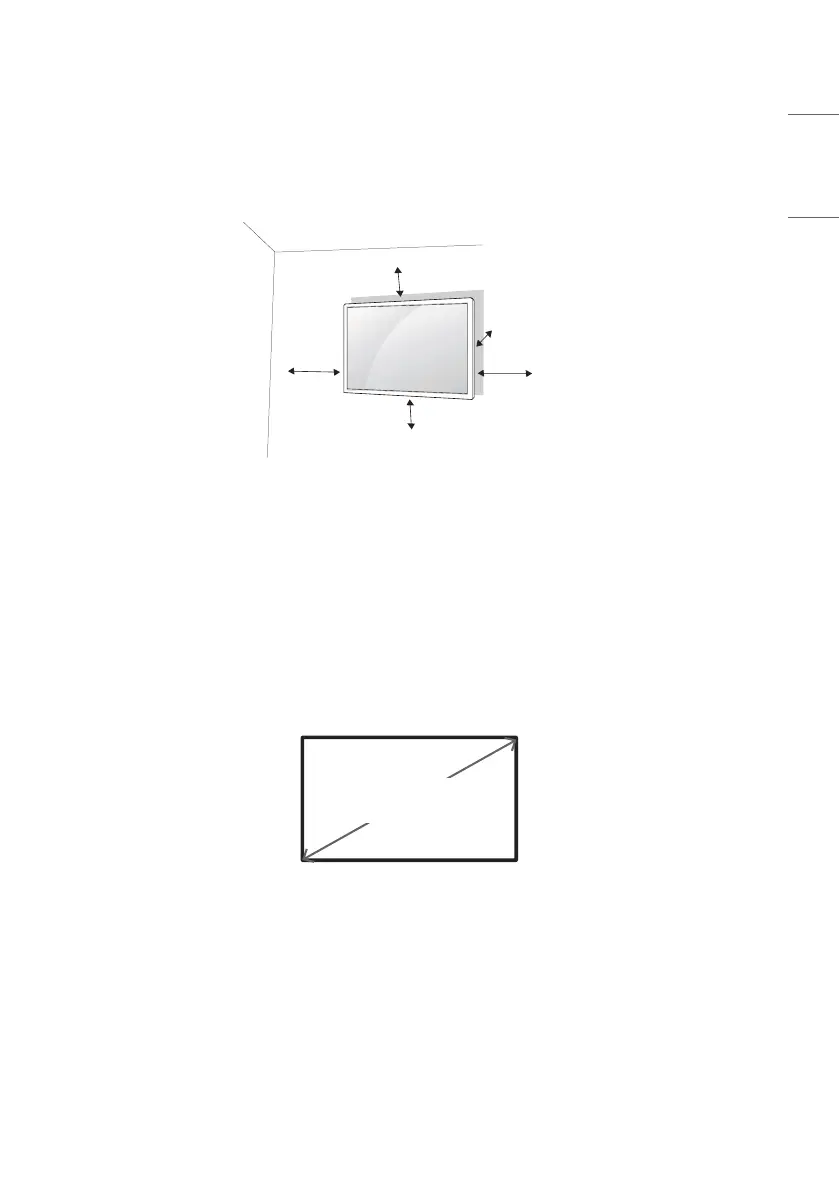
For proper ventilation, allow a clearance of 100mm (3.9inches) on each side and from the wall. Detailed installation
instructions are available from your dealer, see the optional Tilt Wall Mounting Bracket Installation and Setup Guide.
100 mm (3.9inches)
100 mm
100 mm
100 mm
100 mm
To install your monitor on a wall, attach a wall mounting bracket (optional part) to the back of the monitor.
Make sure that the wall mounting bracket is securely fixed to the monitor and to the wall.
1 Use only screws and wall mounting brackets that conform to VESA standards.
2 Screws which are longer than standard length may damage the inside of the monitor.
3 A non-VESA standard screw may damage the product and cause the monitor to fall. LG Electronics is not liable for
any accidents related to the use of non-standard screws.
4 Please use VESA standard as below.
• 785mm (30.9inches) and above
* Fixing screws: Diameter6.0mm (0.2inches) xPitch1.0mm (0.03inches) xLength12mm (0.4inches)
785 mm
(30.9inches)


 To Next Page