Copyright © LG Electronics. Inc. All rights reserved.
Only for training and service purposes
* Method
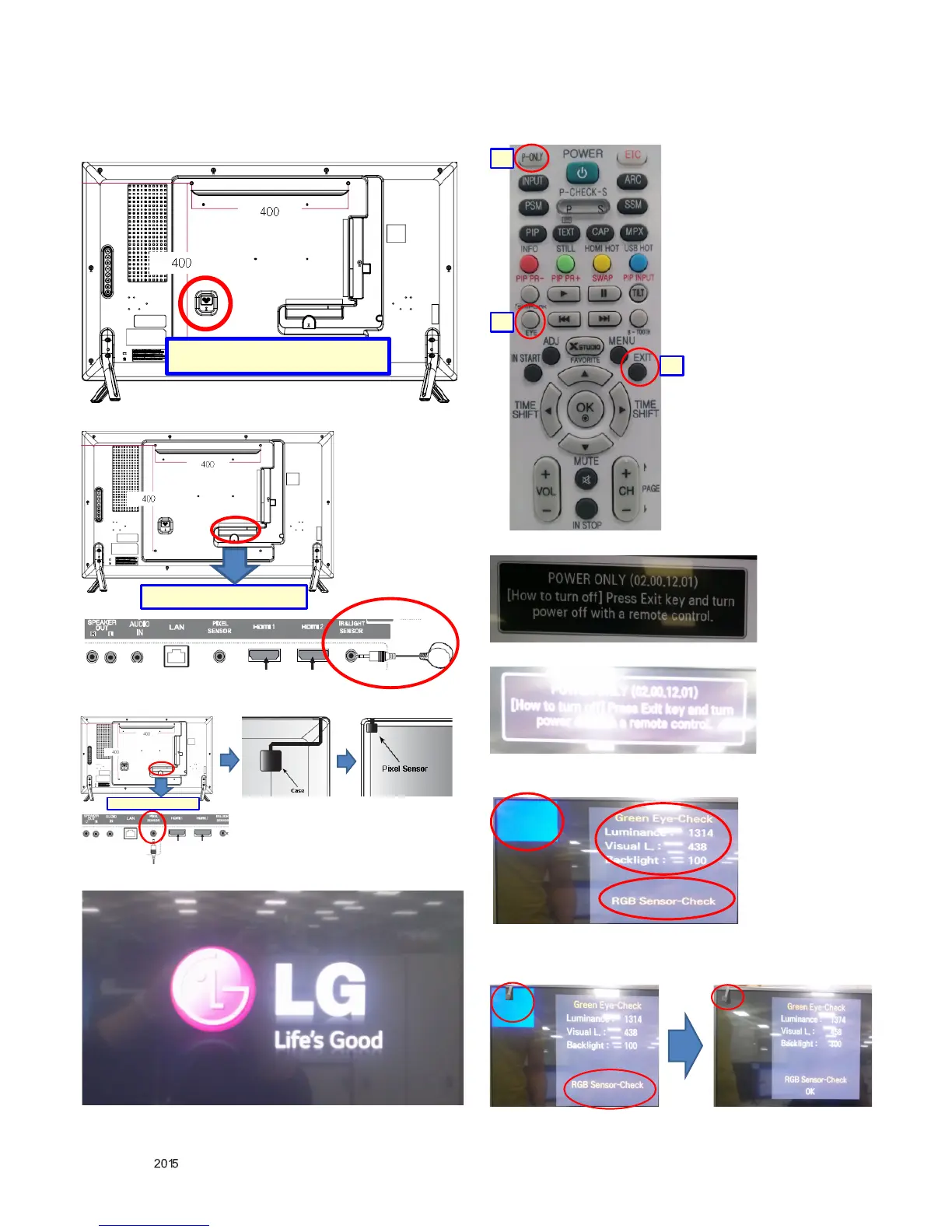
1) Connect the cable Assy[Power Cord] on the set.
2) Connect the cable Assy[IR+Brightness Cable] on the set.
3) Connect the cable Assy[Pixel Sensor Cable] on the set.
4) Turn on the Signage SET.
5) As follows: the remote control operation.
a. Press " P-ONLY " on the adjustment of R/C.
b. Press " EXIT " on the adjustment of R/C.
c. Press “EYE Button” on the adjustment of R/C
- Please Check the R,G,B pattern on the Screen.
- Check the sensor data on the screen
- Please check RGB Sensor-Check On the screen.
OK : Pass . NG : Fail [Re-Run]


 To Next Page