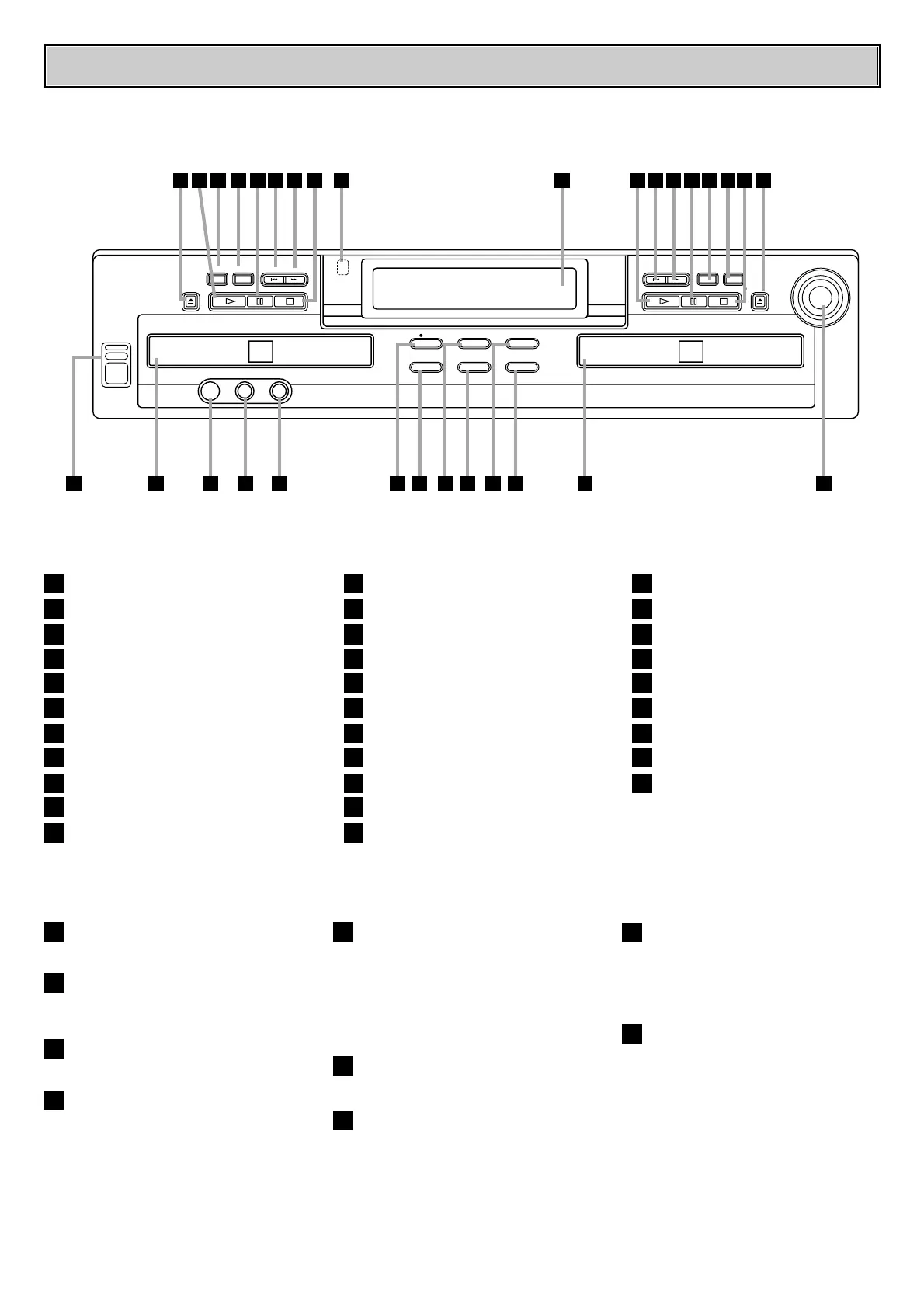
FRONT-PANEL CONTROLS
- 6 -
Power Switch
Play Deck
Headphone Jack
Headphone Level Control
Digital Input
Record Button
Speed
CD Sync.
Erase
Dubbing
Finalize
Power Switch : Press this switch to apply
power to the unit.
Play Deck : This disc deck is used to play
back conventional CD discs and CD-R or CD-
RW discs that have been finalized.
Headphone Jack : Connect standard
headphones to this jack for private listening.
Headphone Level Control : Turn this
control to adjust the volume level to the
headphones. Note that the use of this control
will not change the analog output levels at the
rear-panel audio outputs play(CDP)-Deck
analog output and Record(CDR)-Deck-Analog
output.
Digital Input :
This coaxial digital input may
be used to connect a portable digital audio
player to the unit for digital recording. When an
active digital signal is connected to both the
front-and rear-panel coaxial inputs, the source
connected to the front-panel input will be
selected for recording.
Record Button : Press this button to begin
the recording process.
Speed : Press this button to select the
recording speed for internal dubs.
CD Sync : Press this button once to begin
an automated recording of a single track from
an external CD player when a digital
connection is used. Press it twice to begin
automated recording of an entire disc.
Erase : Press this button to erase one or
more tracks or the entire contents of an
unfinalized CD-RW disc. When a CD-RW disc
has already been finalized you may erase the
entire disc or you may “unfinalize” the disc by
erasing the TOC data.
1
2
3
4
5
6
7
8
9
10
11
Record Deck
Analog-Record Level Control
Record-Deck Open
Record-Deck Stop
Input Select
Record-Deck Display Select
Record-Deck Pause
Record-Deck Next
Record-Deck Previous
Record-Deck Play/Select
Information Display
Remote Sensor
Play-Deck Stop
Play-Deck Next
Play-Deck Previous
Play-Deck Pause
Play-Deck Display Select
Dual-Play Selector
Play-Deck Play
Play-Deck Open


 To Next Page