Installation Manual 7
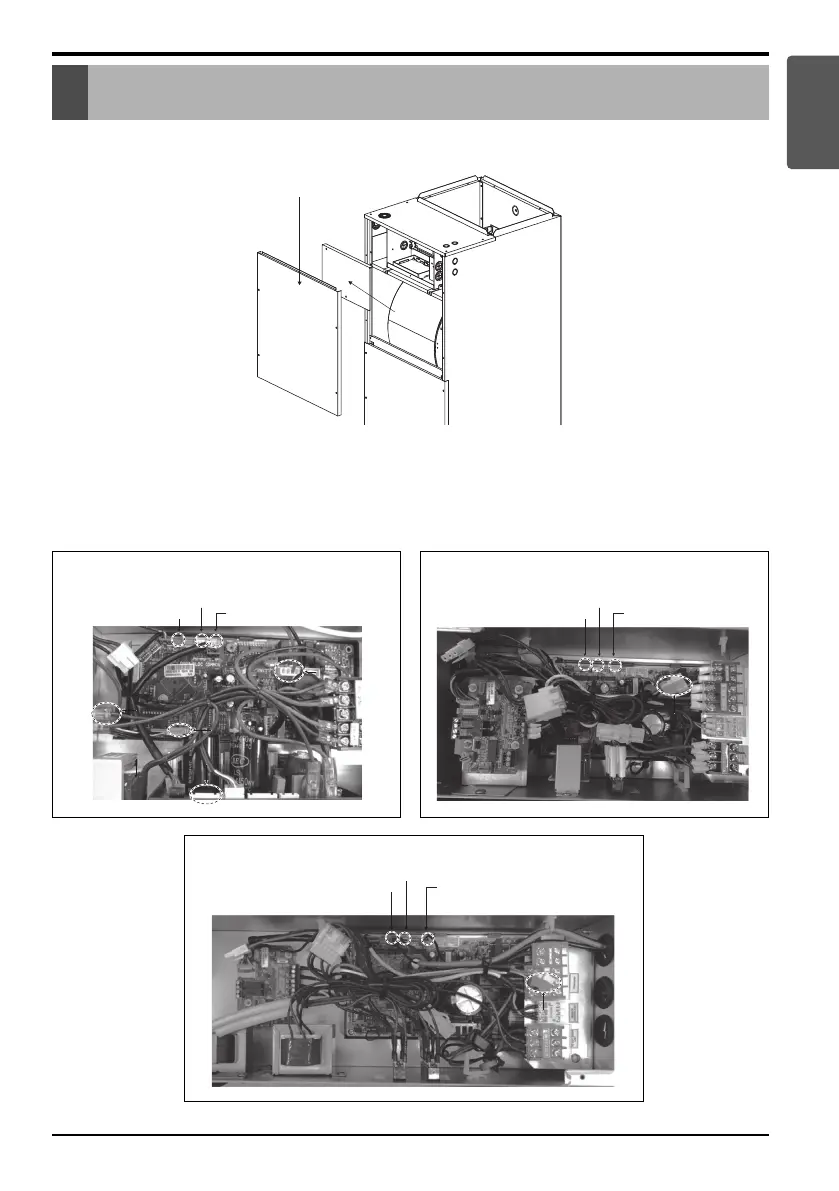
Upper Front Panel
Control Box Cover
Control Box Cover
Assembly Diagram
Assembly Diagram
Step 1. Open upper front panel and control box cover.
Step 2. Disconnect the three thermistors(CN_Pipe out, CN_Pipe in and CN_Room, CN_Out) , CN_EEV and CN_Motor1
connector in control box. Waste the harness and replace new one. (CN_Motor)
The new harness is provided with the Electric Heater accessories. If there are no harness, you don’t need to be
remove. (It may vary depending on the model)
ENGLISH
CN_Pipe out (Red)
CN_Pipe in (White)
(Multi V)
CN_EEV (White)
CN_Motor1 (White)
CN_EEV (White)
CN_Motor1 (White)
CN_Room (Y
ellow)
Terminal BlockTerminal Block
CN OutCN Out
CN_Motor1 (white)
CN_Motor1 (white)
(Single & Multi)NJ
CN_EEV (White)
CN_Motor1 (White)
CN_Pipe out (Red)
CN_Pipe in (White)
CN_Room (Yellow)
Terminal Block
CN Out
CN_Motor1 (white)
CN_Motor1 (white)CN_Motor1 (white)
(Single & Multi)NK
CN_EEV (White)
CN_Motor1 (White)
Terminal Block
CN Out
CN_Pipe out (Red)
CN_Pipe in (White)
CN_Room (Yellow)
CN_Motor1 (white)CN_Motor1 (white)
CN_Motor1 (white)



 To Next Page