Operating40
Operating
4
On-Screen display
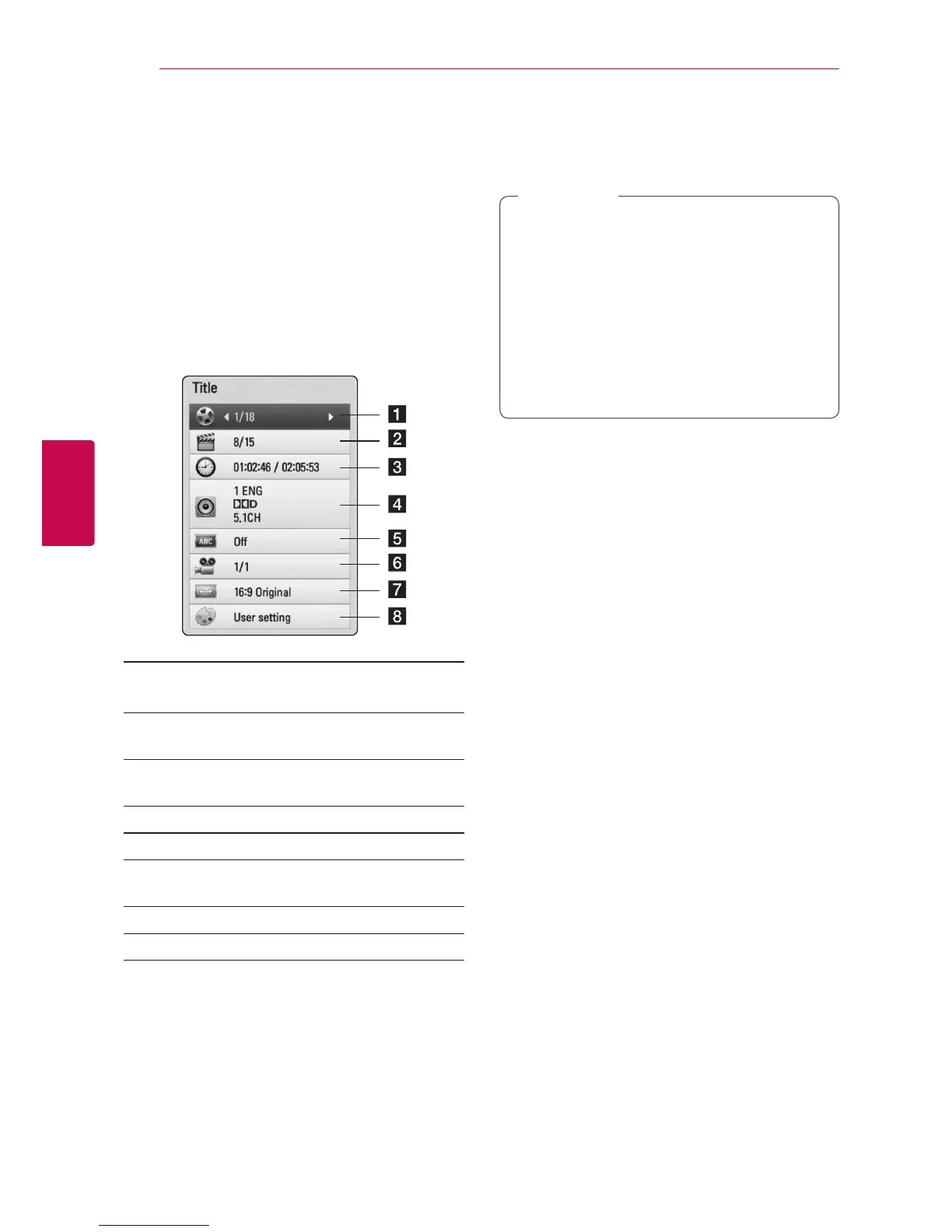
You can display and adjust various information and
settings about the content.
Displaying content information
on-screen
eroy
1. While playback, press INFO/DISPLAY (
m
) to
show various playback information.
a Title – current title number/total number of
titles
b Chapter – current chapter number/total
number of chapters
c Time – elapsed playing time/total playback
time
d Audio – selected audio language or channel
e Subtitle – selected subtitle.
f Angle – selected angle/total number of
angles
g TV Aspect Ratio – selected TV aspect Ratio
h Picture Mode – selected picture mode
2. Select an option using
W/S
.
3. Use
A/D
to adjust the selected option value.
4. Press BACK(
x
) to exit the On-Screen display.
y
If no button is pressed for a few seconds,
the on-screen display disappears.
y
A title number cannot be selected on some
discs.
y
Available items may dier depending on
discs or titles.
y
If an interactive Blu-ray Disc is playing back,
some setting information is displayed on
the screen but prohibited to be changed.
,
Note


 To Next Page