Connecting 17
Connecting
2
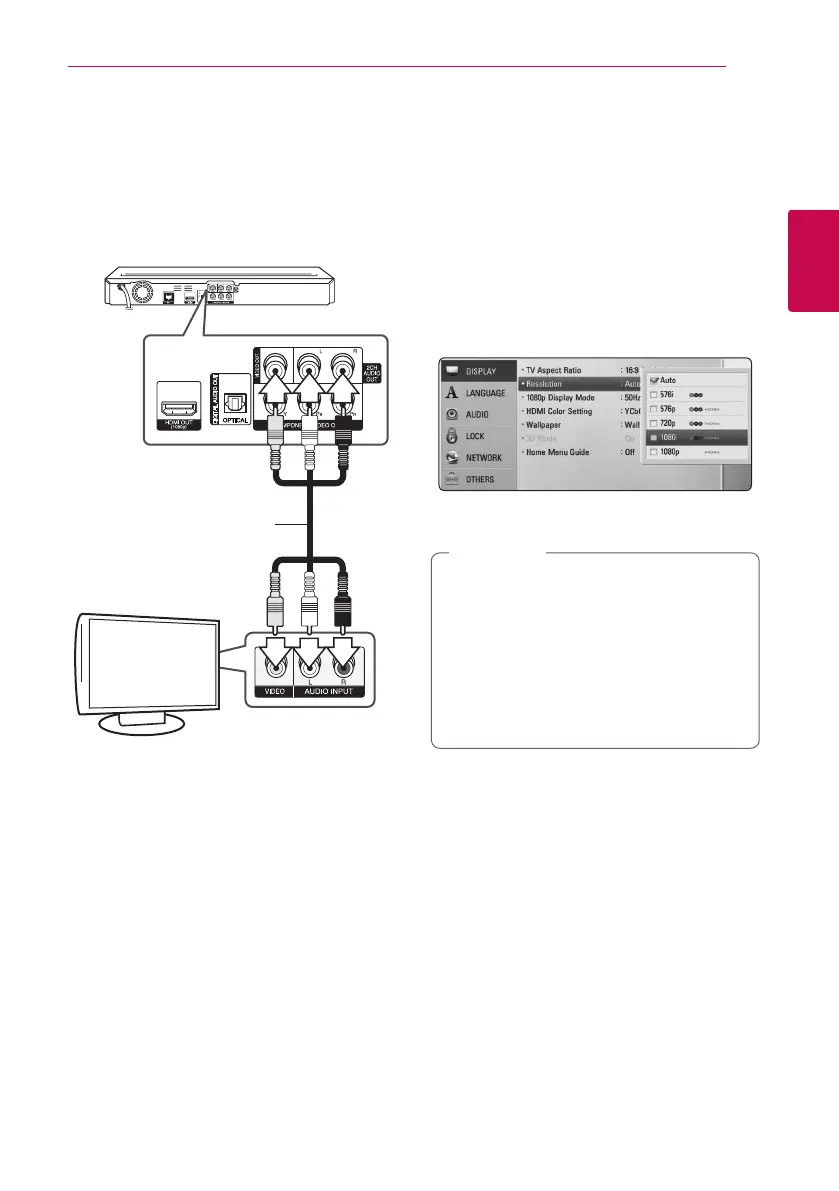
Video/Audio (Left/Right)
Connection
Connect the VIDEO OUT jack on the player to the
video in jack on the TV using a video cable. Connect
the left and right AUDIO OUT jacks of the player to
the audio left and right IN jacks on the TV using the
audio cables.
Rear of the unit
TV
Video/Audio cable
Resolution Setting
The player provides several output resolutions for
HDMI OUT and COMPONENT VIDEO OUT jacks. You
can change the resolution using [Setup] menu.
1. Press HOME (
n
).
2. Use
A/D
to select the [Setup] and press ENTER
(
b
). The [Setup] menu appears.
3. Use
W/S
to select [DISPLAY] option then
press
D
to move to the second level.
4. Use
W/S
to select the [Resolution] option
then press ENTER (
b
) to move to the third level.
5. Use
W/S
to select the desired resolution then
press ENTER (
b
) to conrm your selection.
y
If your TV does not accept the resolution
you have set on the player, you can set
resolution to 576p as follows:
1. Press
B
to open the disc tray.
2 Press
Z
(STOP) for more than 5 seconds.
y
Since several factors aect the resolution of
video output, see “Video Output Resolution”
on page 66.
,
Note



 To Next Page