3. VIODEO PCB ASSEMBLY REMOVAL
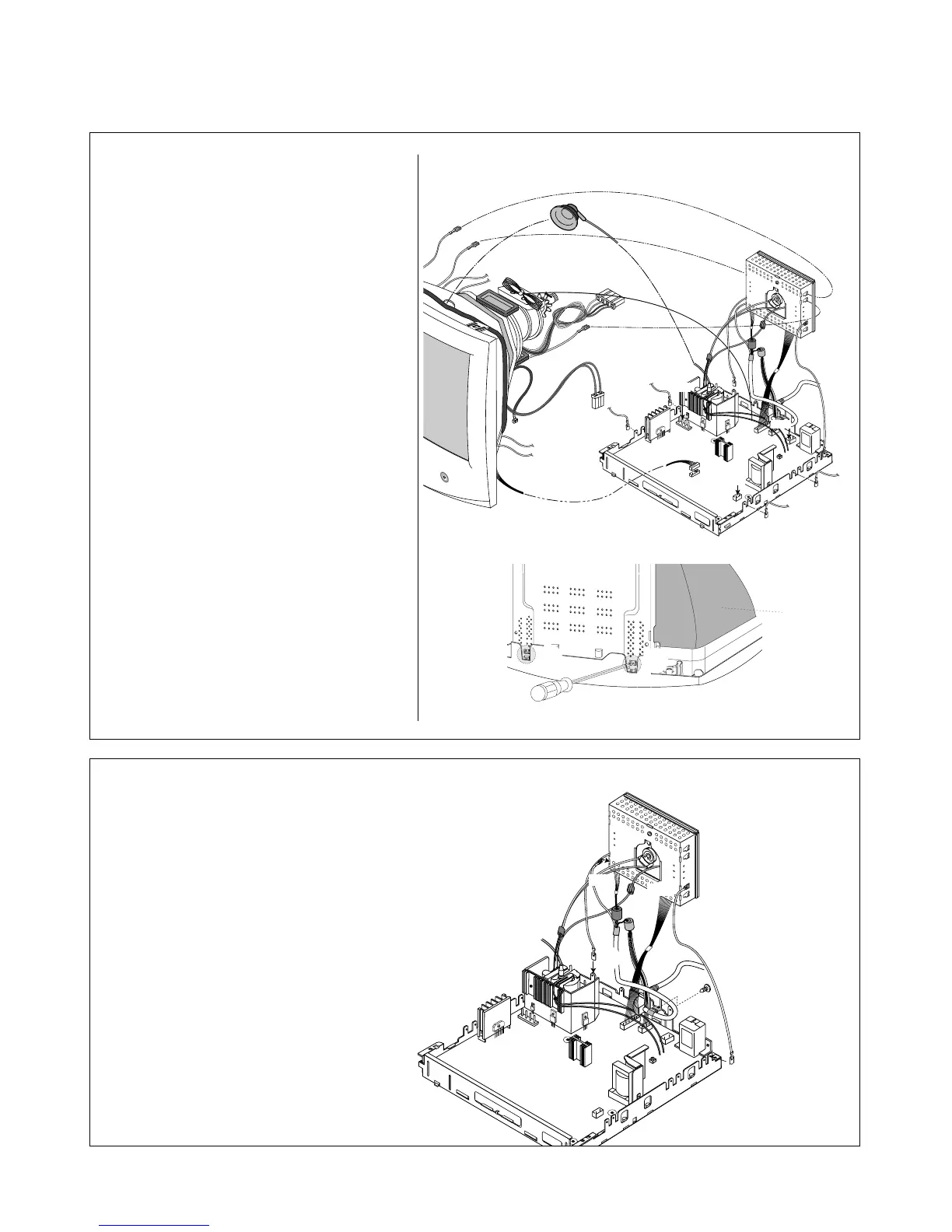
1) Disconnect P301, P302 from the Video PCB.
2) Remove three connects (a).
3) Remove screws (b).
4) Remove the Video PCB Assembly.
2. TOTAL CHASSIS ASSEMBLY REMOVAL
(
Figure.1)
1) Carefully separate the CDT Board
Assembly from the CDT neck.
2) Discharge the remaining static electricity
by shorting between the Anode Cap and
the CDT ground.
3) Disconnect the Anode Cap from the
CDT.
4) Disconnect P902 (Degaussing pin),
P701 (DY pin), and P501, P405 from
the Main PCB.
5) Remove the Total Chassis
Assembly from the Main Frame.
(
Figure.2)
6) Set the monitor face downward.
7) Pressing the latch (a), Main Chassis
by pushing it upward.


 To Next Page