Getting Started10
Getting Started
1
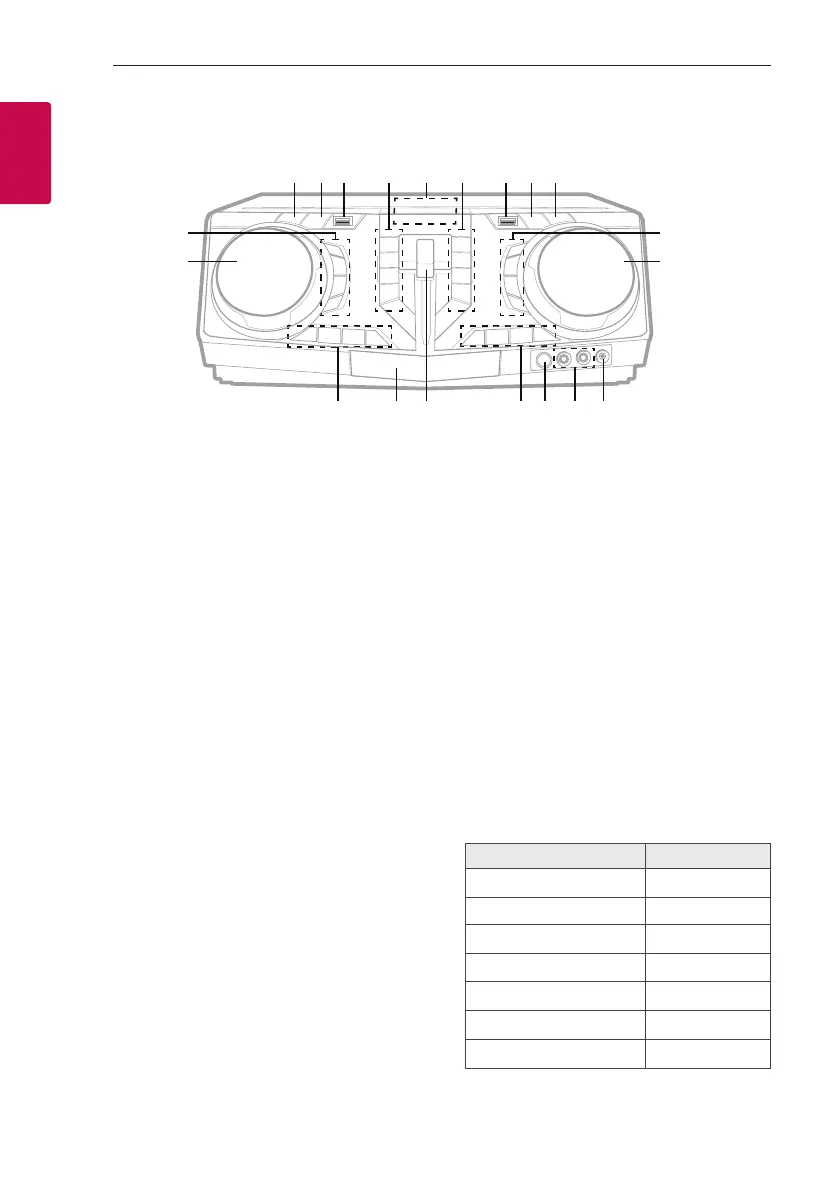
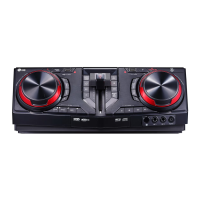
Front panel
a 1 (Standby)
Turns the power on or off.
b USB REC / DEMO
- Records to USB.
- In power off status, if you press
USB REC / DEMO, show DEMO mode.
c USB 1 Port
You can play sound les by connecting the USB
device.
d PARTY THRUSTER MODE
Selects PARTY THRUSTER mode.
I (Stop)
Stops playback or cancels DELETE function.
Y (Skip/Search)
- Skips backward.
- Searches for a section within a track/file.
- Selects the radio stations.
R (Open/Close)
Opens and closes the disc tray.
e Display window
f DJ LOOP
Selects DJ LOOP mode.
(DJ LOOP mode can use during CD/USB
playback.)
T (Play/Pause)
- Starts or pauses playback.
- Selects stereo/mono.
U (Skip/Search)
- Skips forward.
- Searches for a section within a track/file.
- Selects the radio stations.
REGION EQ / BASS BLAST
- Chooses region equalizer.
- Press and hold to select BASS effect directly.
g USB 2 Port
You can play sound les by connecting the USB
device.
h F (Function)
Selects the function and input source.
Input source / Function Display
Disc CD
USB USB1 / USB2
AUX input AUX
Portable input PORTABLE
Bluetooth BT
LG Sound Sync (Wireless) LG TV
Radio FM
a b c d f g h i
k
j
lmnopr q
s
t
e


 To Next Page