l
DEMO
In power off status, if you press DEMO, show DEMO
mode.
SPECIAL EQ / BASS BLAST (or BASS BLAST+)
- Chooses special equalizer.
- Press and hold to select BASS (or BASS+) effect
directly.
Z
(Stop)
Stops playback or cancels DELETE function.
C
(Skip/Search)
- Skips backward.
- Searches for a section within a track/le.
- Selects the radio stations.
B
(Open/Close)
Opens and closes the disc tray.
m
CLUB, DRUM, USER (DJ PAD)
Selects CLUB, DRUM or USER sound effect to mix.
(If you want to use USER, you have to register a source
with “LG XBOOM” app.)
1, 2, 3, 4 (DJ PAD)
Press a desired sound pad.
n
DJ SCRATCHER / LEVEL CONTROL & SEARCH
- Turns clockwise or counterclockwise to make scratch
sound.
- Turns clockwise or counterclockwise to control the
USER EQ level.
- Searches a folder or a le.
- Adjust DJ EFFECT level.
DJ EFFECT
Selects a desired DJ EFFECT.
SEARCH
Moves to folder or file in selection mode.
OK
Selects a folder when searching a file.
USER EQ
Selects the equalizer created by your own.
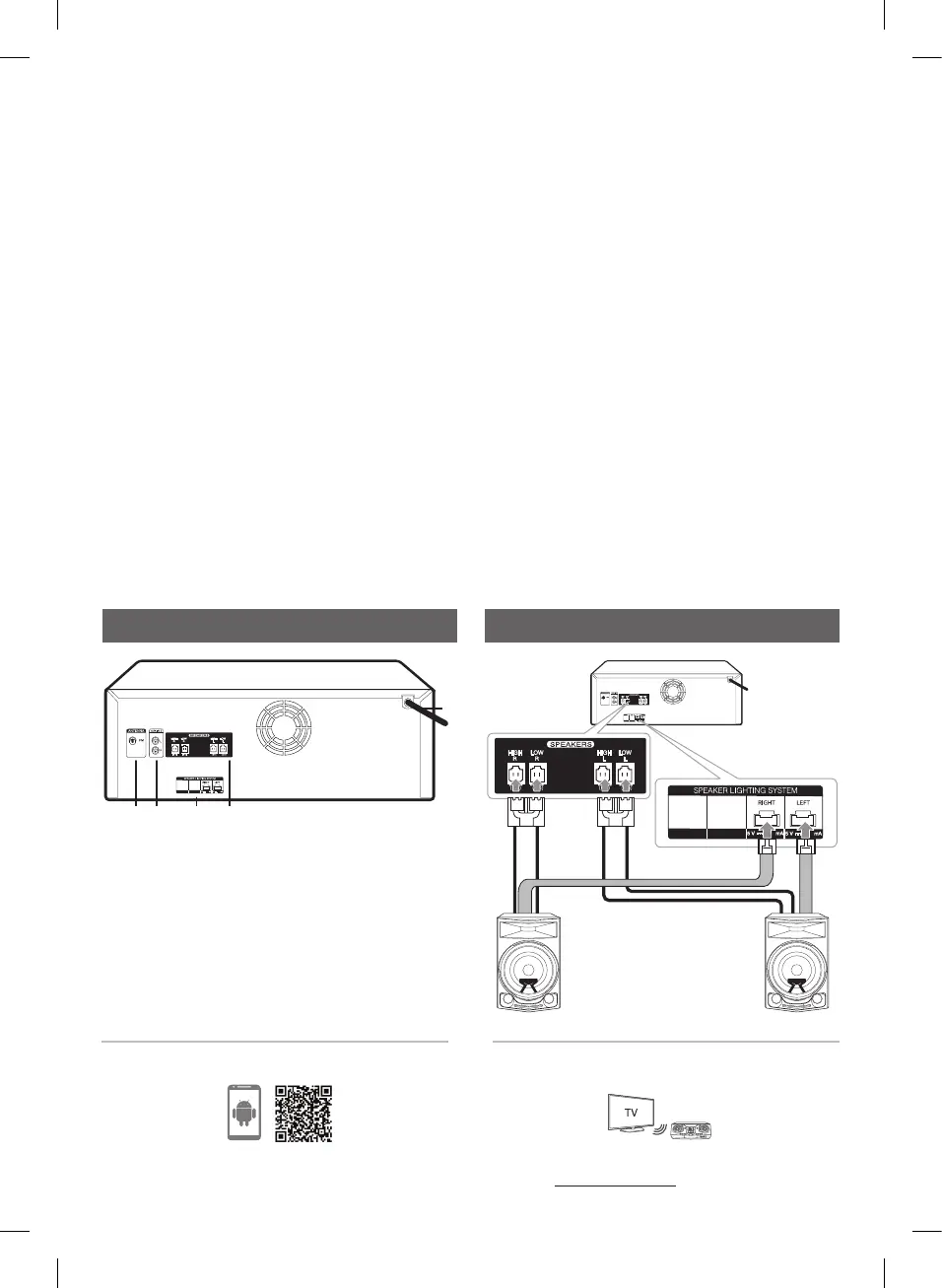
Rear Panel
a
Power cord
b
ANTENNA (FM)
c
AUX IN 2 (L/R)
d
SPEAKER LIGHTING SYSTEM
Connect the speaker lighting cables.
e
SPEAKERS connector
Speaker Connection
Download the LG XBOOM App to your device.
(Android only)
For more information, download the online owner’s
manual. http://www.lg.com
LG Sound Sync (Wireless)
Controller App
b c d e
a
100
100
100
100
100
100
CL87-FB.DCISLLK_SIM_ENG_MFL71389034.indd 3 2021-08-20 3:53:32


 To Next Page