EasyManua.ls Logo

LG CM1530BT - User Manual

LG CM1530BT
24 pages
Print Icon
To Next Page IconTo Next Page
Loading...
OWNER’S MANUAL
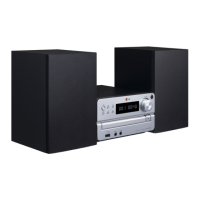
Micro Hi-Fi System
Please read this manual carefully before operating your set and retain it for future
reference.
CM1530BT (CM1530BT, CMS1530F)
ENGLISH
CM1530-FB_AAUSLLK_ENG_6580.indd 1 2014-02-18  10:37:29

Questions and Answers

Summary

Safety Information - Electrical and Laser Precautions

Electrical Shock Warnings

Cautions against opening the unit and emphasizes referring servicing to qualified personnel.

Laser Product Safety

Advises careful handling of the Class 1 Laser Product to avoid hazardous radiation exposure.

Power Cord Safety Guidelines

Details safe use, inspection, and protection of the power cord to prevent hazards.

Safety Information - Battery and RF Exposure

Battery Handling and Disposal

Instructions for safe battery removal, environmental protection, and proper disposal.

RF Radiation Exposure Statement

Specifies recommended installation distance for RF radiation safety.

Troubleshooting and Appendix Overview

Troubleshooting Guide

Provides solutions for common operational problems such as power, sound, and remote control issues.

Getting Started - Unique Features

Getting Started - USB Compatibility

Getting Started - Remote Control

Remote Control Functions

Explains the purpose and operation of each button on the remote control.

Getting Started - Front Panel

Front Panel Controls and Ports

Details the buttons, display, and connection ports located on the unit's front face.

Getting Started - Back Panel

Back Panel Connections

Identifies the power cord, FM antenna input, and speaker terminals on the rear of the unit.

Connecting Components

Speaker Connection Guide

Instructions for attaching speaker wires to the unit's terminals correctly.

Operating the Unit - Basic Functions

Operating the Unit - Advanced Functions

Operating the Unit - Radio Functions

Operating the Unit - Sound and External Audio

Operating the Unit - Bluetooth

Bluetooth Device Pairing and Playback

Step-by-step guide for pairing Bluetooth devices and playing music wirelessly.

Operating the Unit - Bluetooth Notes

Troubleshooting Common Issues

No Power and No Sound Solutions

Addresses common problems like the unit not turning on or producing sound.

Playback and Remote Control Issues

Solutions for playback failures, unplayable discs, and remote control malfunctions.

Summary

Safety Information - Electrical and Laser Precautions

Electrical Shock Warnings

Cautions against opening the unit and emphasizes referring servicing to qualified personnel.

Laser Product Safety

Advises careful handling of the Class 1 Laser Product to avoid hazardous radiation exposure.

Power Cord Safety Guidelines

Details safe use, inspection, and protection of the power cord to prevent hazards.

Safety Information - Battery and RF Exposure

Battery Handling and Disposal

Instructions for safe battery removal, environmental protection, and proper disposal.

RF Radiation Exposure Statement

Specifies recommended installation distance for RF radiation safety.

Troubleshooting and Appendix Overview

Troubleshooting Guide

Provides solutions for common operational problems such as power, sound, and remote control issues.

Getting Started - Unique Features

Getting Started - USB Compatibility

Getting Started - Remote Control

Remote Control Functions

Explains the purpose and operation of each button on the remote control.

Getting Started - Front Panel

Front Panel Controls and Ports

Details the buttons, display, and connection ports located on the unit's front face.

Getting Started - Back Panel

Back Panel Connections

Identifies the power cord, FM antenna input, and speaker terminals on the rear of the unit.

Connecting Components

Speaker Connection Guide

Instructions for attaching speaker wires to the unit's terminals correctly.

Operating the Unit - Basic Functions

Operating the Unit - Advanced Functions

Operating the Unit - Radio Functions

Operating the Unit - Sound and External Audio

Operating the Unit - Bluetooth

Bluetooth Device Pairing and Playback

Step-by-step guide for pairing Bluetooth devices and playing music wirelessly.

Operating the Unit - Bluetooth Notes

Troubleshooting Common Issues

No Power and No Sound Solutions

Addresses common problems like the unit not turning on or producing sound.

Playback and Remote Control Issues

Solutions for playback failures, unplayable discs, and remote control malfunctions.

LG CM1530BT Specifications

General IconGeneral
Channels2.0
BluetoothYes
CD PlayerYes
USB PlaybackYes
FM TunerYes
Playable File FormatsMP3, WMA
Disc FormatsCD, CD-R, CD-RW
TypeStereo System
Power Output30W RMS (15W x 2)

Related product manuals