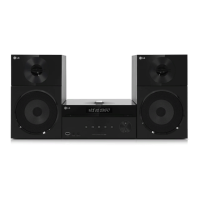
Getting Started 9
Getting Started
1
a
Disc Slot
Insert a disc in the disc slot with the label side
left.
b
NFC allows you to install and open “LG
Bluetooth Remote” app to NFC-enabled phone.
c
1/!
(POWER)
Switches the unit ON or OFF.
d
Display window
Shows the current status of the unit.
e
FUNC. (FUNCTION)
Changes the input source or function.
f
USB Port
Connects an USB device.
g
EQ
Chooses sound impressions.
SET/DEMO
Conrms the setting. / Show DEMO.
ALARM
With the ALARM function you can turn CD, USB
play and TUNER reception on at a desired time.
CLOCK
For setting the clock and checking the time.
h
B
(OPEN/CLOSE)
Ejects or insert the disc from slot loader.
i
C
/
V
(Skip/Search):
Goes to next or previous le/track.
Searches backward or forward (Press and hold)
Tunes in the desired radio station.
d
/
M
(PLAY / PAUSE)
Starts playback.
Pauses playback temporarily, press again to exit
pause mode.
Selects stereo/mono in FM mode.
j
o
/
p
(VOLUME)
Adjusts speaker volume.
Z
(STOP)
Stops playback.
k
USB REC.
Recoding to USB.
l
PORT. IN
Connects to a portable player with audio
outputs.
PHONES
Listens to music with your headphone.(3.5
mm)
Precautions in using the touch buttons
y
Use the touch buttons with clean and dry
hands.
- In a humid environment, wipe out any
moisture on the touch buttons before
using.
y
Do not press the touch buttons hard to
make it work.
- If you apply too much strength, it can
damage the sensor of the touch buttons.
y
Touch the button that you want to work in
order to operate the function correctly.
y
Be careful not to have any conductive
material such as metallic object on the
touch buttons. It can cause malfunctions.
>
Caution
CM2740-FB_DCOLLLK_ENG_9443.indd 9 2014-03-28 5:19:38


 To Next Page