Connecting18
Connecting
2
Connections to Your
TV
Make one of the following connections, depending
on the capabilities of your existing equipment.
y
Depending on your TV and other
equipment you wish to connect, there are
various ways you could connect the player.
Use only one of the connections described
in this manual.
y
Please refer to the manuals of your TV,
Stereo System or other devices as necessary
to make the best connections.
,
Note
y
Make sure the unit is connected directly
to the TV. Tune the TV to the correct video
input channel.
y
Do not connect your player via your VCR.
The image could be distorted by the copy
protection system.
>
Caution
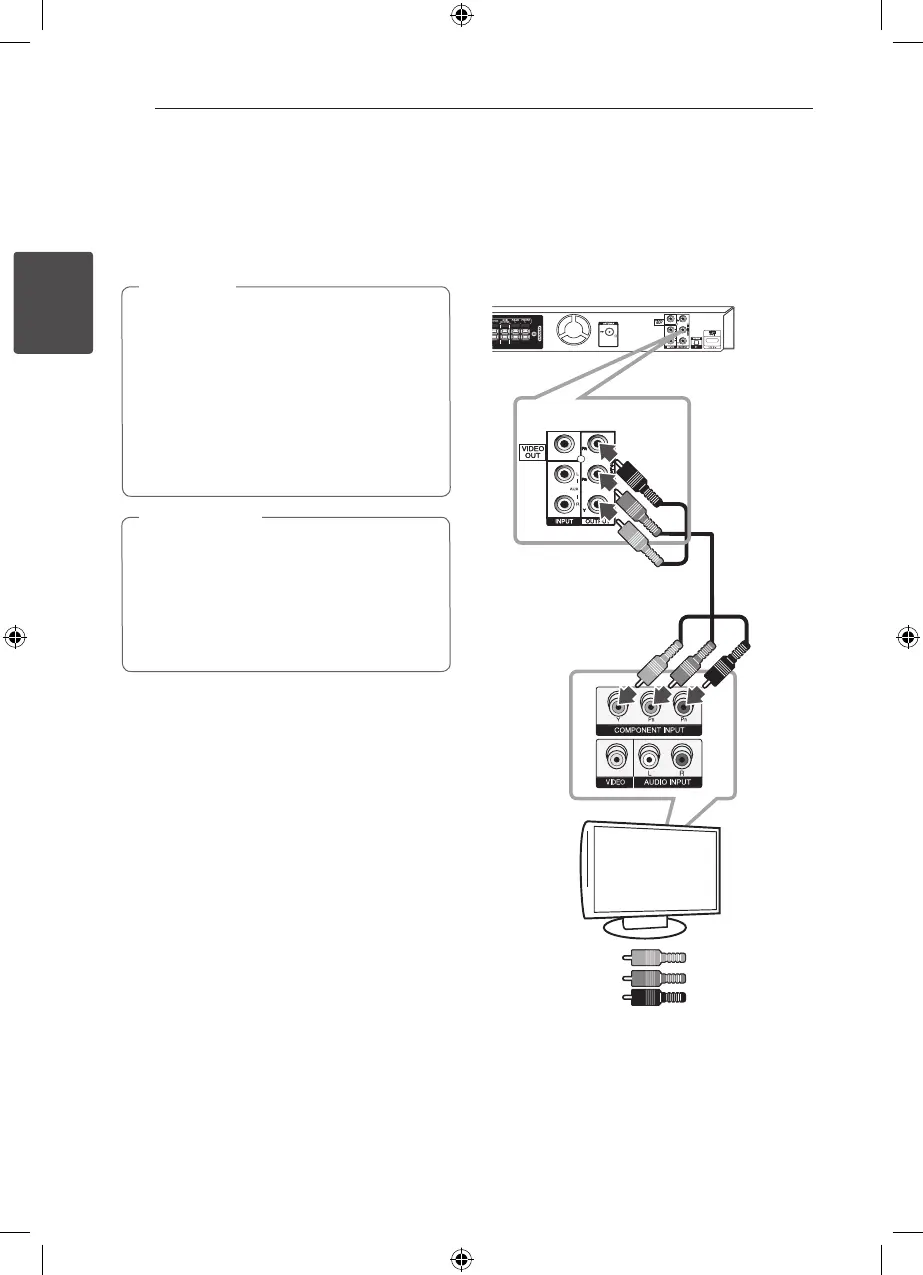
Component Video Connection
Connect the COMPONENT VIDEO OUTPUT jacks on
the unit to the corresponding input jacks on the TV
using component cables.
You can hear the sound through the system’s
speakers.
Unit
TV
Green
Blue
Red
DH6520TK-F2_DRUSLLK_ENG_4602.indd 18 2012-02-16 �� 3:10:55


 To Next Page