40
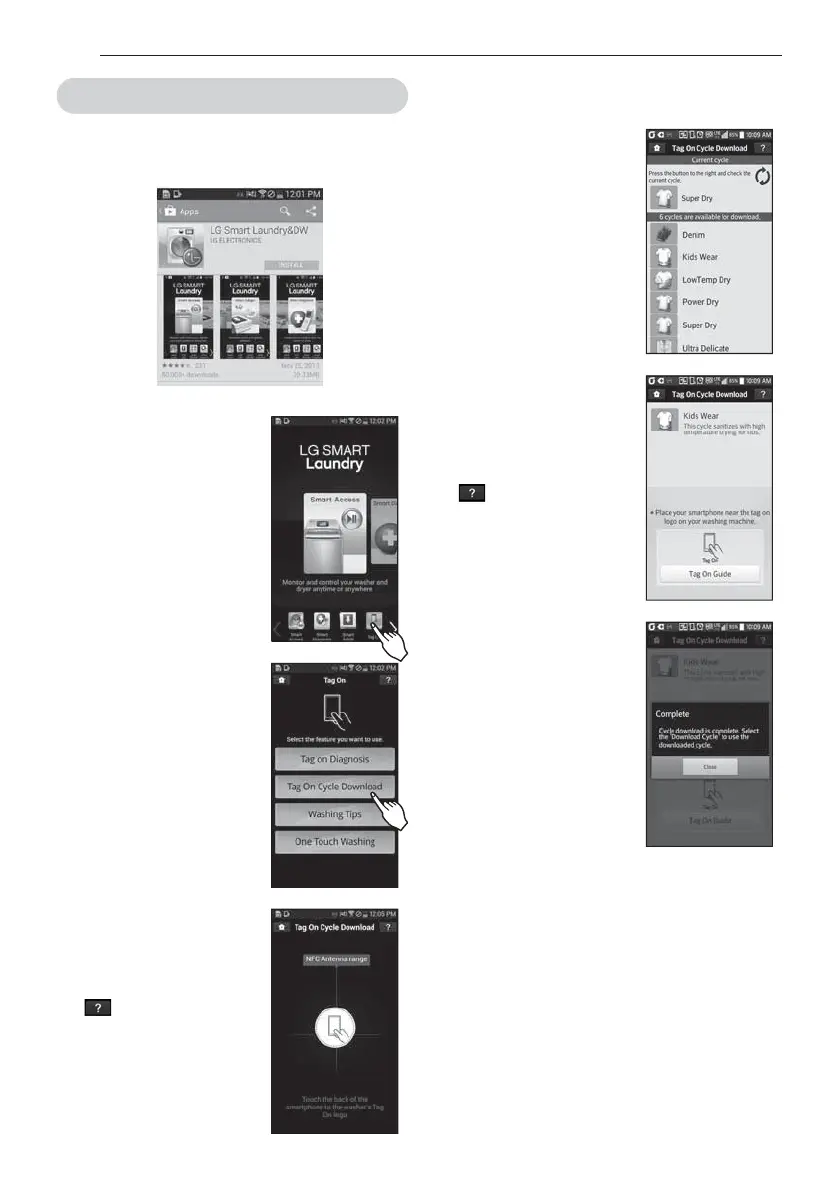
4FMFDUBDZDMFUPEPXOMPBE
- The current downloaded cycle
will appear at the top of the
screen. The available cycles
will appear below the current
cycle.
You can also check the current
downloaded cycle.
5PVDIUIF5BH0OMPHP
- When a Tag On screen
BQQFBSTTFFBUSJHIUUBQ
your smart phone on the Tag
On icon on the right side of
the washer‘s control panel.
- If it isn’t recognized, touch
[
] on the upper right of
the Tag On screen on your
‘LG Smart Laundry&DW’
application to see the detailed
HVJEF5IJTNJHIUIBQQFOEVF
to the different NFC antenna
QPTJUJPOTGPSFBDIQIPOF
5IFOFXDZDMFJTEPXOMPBEFE
TVDDFTTGVMMZ
- Check whether the new cycle
is downloaded by turning
the cycle selector knob to the
Download Cycle.
Images are for reference only. The actual LG Smart
Laundry&DW application may be different.
Tag On Cycle Download
*OTUBMMA-(4NBSU-BVOESZ%8BQQMJDBUJPOPOB
/'$FRVJQQFETNBSUQIPOF
- Install the application from the Play store and run it.
4FMFDUA5BH0O
- Select “Tag On” by using the
home card or the icons at the
bottom of the screen.
4FMFDUA5BH0O$ZDMF
%PXOMPBE
5PVDIUIF5BH0OMPHP
- When a Tag On screen appears
TFFBUSJHIUUBQZPVSTNBSU
phone on the Tag On icon on
the right side of the washer‘s
control panel.
- If it isn’t recognized, touch
[
] on the upper right of
the Tag On screen on your
‘LG Smart Laundry&DW’
application to see the detailed
HVJEF5IJTNJHIUIBQQFOEVF
to the different NFC antenna
QPTJUJPOTGPSFBDIQIPOF
HOW TO USE



 To Next Page
 Loading...