1
2
1. Power Connection
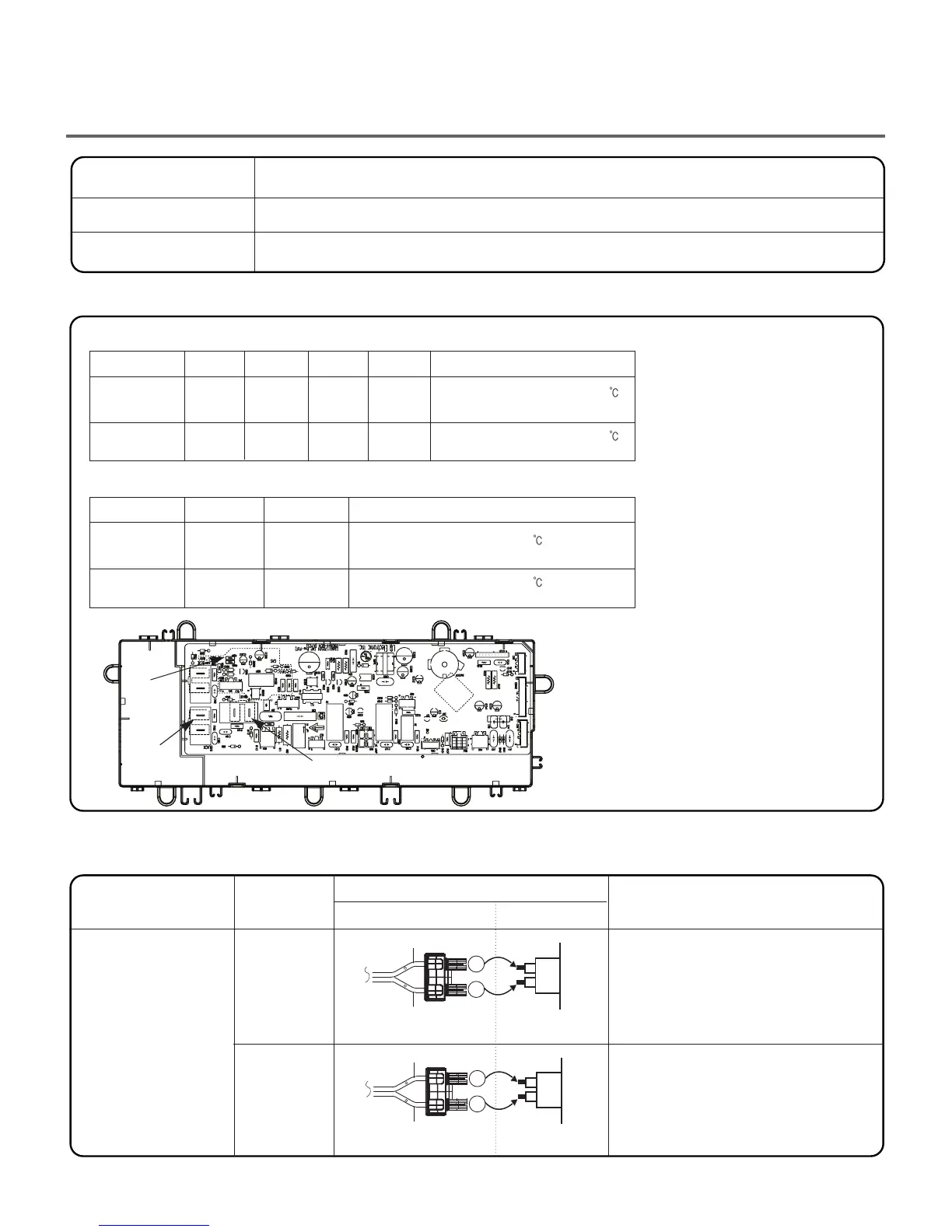
2. Status Mode Of The Connection
When measuring power, be sure to wear insulated gloves, to and avoid an electric shock.
With dryer power on; connector linked to controller.
High
Mid High
Medium
High
Mid High
Medium
Tab Relay 1
Tab Relay 1 Burner Remark
Tab Relay 2
Heater 1 Heater 2
Remark
Connector Housing
Black
Yellow wire
Blue wire
Black wire
Black wire
Connector Housing Tap relay 1
Connector Housing Tap relay 2
Check the Matching color Between
Harness wire and Tab Relay.
(Black Housing – Black Tab Relay)
Check the Matching color Between
Harness wire and Tab Relay.
(White Housing – White Tab Relay)
White
Low
Extra Low
Low
Extra Low
on
on
on
on
on
O O
O O
on
off
off
Temperature Control below 68
ᴦ
4
Turn on Heater1 and Heater2.
Temperature Control below 52
ᴦ
4
Only Turn on Heater1.
Temperature Control below 70
ᴦ
4
Turn on Burner
✽ PCB ASSEMBLY LAYOUT
Temperature Control below 47
ᴦ
4
Turn on Burner
: Connection of the Tab Relay with Heater (Electric)
: Connection of the Tab Relay with Burner (Gas)
: Connection of Tab Relay with the PCB ASSEMBLY (Electric)
Color
Remark
Connection
Harness
PCB
Check the Tab Relays Connection properly.
Tab Relay 1
Tab Relay 2
Trans
Caution
Trouble Symptom
Measurement Condition
24



 To Next Page
 Loading...