Getting Started 9
Getting Started
1
Remote control
Replacement of battery
AAA(R03)
Remove the battery cover on the
rear of the remote control, and
insert the battery with 4 and 5
matched correctly.
• • • • • • • • •
a
• • • • • • •
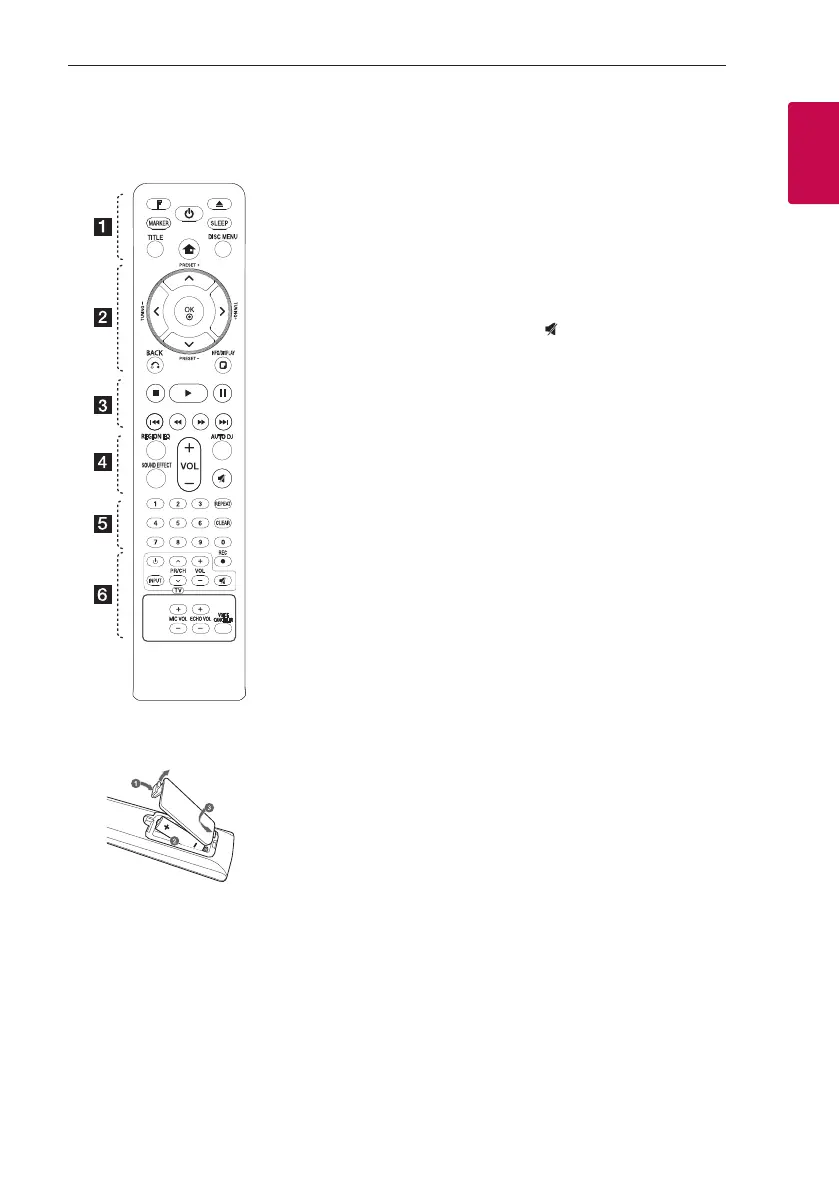
F (Function) : Selects the function
and input source.
MARKER : Marks play list.
1
(Standby/On) : Switches the
unit ON or OFF.
B
(Open/Close) : Opens and closes
the disc tray.
SLEEP : Sets the System to turn
off automatically at a specied
time. (Dimmer : The display window
will be darken by half.)
TITLE: If the current DVD title has
a menu, the title menu appears
on the screen. Otherwise, the disc
menu may not appear.
n
(Home) : Displays the [Home
Menu].
DISC MENU : Accesses the menu
on a DVD disc.
• • • • • • • • •
b
• • • • • • •
W/S/A/D
(up/ down/ left/
right) : Used to navigate on-screen
displays.
PRESET +/- : Selects programme
of Radio.
TUNING +/- : Tunes in the desired
radio station.
b
OK : Acknowledges menu
selection.
Presetting the radio stations.
x
BACK : Moves backwards in
the menu or exits the setup menu.
m
INFO/DISPLAY : Accesses
On-Screen Display.
See the name of connected
Bluetooth device in Bluetooth
mode.
• • • • • • • • •
c
• • • • • • •
Z
(Stop) : Stops playback.
d
(Play) : Starts playback.
M
(Pause) : Pauses playback.
C/V
(Skip) : Goes to the
next or previous chapter / track /
le.
c/v
(Scan) : Searches
backward or forward.
• • • • • • • • •
d
• • • • • • •
REGION EQ : Chooses sound
impressions.
SOUND EFFECT : Selects a sound
effect mode.
VOL -/+ (Volume) : Adjusts speaker
volume.
AUTO DJ : Selects the AUTO DJ
mode. (For more information refer
to page 24)
(Mute) : Mutes the sound.
• • • • • • • • •
e
• • • • • • •
0-9 numerical buttons : Selects
numbered options in a menu.
REPEAT : Selects a play mode.
(Repeat/ Random)
CLEAR : Removes a number when
setting the password.
• • • • • • • • •
f
• • • • • • •
TV Control buttons: See page 41.
X
REC : USB Direct Recording.
MIC VOL -/+ (Microphone Volume)
: Adjusts microphone volume.
ECHO VOL -/+ (Volume) : Adjusts
echo volume.
VOICE CANCELLER: You can
enjoy the function as karaoke, by
reducing singer vocal of music in
the various source


 To Next Page