Initial Settings
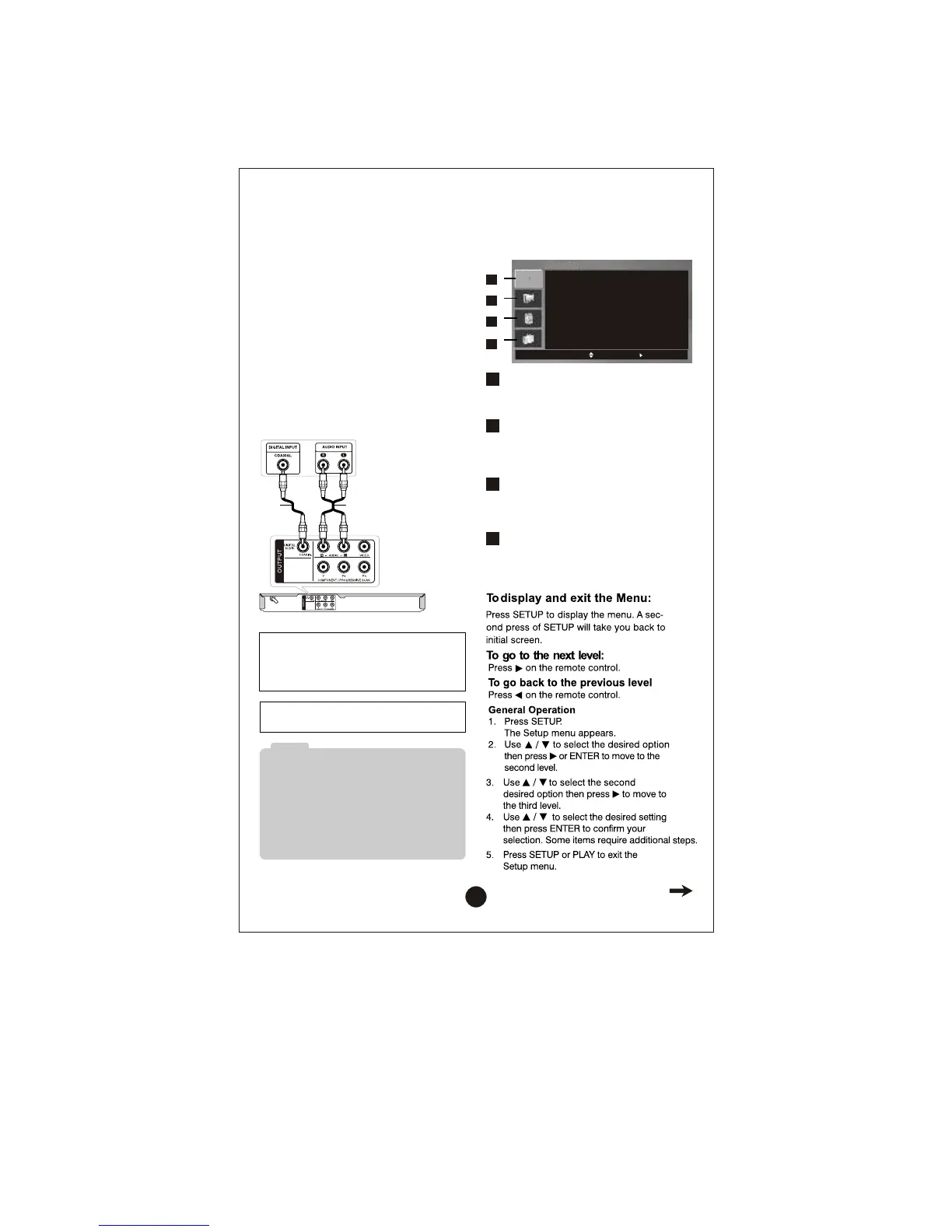
By using the Setup menu, you can make
various adjustments to items such as
picture and sound.
1
LANGUAGE
• Menu Language
• Disc Audio / Disc Subtitle / Disc Menu
4
2
3
DISPLAY
• TV Aspect
• Display Mode
• Progressive Scan
AUDIO
• Dolby Digital / DTS / MPEG
• Sample Freq.
• DRC
OTHERS
• PBC
• MPEG4 Subtitle
• DivX(R) VOD
4
2
3
1
LANGUAGE
Menu Langu age
Disc Audio
Disc Subtitle
Disc Men u
English
Original
Off
Original
Mov e
Select
A
Rear of DVD player
Amplifier (Receiver)
X A
Amplifier equipped with 2-channel digital
stereo (PCM) or audio / video receiver
equipped with a multi-channel decoder
(Dolby Digital™, MPEG 2, or DTS)
Connect one of the DVD Player’s DIGITAL
AUDIO OUTPUT jacks (COAXIAL X
) to
the corresponding in jack on your amplifier.
Use an optional digital (coaxial X)
audio cable.
Digital Multi-channel sound
A digital multi-channel connection provides
the best sound quality. For this you need a
multi-channel audio / video receiver that
supports one or more of the audio formats
supported by your DVD player such as
MPEG 2, Dolby Digital and DTS. Check
the receiver manual and the logos on the
front of the receiver.
•
If the audio format of the digital output does not
match the capabilities of your receiver, the
receiver produces a strong, distorted sound or
no sound at all.
•
Six Channel Digital Surround Sound via a digi-
tal connection can only be obtained if your
receiver is equipped with a Digital Multi-chan-
nel decoder.
Note
Manufactured under license from Dolby
Laboratories. “Dolby”, “Pro Logic”, and
the double-D symbol are trademarks of
Dolby Laboratories.
DTS and DTS Digital Out are trademarks
of Digital Theater Systems, Inc.
8



 To Next Page