To Next Page
K
Kaitlin ButlerAug 18, 2025
What to do if my LG DV286-E1M has no power?
- BbarrykristenAug 18, 2025
If your LG DVD Player has no power, the power cord might be disconnected. Ensure that the power cord is securely plugged into the wall outlet.

What to do if my LG DV286-E1M has no power?
If your LG DVD Player has no power, the power cord might be disconnected. Ensure that the power cord is securely plugged into the wall outlet.
Why is there no sound coming from my LG DVD Player?
If your LG DVD player has no sound, make sure the equipment connected with the audio cable is set to receive the DVD audio signal output by selecting the correct input mode on the audio receiver. Also, verify that the connected equipment is powered on. Finally, ensure the AUDIO options are correctly set, and then power cycle the DVD player.
Why is there no picture on my TV when using my LG DV286-E1M DVD Player?
If you're not getting a picture from your LG DVD Player, it could be due to two reasons: either the TV is not set to receive the DVD signal output, or the video cable is not connected properly. First, select the appropriate video input mode on your TV. If that doesn't work, ensure the video cable is securely connected.
Why is there no sound from my LG DVD Player?
If you're experiencing sound issues, make sure the equipment connected to the audio cable is set to receive the DVD audio signal output by selecting the correct input mode on the audio receiver. Verify that the connected equipment is powered on. Also, check that the AUDIO options are set correctly, and then turn the DVD player on again.
What to do if my LG DVD Player remote control does not work properly?
If the remote control isn't working, make sure you're pointing it at the remote sensor on the DVD player and that you're not too far away from the DVD player.
What to do if my LG DVD Player is on, but not working?
If the power is on but the DVD player isn't working, insert a disc and check if the disc indicator in the display window lights up.
Why won't my LG DV286-E1M DVD Player start playback?
If your LG DVD Player doesn't start playback, there might be several reasons: * The disc you've inserted might not be playable. Ensure it's a compatible disc type and regional code. * The rating level might be set. Try changing the rating level. * The remote control might not be pointed correctly or is too far away. Point the remote at the sensor on the DVD player and ensure you're close enough.
What to do if my LG DVD Player has no picture?
If your LG DVD player shows no picture, first ensure that your TV is set to receive the DVD signal output by selecting the appropriate video input mode. Also, check that the video cable is securely connected to both the DVD player and the TV.
What to do if my LG DVD player does not start playback?
If your LG DVD player isn't starting playback, first ensure that you've inserted a playable disc. If the issue persists, check if the rating level is set and change it if necessary. Also, make sure that the remote control is pointed at the remote sensor on the DVD player and that you are not too far away from the DVD player when using the remote control.
How to fix an LG DVD Player with no power?
If your LG DVD player has no power, ensure that the power cord is securely plugged into the wall outlet.
 General
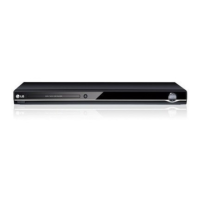
| Type | DVD player |
|---|---|
| Video Output | Composite, Component |
| Progressive Scan | Yes |
| Remote Control | Yes |
| Playable Media Format | CD, DVD |
| Playback Formats | MP3, JPEG |
| Audio Output | Stereo |
| Audio Playback Formats | MP3, WMA |
| Output Resolution | 480p |