31
Special Features
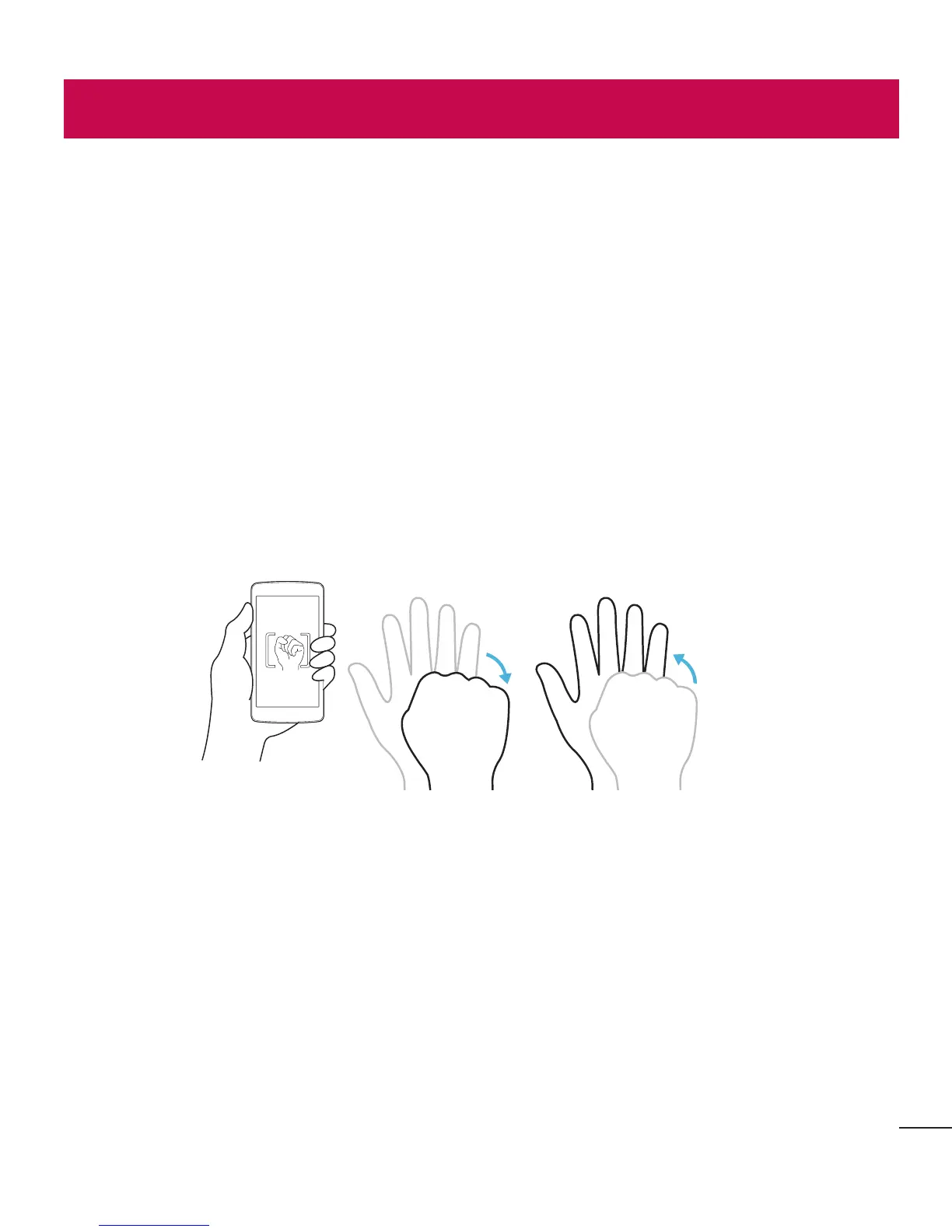
Gesture shot
TheGestureshotfeatureallowsyoutotakeapicturewithahandgestureusingthe
frontcamera.
To take photo
TherearetwomethodsforusingtheGestureshotfeature.
• Raiseyourhand,withanopenpalm,untilthefrontcameradetectsitandabox
appearsonthescreen.Thencloseyourhandintoafisttostartthetimer,allowing
youtimetogetready.
• Raiseyourhand,inaclenchedfist,untilthefrontcameradetectsitandabox
appearsonthescreen.Thenunclenchyourfisttostartthetimer,allowingyoutime
togetready.
or
KnockON
TheKnockONfeatureallowsyoutodouble-tapthescreentoeasilyturnitonoroff.
To turn the screen on
1 Double-tapthecenteroftheLockscreentoturnthescreenon.
2 Unlockthescreenoraccessanyoftheavailableshortcutsorwidgets.
Special Features



 To Next Page