28
Your Home screen
Opening the notifications panel
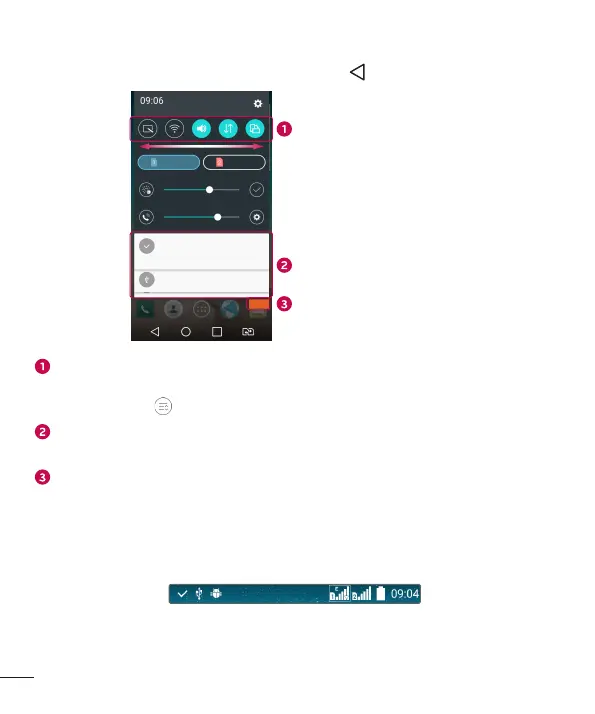
Swipedownfromthestatusbartoopenthenotificationspanel.Toclosethe
notificationspanel,swipethescreenupwardsortap .
Quick Settings Area
Notifications
Clear
Tapeachquicksettingkeytotoggleiton/off.Touchandholdthedesiredkeyto
directlyaccessthesettingsmenuforthefunction.Toseemoretogglekeys,swipe
leftorright.Tap toremove,addorrearrangequicksettingkeys.
Currentnotificationsarelisted,eachwithabriefdescription.Tapanotificationto
viewit.
Taptoclearallthenotifications.
Indicator icons on the Status Bar
Indicatoriconsappearonthestatusbaratthetopofthescreentoreportmissedcalls,
newmessages,calendarevents,devicestatusandmore.
Theiconsdisplayedatthetopofthescreenprovideinformationaboutthestatusofthe
device.Theiconslistedinthetablebelowaresomeofthemostcommonones.



 To Next Page