EasyManua.ls Logo

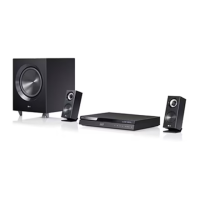
LG HE903PAW - User Manual

LG HE903PAW
28 pages
Print Icon
To Next Page IconTo Next Page
Loading...
Model: HE903PAW(HE903PAW, SH93PA-F/S/C/W, W93-T/R)
Unique Features
5.1ch ez Set-up
Listen sound from TV, DVD
and Digital Device with vivid
5.1ch mode.
Go to page 20
Full HD up-scaling
(1080p)
View Full HD picture quality
with simple setup.
Go to page 14
HDMI In
Simple connection with Set
Top Box through HDMI.
Go to page 10
Portable In
Listen to music from your
portable device (MP3,
Notebook, etc).
Go to page 20
Made for iPod
Enjoy music from iPod with
simple connection.
Go to page 22
http://www.lg.ca
P/NO : MFL42932960
HE903PAW-AP_BCANLL_ENG_2960 2/19/08 5:04 PM Page 1

Questions and Answers

  • Q
    qbellAug 10, 2025
    How to fix no picture on my LG HE903PAW Home Theater System?
    • M
      Mason Larsen IVAug 10, 2025
      If your LG Home Theater System shows no picture, ensure the TV is set to the correct video input mode to receive the DVD signal. Also, check that the video cables are securely connected to both the TV and the DVD receiver.
  • A
    Audrey WilsonAug 15, 2025
    Why is there no sound on my LG HE903PAW Home Theater System?
    • E
      Elizabeth KnightAug 15, 2025
      If you experience little or no sound from your LG Home Theater System, verify that the connected equipment is set to receive the DVD signal output. Also, make sure the audio cables are securely connected to the speakers or receiver. If the issue persists, try replacing the audio cables, as they might be damaged.
  • G
    Gail WadeAug 20, 2025
    Why is there no sound coming from my LG HE903PAW?
    • X
      xstewartAug 20, 2025
      If your LG Home Theater System has little or no sound, first, make sure that the equipment connected via the audio cable is set to receive the DVD signal output. Select the correct input mode on the audio receiver. Also, ensure the audio cables are securely connected to both the speakers and the receiver. If the problem persists, the audio cables might be damaged, consider replacing them.
  • H
    hleeAug 26, 2025
    What to do if my LG HE903PAW Home Theater System won't play a DVD?
    • J
      joseph45Aug 26, 2025
      If your LG Home Theater System won't play a DVD or CD, first ensure that a disc is inserted correctly with the label side facing up. Check that the disc is playable by the system and that the menu is closed. Also, verify that parental lock settings aren't preventing playback. If the disc is unplayable, insert a playable disc.
  • M
    mariobradyAug 30, 2025
    How to stop humming noise from my LG HE903PAW when playing a DVD?
    • J
      Julian LawrenceAug 30, 2025
      If you hear a humming noise while playing a DVD or CD on your LG Home Theater System, clean the disc with a soft cloth using outward strokes. Also, try moving the DVD receiver and audio components further away from your TV to reduce feedback.
  • N
    Nicholas RoweSep 4, 2025
    What to do if a DVD/CD will not play on my LG HE903PAW Home Theater System?
    • J
      Jennifer GreenSep 4, 2025
      If your LG Home Theater System DVD/CD will not play, first, ensure that a disc is properly inserted with the label side facing upwards. Check that the disc is playable by verifying the disc type, color system, and regional code. Also, make sure the menu is closed by pressing SETUP. Finally, check if a parental lock is enabled, and if so, enter your password or change the rating level.

LG HE903PAW Specifications

General IconGeneral
BrandLG
ModelHE903PAW
CategoryHome Theater System
LanguageEnglish

Related product manuals