EasyManua.ls Logo

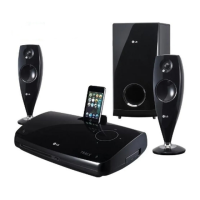
LG HS33S - User Manual

LG HS33S
21 pages
Print Icon
To Next Page IconTo Next Page
Loading...
Model: HS33S (HS33S-A2P, SH33S-F/A)
Unique Features
P/NO : MFL56962858
USB Direct Recording
Record music from CD to
your USB device.
Go to page 16
Home Theater
Speaker ez Set-up
Listen sound from TV and
Digital Device with 2.1ch
mode.
Go to page 14
Full HD up-scaling
(1080p)
View Full HD picture quality
with simple setup.
Go to page 9
Portable In
Listen to music from your
portable device (MP3,
Notebook, etc).
Go to page 16
Made for iPod
Enjoy music from iPod with
simple connection.
Go to page 17
HS33S_A2P.BSGPLLK_ENG_2858 3/4/09 2:05 PM Page 1
Downloaded From TheatreSystem-Manual.com Manuals

Other manuals for LG HS33S

Questions and Answers

  • C
    Courtney DixonSep 12, 2025
    What to do if my LG HS33S won't play a DVD/CD?
    • K
      Kari HallSep 12, 2025
      If your LG Home Theater System is not playing a DVD or CD, first ensure that a disc is properly inserted with the label or printed side facing upwards. Confirm that the disc is a playable format, considering the disc type, color system, and regional code. If a menu is open on the screen, press SETUP to close it. If there is a parental lock, enter your password or adjust the rating level.
  • C
    Christopher HernandezSep 15, 2025
    Why can’t radio stations be tuned in properly on LG HS33S?
    • E
      Emily RuizSep 15, 2025
      If your LG Home Theater System radio stations can’t be tuned in properly, check the antenna connection and adjust its position. If the signal strength of the radio station is too weak, tune to the station manually.

LG HS33S Specifications

General IconGeneral
BrandLG
ModelHS33S
CategoryHome Theater System
Channels2.1
BluetoothYes
USB PortYes
HDMIYes
Optical InputYes
Remote ControlYes
Audio FormatDolby Digital

Related product manuals