Need help?
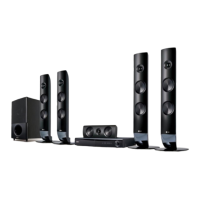
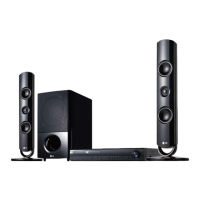
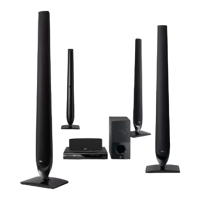
Do you have a question about the LG HT806TGW and is the answer not in the manual?
Covers electrical shock, laser, power cord, and ventilation safety warnings.
Instructions for safely removing, disposing of, and handling batteries.
Guidelines for safe appliance use by children and supervision requirements.
Details copyright protection technology and restrictions on material usage.
Information on compatibility with High Definition Television sets and potential picture artifacts.
Guidance on setting disc format options for compatibility with LG players.
Explains the meaning of LED colors on the wireless receiver.
Steps for automatically connecting the main unit and wireless receiver.
Procedure to reset the wireless receiver ID if interference occurs.
Explains the function of ferrite cores in reducing noise and improving signal.
Step-by-step guide on how to attach the ferrite core to speaker cables.
Connects the unit's component video output to the TV using component cables.
Steps to connect the unit to an HDMI compatible TV or monitor.
Guide to accessing and changing the video output resolution via the Setup menu.
Lists the supported output resolutions for HDMI and Component Video.
Connects auxiliary devices like TV or VCR to the AUX (L/R) INPUT.
Connects portable players (MP3, PMP) to the AUDIO (PORT. IN) jack.
Instructions for playing music from portable players or external devices.
How to connect USB memory or MP3 players to the unit's USB port.
Lists compatible USB devices like MP3 players and USB flash drives.
Details requirements and limitations for USB device compatibility and usage.
Connects optical output from components to the OPTICAL IN connector.
Instructions for connecting the FM antenna for radio reception.
Guide to setting up the home theater system for 5.1/2.1/2.0 channel sound.
How to make various adjustments to picture, sound, and other settings.
Procedure for selecting the initial display language upon first use.
Instructions for displaying and exiting the main Setup menu.
Set menu, disc audio, subtitle, and disc menu languages.
Configure TV aspect ratio (4:3/16:9) and display modes (Letterbox/Panscan).
Details available output resolutions like 1080p, 720p, 480p, etc.
Configure individual speaker settings for optimal surround sound.
Adjusts sound clarity for Dolby Digital by controlling dynamic range.
Mixes karaoke channels into normal stereo for multi-channel karaoke DVDs.
Compensates for delay between picture and sound in digital TV broadcasts.
Manual setup for wireless speaker connection if automatic fails.
Setting the DVD region code upon initial use of the unit.
Configure parental control settings to block or allow rated DVDs.
Enter or change the system password for security and access control.
Information on registering and deregistering for DivX VOD services.
Setting the area code for DVD playback compatibility.
Accessing and selecting main functions like Music, Movie, Photo, and Setup.
Starting playback from discs or USB devices and basic media selection.
Viewing on-screen information about the loaded disc, such as title and chapter.
Detailed instructions for stop, play, pause, skip, scan, repeat, and speed control.
How to display and navigate the DVD disc menu.
How to select and play different titles on a DVD.
Enables faster playback of video and audio content.
Automatic screen saver activation in Stop mode to protect the display.
Allows playback to start from a specific hour, minute, and second.
Remembers the last playback point on a disc for continued viewing.
Adjusting subtitle code pages for proper display of subtitle files.
Marks favorite files from discs or USB for easy recall.
Removes a specific marked track or file from the memory.
Clears all marked files from the unit's memory.
Instructions for selecting, viewing, and managing photo files.
Features like slide show, speed control, and rotation during photo viewing.
Sets the unit to turn off automatically after a specified delay.
Reduces the brightness of the display window.
Mutes the unit's audio output, indicated by 'MUTE' on the display.
Remembers and recalls the last playback scene from a disc.
Selects the appropriate system mode for TV compatibility.
Instructions for tuning into FM radio stations.
How to store up to 50 FM radio stations for quick access.
Erases all stored radio stations from the unit's memory.
Removes a specific preset radio station.
Tips for improving FM reception, such as switching to mono sound.
Choose from various pre-set surround sound fields for immersive audio.
Details various sound modes and equalizer settings for optimal audio experience.
Instructions for recording music and sound sources to a USB device.
Records all tracks or files from a source to the USB device.
Records files marked in a program list to the USB device.
Important notes regarding recording percentage, file limits, and device compatibility.
Solutions for when the unit does not turn on.
Solutions for issues related to the picture not appearing on the TV.
Solutions for problems with little or no sound output.
Tips for improving DVD picture quality, such as cleaning the disc.
Solutions for when a DVD or CD disc cannot be played.
Solutions for humming noise during disc playback.
Solutions for problems with tuning in radio stations.
Solutions for remote control not working correctly.
Guidelines for handling, cleaning, and safely shipping the unit.
Information on unit maintenance and when to contact authorized service.
Instructions for proper handling, storage, and cleaning of discs.
Information on Dolby, HDMI, DVD, and DivX trademarks and licenses.
Explanation of SIMPLINK for controlling LG TV functions via the unit's remote.
Details power requirements, dimensions, weight, temperature, and humidity.
Lists all available video, audio, and digital input/output connectors.
Technical details on stereo and surround sound output power.
Details the FM tuning range for radio reception.
Technical details for the wireless receiver, including dimensions and frequency.
Technical details for the front speakers, including impedance and power.
Technical details for the rear speakers, including impedance and power.
Technical details for the center speaker, including impedance and power.
Technical details for the passive subwoofer, including impedance and power.
 General
| Brand | LG |
|---|---|
| Model | HT806TGW |
| Category | Home Theater System |
| Total Output Power | 1000W |
| Number of Channels | 5.1 |
| DVD Playback | Yes |
| Bluetooth | Yes |
| HDMI Inputs | 1 |
| USB Playback | Yes |
| FM Tuner | Yes |
| Playable Disc Types | DVD, CD |
| Playable File Formats | MP3, WMA, JPEG |
| Connectivity | HDMI, USB, Bluetooth |
| Smart Functionality | No |
| Wireless Connectivity | Bluetooth |
| HDMI Output | 1 |
| USB Port | 1 |
| Radio | FM |


 To Next Page