52 SMART DIAGNOSIS TM
SMART
Smart
DiagnosisTM
DIAGNOSIS TM
Should you experience any problems with your range,
it has the capability of transmitting data to your smart
phone using the LG Smart Oven application or via
your telephone to the LG call center.
Smart Diagnosis TM cannot be activated unless your
range is turned on by touching the Start button. If
your range is unable to turn on, then troubleshooting
must be done without using Smart Diagnosis TM.
====
Using Smart Diagnosis TM
Smart Diagnosis TM Using Your Smart
Phone
1 Download the LG Smart Oven application on
your smart phone.
2 Open the LG Smart Oven application on your
smart phone. Touch Smart Diagnosis TM button to
advance to the next screen.
3
4
Follow directions of the application. Using 'Tag
On' is recommended but, if it does not work welt,
the application will show how to use Audible
Diagnosis.
Touch[ : ] in the LG Smart Oven application
for a more detailed guide on how to use the Tag
On function.
Smart Diagnosis TM Through the Call
Center
1 Call the LG call center at: (LG U.S.) 1-800-243-
0000 (LG Canada) 1-888-542-2623.
2
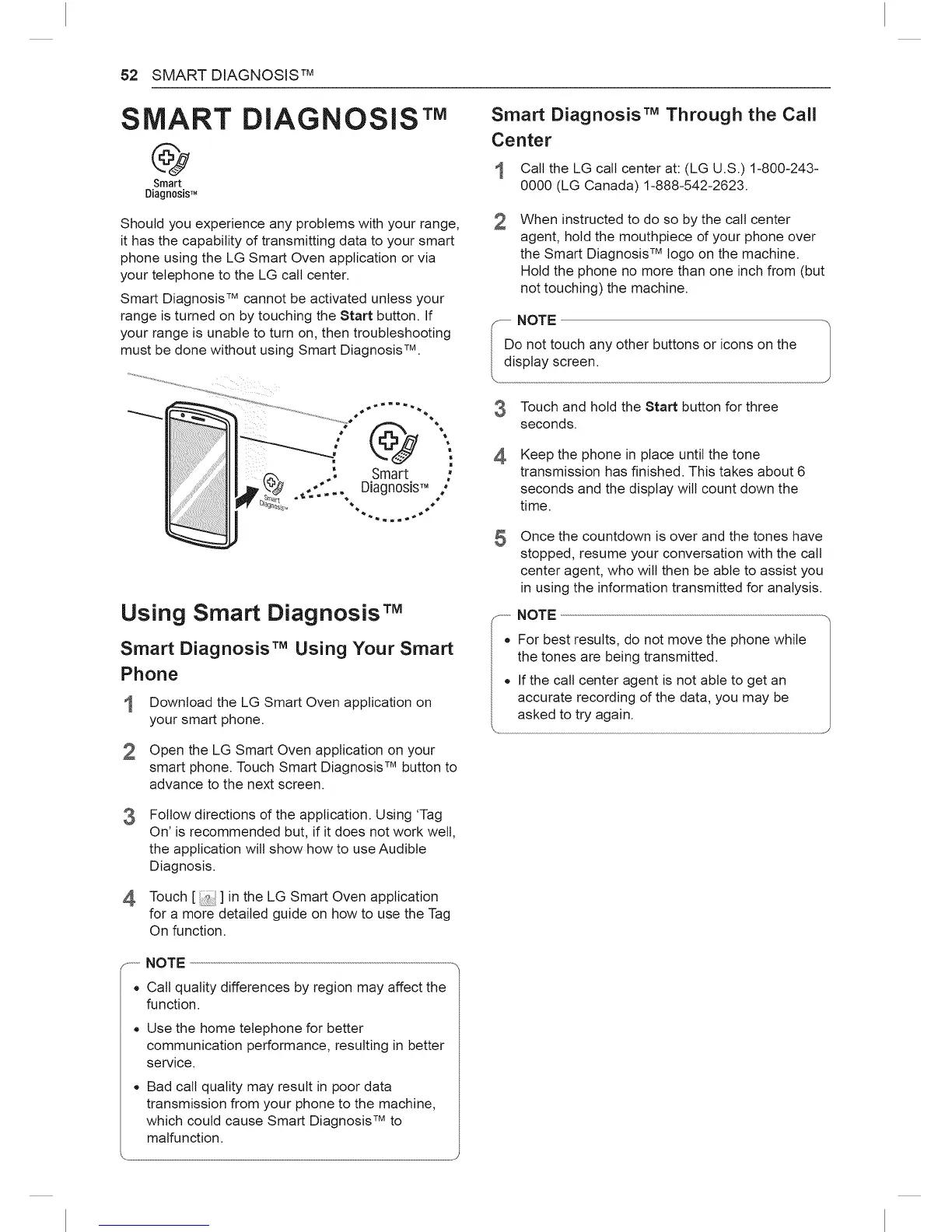
When instructed to do so by the call center
agent, hold the mouthpiece of your phone over
the Smart Diagnosis TM logo on the machine.
Hold the phone no more than one inch from (but
not touching) the machine.
-- NOTE 1
I o not touch any other buttons or icons on thedisplay screen.
Touch and hold the Start button for three
seconds.
4
Keep the phone in place until the tone
transmission has finished. This takes about 6
seconds and the display will count down the
time.
5
®
Once the countdown is over and the tones have
stopped, resume your conversation with the call
center agent, who will then be able to assist you
in using the information transmitted for analysis.
NOTE
For best results, do not move the phone while
the tones are being transmitted.
If the call center agent is not able to get an
accurate recording of the data, you may be
asked to try again.
...........NOTE
• Call quality differences by region may affect the
function.
Use the home telephone for better
communication performance, resulting in better
service.
Bad call quality may result in poor data
transmission from your phone to the machine,
which could cause Smart Diagnosis TM to
malfunction.



 To Next Page