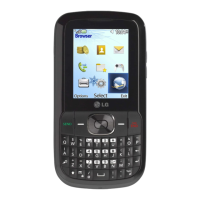
The LG-AX3100 is a Tri-Band, Quad-Mode (PCS/GPS/Cellular/AMPS) CDMA Mobile Phone designed for wireless communication.
Function Description:
The LG-AX3100 serves as a mobile phone, enabling users to make and receive calls, send and receive text messages, and access various phone book and utility features. It supports CDMA mobile phone services across PCS, GPS, Cellular, and AMPS bands. The device is designed for ease of use with a clear LCD screen, alphanumeric keypad, and dedicated function keys.
Important Technical Specifications:
- Bands/Modes: Tri-Band, Quad-Mode (PCS/GPS/Cellular/AMPS) CDMA.
- Data Communication: Supports data and fax transmission at 8Kbps or up to 13Kbps, allowing access to the internet with a personal computer or laptop.
- Battery: Uses LGLI-AAEM standard and extended batteries.
- Chargers:
- Travel Charger (TC-10W): Charges a completely discharged battery in 5 hours.
- Desktop Charger (DC-41W): Charges a completely discharged battery in 3 hours.
- Cigar Lighter Charger (CLC-11W): Trickle charges the battery in 5 hours.
- Memory: Stores up to 30 call history records (oldest overwritten after limit), 198 phone book entries (Entry 9 for Emergency Call), and up to 30 messages (1 voice, 29 text) with 245 characters per message.
- TTY Mode: Supports TTY mode for users with hearing or speech impairments.
- Baud Rate: For HSPD mode, the baud rate should be set to 230,400 bps. Optional data baud rates include 9,600, 19,200, 38,400, 57,600, 115,200, and 230,400. Diag baud rates are 38,400 and 115,200.
- RF Exposure: Complies with FCC RF exposure guidelines, requiring a minimum 1.5 cm separation distance for body-worn operation.
Usage Features:
Getting Started:
- Turning On/Off: Press and hold the END/PWR key.
- Making a Call: Enter the number and press SEND.
- Receiving Calls: Open the cellcase or press any key (except END/PWR, Side Keys) when the phone rings.
- Correcting Dialing Mistakes: Press CLR once for the last digit, hold CLR for two seconds to delete all digits, or press Soft Key 2 [BACK] to exit.
Dialing Features:
- One-Touch Dialing: Press and hold a key (1-8) for frequently used numbers (Entry 9 is for Emergency Call).
- Two-Touch Dialing: Press the first digit, then press and hold the second digit (or press SEND after both digits) for locations 10-99.
- Three-Touch Dialing: Press the first two digits, then press and hold the third digit for locations 100-199.
- Dialing from Memory List: Scroll to the desired location and press SEND.
- Dialing from Phone Book: Press SEND while viewing a memory location.
- Sound ([Menu]+[1]):
- Ring Sound: Select ringer sound.
- Ring Type: Choose from Ring, Vibrate, Vib+Ring, and Lamp.
- Ring & Vibrate Volume: Adjust ringer volume.
- Key Tone: Set key tone length (Normal/Long) and touch tone playback speed.
- Key Volume: Adjust key beep volume.
- Ear Volume: Adjust earpiece volume during a call using side keys.
- Alerts:
- Fade: Alerts for lost calls or services.
- Minute: Alerts 10 seconds before the end of every minute during a call.
- Service: Alerts when service changes (Entering/Leaving Service Area).
- Call Connect: Alert tones when a call is connected.
- Display ([Menu]+[2]):
- Backlight: Adjust backlight duration (10/30 seconds, On when Cellcase open, Always on, Always off).
- Contrast: Adjust display contrast.
- Banner: Customize display banner.
- Theme: Set screen theme (Default, Star theme).
- Language: Select display language.
- Version: View software and PRL version.
- Features ([Menu]+[3]):
- Data: Enable/disable data and fax reception.
- Auto Answer: Select ring type before automatic answer (off, after 1 ring, after 3 rings, Machine Enable for pre-recorded message and recording caller's speech).
- Auto Retry: Set redialing time for failed calls (off, every 10/30/60 seconds).
- One-Touch: Enable/disable one-touch dialing.
- Voice Privacy: Set voice privacy for CDMA calls (Enhanced/Standard).
- Audio AGC: Automatic Gain Control for audio.
- SIO Config: Configure Serial Input/Output, including port map and baud rates.
- System ([Menu]+[4]):
- System Select: Control which cellular company the phone uses (Automatic_B, Home only, Automatic_A).
- Set NAM: Select Number Assignment Module for multiple service providers.
- Auto NAM: Automatically switch to programmed Telephone No. in corresponding service provider area.
- Force Call: Place next call in analog mode (30-second window).
- TTY Mode: Enable/disable TTY mode.
- Security ([Menu]+[5]):
- Lock Mode: Protects phone from unauthorized use (Never, On power up, Always). Allows emergency calls and receiving calls when locked.
- Restrict: Set call restrictions (Yes/No) to emergency numbers and Phonebook Entry numbers only.
- Clear Call: Delete all numbers from "Call History."
- Clear Data: Delete all information from memory locations 001-199 (Entry 9 is Emergency Call).
- Emergency #: Enter up to 3 emergency numbers, callable even when locked or restricted.
- New Lock Code: Change the four-digit lock code.
- Voice Service ([Menu]+[6]):
- Voice Dialing: Make calls by voice command.
- Voice Recording: Record conversations.
- Voice Memo: Callers can leave messages when unavailable.
- Auto Answering Machine: Set phone to auto-answer with recorded message.
- Voice Memo ([Menu]+[6]+[1]): Playback or record voice messages.
- Training ([Menu]+[6]+[2]): Practice voice commands (Yes/No).
- Undo Train ([Menu]+[6]+[3]): Delete recorded voice commands.
- Voice Setup ([Menu]+[6]+[4]): Set voice dialing mode (Manual, Auto, Disable).
Book Features (Accessed via Soft Key [PIM]):
- Call History ([PIM]+[1]): View 30 most recent calls (Outgoing, Incoming, Missed).
- Call Information: View Last Call time, Home Calls duration, Roam Calls duration, All Calls duration.
- Recent Call History List: View and redial numbers from call history.
- Phone Book ([PIM]+[2]):
- Find Entry: View all entries or search by entry number.
- Search Name: Search for entries by name.
- Add Entry: Save telephone numbers, pager numbers, etc. (up to 198 entries). Supports Home, Office, Mobile, Pager, Data/Fax, E-Mail labels.
- Find Email: Search for entries by email address.
- Scheduler ([PIM]+[3]): Manage scheduled events.
- WakeUp ([PIM]+[4]): Set wake-up alarms.
- Game ([PIM]+[5]): Access games.
- Calculator ([PIM]+[6]): Use the calculator function.
Message Features (Accessed via Message Key):
- Voice: Check voice messages in the mailbox.
- Send Msg: Send text messages to a destination address.
- NewMsgs: Check new incoming text messages.
- OldMsgs: View checked but not erased text messages.
- Erase All: Erase all stored messages.
Functions Used During a Call (Accessed via Soft Key [Menu] during a call):
- Mute ([MENU]+[1]): Mute/unmute the microphone.
- Memo ([MENU]+[2]): Create a memo during a call.
- Recording ([MENU]+[3]): Record a conversation.
- Key Tone ([MENU]+[4]): Set key beep length and touch tone playback speed.
- Voice Privacy ([MENU]+[5]): Set voice privacy for CDMA calls (Enhanced/Standard).
Maintenance Features:
- Battery Charging: Use supplied chargers (Travel, Desktop, Cigar Lighter) to charge the battery.
- Antenna Care: Fully extend the antenna for best performance; protect it by pushing it back in when not in use. Do not use with a damaged antenna.
- Accessory Use: Use only LG-provided batteries, antennas, and chargers to avoid voiding the warranty.
- Water Damage: If the phone gets wet, immediately turn off power and remove the battery pack. Return to dealer for service if mal-functional.
- Authorized Service: Only authorized personnel should service the phone and its accessories.
- Environmental Protection: Avoid high temperature or humidity.
- Physical Protection: Avoid shock or impact.
- RF Exposure Compliance: Maintain 1.5 cm separation for body-worn operation; use only non-metallic belt-clips, holsters, or similar accessories.
- Data Management: Regularly clear call history and data if desired, but be aware that deleted information is not recoverable.

 Need help?

 To Next Page
 General