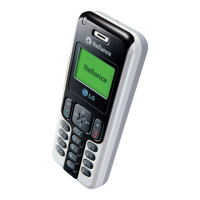
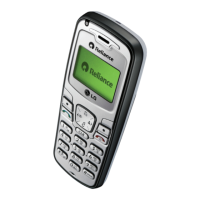
The LG-RD2340 is a cellular phone designed to operate with Code Division Multiple Access (CDMA) technology, offering enhanced voice clarity and a range of advanced features.
Function Description:
The LG-RD2340 is a compact mobile phone with a user-friendly interface. It supports basic communication functionalities such as making and receiving calls, paging, messaging (SMS, LMS, SMS to E-mail, Group SMS), and voicemail. The phone also includes a Caller ID feature. Beyond communication, it offers organizational tools like a scheduler, memo, alarm, stopwatch, calculator, currency converter, and world clock. For entertainment, it provides access to "R World" data services, including ringtones, cricket updates, dating services, news, astro information, and city & TV guides, as well as built-in games like "Tizzy Jump" and "Stone Axe." The phone supports a bilingual feature, allowing users to choose between English and Hindi for the display language. It also has an "Airplane Mode" that disables call sending/receiving and online access while allowing other features like games and memos to be used.
Important Technical Specifications:
- Display: Large, easy-to-read, 2 lines display with 1 Icon Line and 1 Menu Line.
- Keypad: 18-key keypad, including 10 number keys, 2 function keys, 2 soft keys, 1 clear key, 4-way navigation key, 1 call key, and 1 end key.
- Battery: Rechargeable Li-Ion Battery 3.7V. Designed for long standby and talk time. Full recharge takes approximately three hours.
- Memory Locations: Supports speed dial with up to 99 memory locations.
- Contacts: Stores up to 600 contacts, each with 4 phone numbers, E-mail, and Memo fields. Allows assigning Group, Ring Tone, and Message Alert Tone to each entry.
- Messages:
- LMS (Long Message Service): Sends messages up to 462 characters. Maximum 3 packets for English messages and 4 for Hindi messages.
- Inbox/Outbox/Drafts/Archive: Stores up to 30 messages each.
- Templates: 10 predefined phrases, with the option to add up to 20 more.
- Msg Groups: 5 SMS/E-mail groups, each with a maximum of 10 members.
- Call History: Stores up to 60 numbers for Missed, Received, and Dialled calls, including In Call Memo. In Call Memo stores up to 5 numbers.
- Ring Tones: Choice of 19 built-in ring sounds, plus 3 downloadable ringtones via SMS and 50KB R World downloadable ringtones.
- Wallpapers: Choice of 3 built-in wallpapers, plus 3 downloadable via SMS. Up to three images can be set for the standby screen.
- Security: Default Lock Code is 0000.
- Scheduler: Stores up to 160 appointments.
- Memo: Stores up to 40 memos.
- Voice Privacy: CDMA encoding provides inherent voice privacy, with settings for Standard or Enhanced.
- Audio AGC (Auto Gain Control): On/Off function for clear voice.
Usage Features:
- Power On/Off: Hold down the END/PWR Key for 2 seconds.
- Making Calls: Type the number and press the CALL Key.
- Receiving Calls: Press any key (except END/PWR Key) when the phone rings or vibrates. Press END/PWR Key once to stop ringing/vibrating, twice to reject.
- Display Language: Set to English or Hindi via Menu > Display > Language.
- Text Input: Supports T9En (predictive text), Abc (multi-tap), 123 (numbers), Symbol/Smileys, and Hindi input modes. Shift Key changes letter case.
- Navigation: 4-Way Navigation Key provides quick access to Messages, Voice Mail, Ring Tone, Scheduler, and Profiles.
- Vibrate Mode: In standby, press and hold the Vibrate Mode Key for about 2 seconds.
- Key Guard: Protects the keypad from accidental dialing.
- Call Forward/Waiting: Features for managing incoming calls.
- Any Key Answer: Allows answering calls by pressing any key.
- Auto Redial: Automatically redials a number if the initial call fails.
- Call Timer: Displays elapsed time during a call.
- Call Connect Alert: Notifies when a call connection is established.
- Profiles: Customizable sound settings (Ring Type, Ring Tone, Ringer Volume, Earpiece Volume, Key Volume, Message Alert) for different environments (Vibrate Only, Silent, General, Outdoor, Headset, Carkit).
- Display Settings: Language, Service Area, Clock, Wallpaper, Screensaver, Menu Style, Rhythmic Lighting, Backlight, Contrast.
- Security Features: Lock Mode, Emergency Numbers (100, 101, 102 callable even when locked), Change Lock Code, Clear Memory, Reset Default.
- In Call Memo: Note phone numbers provided by the other person during a call.
- Mute/Unmute: Locks the microphone to prevent sounds from being heard by the other party.
- Call Volume: Adjust earpiece volume during a call.
Maintenance Features:
- Battery Care:
- Charge fully before initial use.
- Use only LG-approved chargers.
- Do not disassemble or short-circuit.
- Keep metal contacts clean.
- Recharge after long periods of non-use.
- If the phone operates abnormally, remove and reinstall the battery.
- Charger and Adapter Safety: Intended for indoor use only.
- General Notice:
- Dispose of battery properly.
- Avoid damaged antennas.
- Do not immerse in water; if it happens, turn off, remove battery, and seek service.
- Avoid placing items with magnetic components near the phone.
- Backup important data (phone numbers, ringtones, messages, etc.) as data loss can occur due to careless use, repair, or software upgrades.
- Do not paint the phone.
- Do not turn the phone on or off when putting it to your ear.

 Need help?
 General

 To Next Page