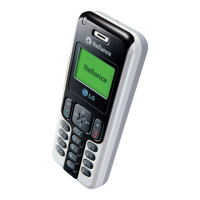
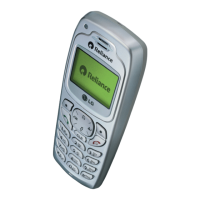
The LG-RD2430 is a CDMA (Code Division Multiple Access) cellular phone designed for digital mobile communication. It features a compact and advanced design with a range of functionalities for everyday use.
Function Description:
The LG-RD2430 serves as a mobile communication device, enabling users to make and receive calls, send and receive messages (SMS, LMS, SMS to E-mail, Group SMS), and manage personal information. It supports various modes for text input, including T9En, Abc (Multi-tap), 123 (Numbers), Symbol/Smileys, and Hindi. The phone also includes an "Airplane Mode" for situations where cellular functions are restricted, allowing access to other features like games, scheduler, and memo.
Important Technical Specifications:
- Display: Large, easy-to-read, 2 lines display + 1 Icon Line + 1 Menu Line.
- Keypad: 18-key keypad, consisting of 10 number keys, 2 function keys, 2 Soft keys, 1 clear key, 1 4-way navigation key, 1 Call key, and 1 End key.
- Battery: Rechargeable Li-Ion Battery 3.7V, designed for long standby and talk time.
- Memory:
- Names/Phonebook: Stores up to 600 contacts, each with 4 phone numbers, E-mail, and memo, along with Group, Ring Tone, and Message Alert Tone assignments.
- Messages: Stores up to 30 sent messages in Outbox, 30 received messages in Inbox, and 30 messages in Archive and Drafts.
- Call History: Stores up to 60 numbers for Missed, Received, and Dialled calls, including In Call Memo.
- In Call Memo: Stores up to 5 numbers taken during a call.
- Templates: Includes 10 predefined phrases, with the ability to add up to 20 more.
- Scheduler: Stores up to 160 appointments.
- Memo: Stores up to 40 memos.
- Ringtones: Choice of 19 Ring sounds + 3 downloadable Ring tones by SMS + 50KB R World downloadable Ring tones.
- Wallpapers: Choice of 3 Wallpapers + 3 downloadable by SMS.
- Voice Privacy: Inherent with CDMA encoding, with options for Standard or Enhanced.
- Audio AGC: On/Off function for Audio AGC (Auto Gain Control) system.
- Lock Code: Default lock code is 0000.
- Emergency Numbers: 100, 101, 102 can be called even when the phone is locked or restricted.
Usage Features:
- Making a Call: Ensure the phone is on, type the number, and press the Call key. If locked, enter the lock code.
- Receiving Calls: Press any key (except End/PWR) when the phone rings or vibrates. Press the Call key once to answer, or twice to reject.
- Display Language: Change between English and Hindi via the Menu.
- Text Input Modes:
- T9 Mode: Predictive text input for faster messaging.
- ABC (Multi-tap) Mode: Traditional multi-tap input.
- 123 (Numbers) Mode: Direct number input.
- Symbol/Smileys Mode: Access to various symbols and smileys.
- Hindi Mode: Specific mode for Hindi text input.
- Messaging: Supports LMS (Long Message Service) for up to 462 characters, with a maximum of 3 English packets and 4 Hindi packets. Each LMS packet is received individually with a sequence number.
- E-mail: Send messages to an E-mail ID with options to send, save, select templates, and set priority.
- 1234 Services: Access SMS-based infotainment services like News, Joke, Horoscope, Cricket, etc., available to Reliance subscribers.
- Menu Navigation: Menu-driven interface for easy operation and configuration, including options for Names, Messages, Call History, Profiles, Display, Settings, Organiser, and R World.
- Call Features: Call Forward, Call Waiting, Any Key Answer, Auto Redial, Call Timer, Call Connect Alert, Key Guard.
- Personalization: Set Wallpaper, Screensaver, Menu Style, Rhythmic Lighting, Backlight, and Contrast.
- Organiser: Scheduler, Memo, Alarm, Stopwatch, Calculator, Currency Converter, World Clock.
- R World: Access Ringtones, Cricket, Dating, News, Astro, City & TV Guides, and Games (Tizzy Jump, Stone Axe).
- Security: Lock Mode, Change Lock Code, Clear Memory, Reset Default.
- In-Call Functions: Mute/Unmute, Call Volume adjustment, Voice Privacy On/Off, In Call Memo.
Maintenance Features:
- Battery Charging: Charge the battery fully before initial use. The battery icon displays progression during charging. A full charge takes approximately three hours.
- Battery Level Indicator: Shown at the top right of the LCD screen. Low battery triggers an audible tone, blinking icon outline, and "Recharge the battery" message, eventually leading to automatic phone shutdown if not charged.
- Battery Installation/Removal: Insert the battery into the back of the phone until it latches. To remove, push the back cover down, pull the tab, and lift the battery.
- General Care:
- Dispose of batteries properly.
- Use only LG-approved chargers.
- Do not disassemble or short-circuit the battery.
- Keep battery metal contacts clean.
- Recharge after long periods of non-use.
- If the phone operates abnormally, remove and reinstall the battery.
- Avoid placing magnetic items near the phone to prevent data damage.
- Avoid prolonged calls to prevent heat-related call quality reduction.
- Store the phone safely with the power cord unplugged when not in use.
- Avoid using the phone near receiving equipment (TV/radio) to prevent interference.
- Do not use if the antenna is damaged; contact an LG Authorized Service Center for replacement.
- Do not immerse the phone in water; if it happens, turn it off, remove the battery, and take it to an LG Authorized Service Center.
- Do not paint the phone.
- Backup important data (phone numbers, ring tones, text messages, voice messages, pictures, videos) as data loss can occur due to careless use, repair, or software upgrade.
- Avoid turning the phone on or off when it is in your ear.

 Need help?
 General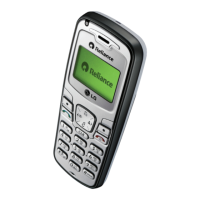

 To Next Page