EasyManua.ls Logo

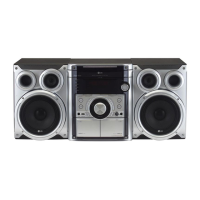
LG LMS-U360 - User Manual

LG LMS-U360
20 pages
Print Icon
To Next Page IconTo Next Page
Loading...
Please read this manual carefully before operating your set.
Retain it for future reference.
Designs and specifications are subject to change without
notice for improvement.
ALMATY_LM-U1560/U1060/U560/U365/U360_ENG_MFL35767806
MINI HI-FI System
OWNER’S MANUAL
MODEL : LM-U1560
(LM-U1560A/D/X, LMS-U1560W, LMS-U1560)
LM-U1060
(LM-U1060A/D/X, LMS-U1060)
LM-U560
(LM-U560A/D/X, LMS-U560)
LM-U365
(LM-U365A/D/X, LMS-U365)
LM-U360
(LM-U360A/D/X, LMS-U360)
CD-R/RW
CD - R/RW
USB

Other manuals for LG LMS-U360

Questions and Answers

  • G
    Gregory BoydAug 9, 2025
    Why is there no sound coming from my LG Stereo System?
    • B
      Beth AveryAug 9, 2025
      If your LG Stereo System isn't producing any sound, there might be a few reasons: 1. Check that the audio cables are securely connected to the jacks. 2. Ensure that the external source equipment connected to the stereo is powered on. 3. Verify that the speaker cable is correctly positioned, and then turn the unit on again using the POWER button.
  • J
    julia02Aug 18, 2025
    How to fix an LG Stereo System that won't turn on?
    • S
      Samuel WrightAug 18, 2025
      If your LG Stereo System has no power, it might be due to the power cord being disconnected. Make sure to securely plug the power cord into the wall outlet.
  • C
    Carl JonesAug 29, 2025
    What to do if the LG Stereo System remote control is not working?
    • C
      Christian FullerAug 29, 2025
      If your LG Stereo System remote control isn't working, here's what you can do: * Make sure you're pointing the remote directly at the remote sensor on the unit. * Ensure you're within about 23 ft (7 m) of the unit. * Remove any obstacles that might be blocking the path between the remote and the unit. * Try replacing the batteries in the remote with new ones.

Summary

Safety Precautions

Power Cord and Disposal Guidelines

Cautions for power cord safety and instructions for appliance disposal.

Laser and Moisture Warnings

Warnings related to laser system safety and protection from water.

PREPARATION and Initial Setup

Advanced Audio Settings

Audio Enhancement Features

OPERATION - Radio Functions

Presetting and Listening to Radio Stations

Steps for saving favorite radio stations and manual tuning.

OPERATION - Tape Functions

Basic Tape Playback and Recording

Instructions for playing, dubbing, and recording audio onto cassette tapes.

OPERATION - CD Playback

Basic CD Playback and Navigation

How to play CDs, search tracks, and select discs.

CD Playback Features

OPERATION - USB Functionality

Connecting and Playing USB Devices

Guide to connecting USB storage devices and playing audio files.

REFERENCE Information

Troubleshooting Common Problems

Solutions for frequently encountered issues with the unit.

Technical Specifications

Tuner, Tape, and Amplifier Specifications

Detailed technical data for the tuner, tape deck, and amplifier sections.

Speaker System and Model Variations

Specifications for speaker systems and differences across model variants.

LG LMS-U360 Specifications

General IconGeneral
TypeMini hi-fi system
Power Output360W
Speaker Configuration2.1 channel
Supported Audio FormatsMP3, WMA
USB Direct PlaybackYes
CD PlayerYes
Cassette DeckNo
ConnectivityUSB, AUX
Radio TunerFM
Speakers2 Main Speakers, 1 Subwoofer

Related product manuals