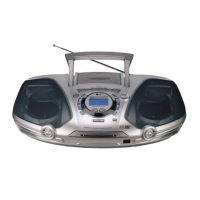
This document describes the LG Portable CD Cassette Recorder, models LPC-130A and LPC-130X, an owner's manual detailing its operation, features, and specifications.
Function Description:
The LG Portable CD Cassette Recorder is a versatile audio device designed for playing CDs and cassette tapes, as well as receiving AM/FM radio broadcasts. It also features recording capabilities, allowing users to record from the radio or CD player onto a cassette tape. The device is portable, offering both AC power and battery operation for use in various locations.
Important Technical Specifications:
The specifications for both models, LPC-130A and LPC-130X, are largely identical, with the primary distinction being the model number itself.
- Power Supply: Refer to the back panel of the unit.
- Power Consumption: 8W.
- Net Weight: 2.6kg.
- External Dimensions (W x H x D): 374 x 178 x 255 mm.
- Output Power: 1.8W x 2, T.H.D 10%.
- Speakers: 8Ω (4").
- Battery Operation: DC 9V, six "C"(R14) batteries (not supplied).
- Frequency Response (CD): 100 - 16000 Hz.
- Signal-to-noise Ratio (CD): 55 dB.
- T.H.D (CD): 0.3 %.
- Tuning Range (FM): 87.5 - 108 MHz.
- Intermediate Frequency (FM): 10.7 MHz.
- Antenna (FM): Telescopic antenna.
- Tuning Range (AM/MW): 530 - 1610 kHz or 530 - 1610 kHz.
- Intermediate Frequency (AM/MW): 455 kHz.
- Antenna (AM/MW): Ferrite bar antenna.
- Recording System (TAPE): 2 track, 2 channel stereo.
- Frequency Response (TAPE): 125 - 8000Hz.
- Signal to Noise Ratio (TAPE): 45dB (REC/PLAY).
Usage Features:
General Operation:
- Power Source: The unit can be powered by an AC power cord connected to a wall outlet or by six "C" (R14) batteries. An optional voltage selector may be present for adjusting to local power supplies.
- Audio Adjustment: A VOLUME CONTROL DIAL allows users to increase or decrease the sound level. A headphone socket (Ø 3.5mm) is available for private listening, automatically disconnecting the speakers when headphones are plugged in.
Radio Operation:
- Tuning: A FUNCTION SWITCH allows selection of AM or FM bands, and a TUNING dial is used to set a station.
- Stereo/Mono Selection: The RIF/FM MODE SWITCH (ST./MONO) enables listening to FM stereo broadcasts (ST.) or switching to mono (MONO) to reduce noise, though this will eliminate the stereo effect.
- Antenna: For AM, the built-in antenna requires rotating the unit for better reception. For FM, a telescopic antenna needs to be pulled out and adjusted for optimal reception.
Tape Operation:
- Basic Playback: Set the FUNCTION SWITCH to TAPE, open the cassette door using the TAPE STOP/EJECT (▲) button, insert a cassette, close the door, and press TAPE PLAY (►) to begin playback.
- Pause/Stop: TAPE PAUSE (II) temporarily stops playback, and TAPE STOP/EJECT (▲) stops playback and automatically stops the cassette deck at the end of the tape.
- Fast Forward/Rewind: REWIND (◄◄) and FAST FORWARD (►►) buttons allow quick navigation through the tape.
- Recording: To record, set the FUNCTION SWITCH to the desired source (CD or Radio), insert a blank tape, press RECORD (●), and then TAPE PLAY (►).
- CD Synchronized Recording: This feature automatically records an entire CD onto a cassette. Load a CD, set FUNCTION SWITCH to CD, insert a blank tape, press RECORD (●), and the recording will start automatically after about 7 seconds. Users can select a desired track for recording using CD SKIP/SEARCH buttons before starting.
CD Operation:
- Basic Playback: Set the FUNCTION SWITCH to CD, open the CD DOOR OPEN (▲ PUSH OPEN) button, load a disc with the printed side up, close the compartment, and press CD PLAY/PAUSE (►/II).
- Pause/Stop: CD PLAY/PAUSE (►/II) pauses playback, and CD STOP (■) stops it.
- Skipping Tracks: CD FORWARD SKIP/SEARCH (►►►►►) moves to the next track. CD BACKWARD SKIP/SEARCH (◄◄◄◄) returns to the start of the current track or skips previous tracks with repeated presses.
- Searching Tracks: Press and hold CD SKIP/SEARCH buttons during playback, then press CD PLAY/PAUSE (►/II) at the desired point.
- Repeat Play: The CD REPEAT button allows repeating one track ("REPEAT 1") or all tracks ("REPEAT ALL"). Pressing it again cancels the repeat function.
Maintenance Features:
- Handling the Unit: The manual advises using the original shipping carton and packing materials for maximum protection when shipping the unit.
- Cleaning the Cabinet: Use a soft, dry cloth. For very dirty surfaces, a soft cloth lightly moistened with a mild detergent solution is recommended. Avoid strong solvents like alcohol, benzine, or thinner, as they can damage the surface. Do not use volatile liquids or leave rubber/plastic products in contact with the unit for extended periods.
- Handling Discs: Do not touch the playback side of the disc. Hold discs by the edges to avoid fingerprints. Do not stick paper or tape on discs.
- Cleaning Discs: Fingerprints and dust can degrade sound quality. Clean discs with a soft, clean cloth, wiping from the center outwards. Do not use strong solvents or anti-static sprays meant for analog records.
- Storing Discs: Store discs in their cases after playing. Avoid direct sunlight, heat sources, or leaving them in parked cars exposed to sunlight, as high temperatures can damage them.
- Preventing Tape Erasure: Removing the tab(s) of a cassette (using a small screwdriver) prevents accidental erasure. To record again on such a tape, cover the tab hole with adhesive tape.
- Battery Care: Remove batteries if the unit will not be used for an extended period to prevent damage from leakage. Replace all batteries with new ones when they are weak. Batteries are not used when the AC power cord is connected.
- CD Player Care: Do not tilt or move the unit with discs loaded to avoid damage. Do not touch the playing side of the CD. Clean CDs with a soft, lint-free cloth from the middle outward.

 Need help?
 General

 To Next Page