CD Operation
OPERATION
9
Basic Playback
11
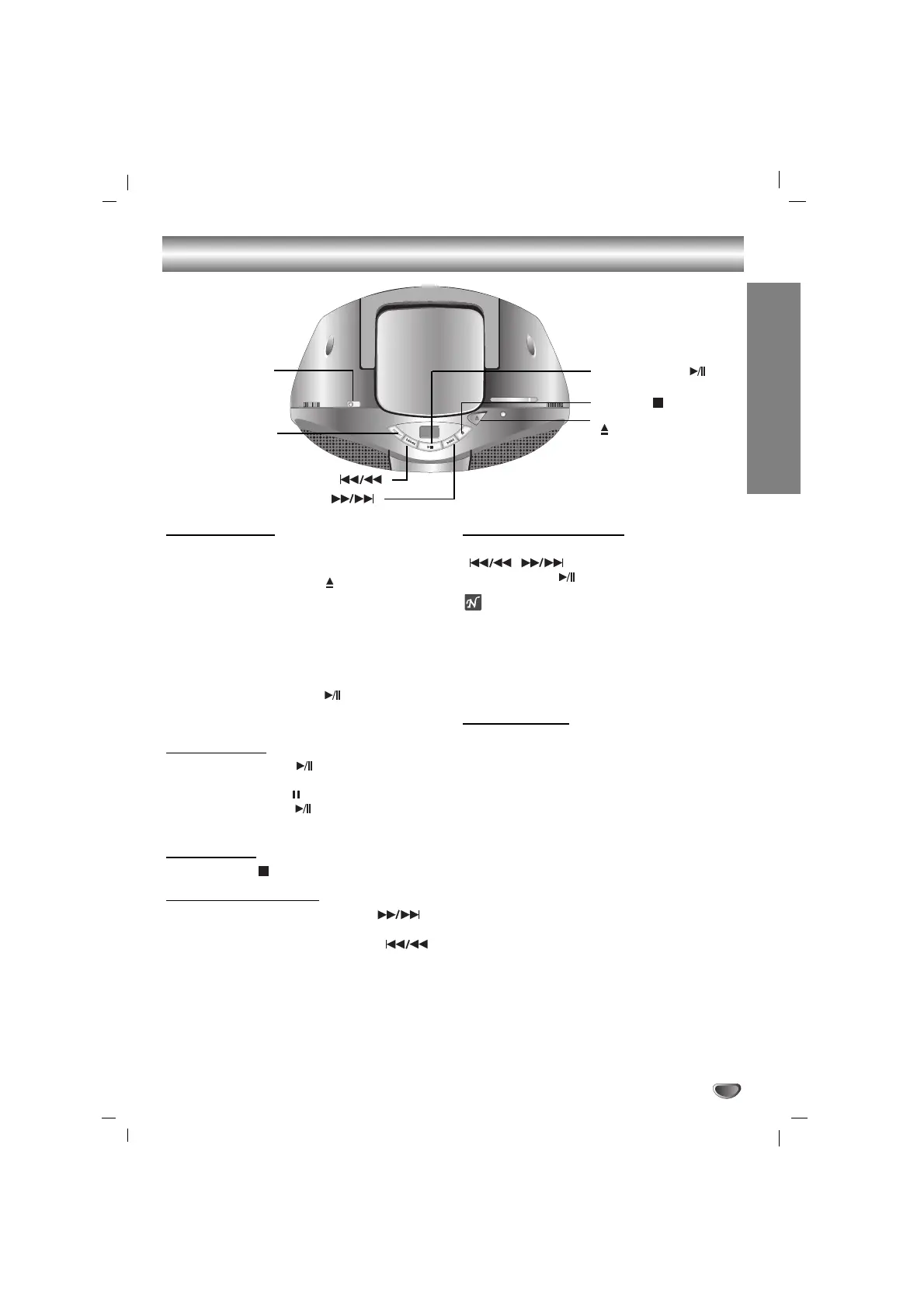
Set FUNCTION SWITCH to CD.
22
Press CD DOOR OPEN ( PUSH OPEN) button
to open the disc compartment.
33
Load a disc with the printed side facing up.
44
Close the disc compartment. The display will
show the total number of tracks.
55
Press CD PLAY/PAUSE ( ) button to begin
play.
The track number will be shown in the display.
To Pause Play
Press CD PLAY/PAUSE ( ) button to pause during
playback.
When a track is paused “”will flash in the display.
Press CD PLAY/PAUSE ( ) button again to resume
play.
To Stop Play
Press CD STOP ( ) button during playback.
To Skipping the Track
• Press CD FORWARD SKIP/SEARCH ( )
button to go to the next track.
• When CD BACKWARD SKIP/SEARCH ( )
button is pressed once midway through a track,
the player returns to the start of that track. When it
is pressed again, a track is skipped each time the
button is pressed.
To Searching the Track
After pressing and holding CD SKIP/SEARCH
( , ) button during playback, press
CD PLAY/PAUSE ( ) button at the point you want.
Notes
• Do not tilt or move your unit with discs loaded. If you
do you may damage the discs and your unit.
• Do not touch the playing side of CD; the side without
any printing on it.
• Clean your CD from the middle outward with a soft
lint free cloth.
To Repeat Play
To play one track repeatedly
Press CD REPEAT button once during playback.
- “REPEAT 1” appears in the display.
To play all tracks repeatedly
Press CD REPEAT button again during playback.
- “REPEAT ALL” appears in the display.
To cancel repeat play
Press CD REPEAT button once more during playback.
- Repeat indicator disappears.
FUNCTION SWITCH
CD DOOR OPEN
( PUSH OPEN)
CD PLAY/PAUSE ( )
CD STOP ( )
CD BACKWARD SKIP/SEARCH ( )
CD REPEAT
CD FORWARD SKIP/SEARCH ( )


 To Next Page