EasyManua.ls Logo

LG LW8016ER.AC1AUSB - User Manual

LG LW8016ER.AC1AUSB
29 pages
Print Icon
To Next Page IconTo Next Page
Loading...
LW8016ER
LW8017ERSM
EN ENGLISH
TYPE : WINDOW
www.lg.com
Copyright © 2017 - 2020 LG Electronics Inc. All Rights Reserved.
OWNER’S MANUAL
AIR CONDITIONER
Read this owner’s manual thoroughly before operating the
appliance and keep it handy for reference at all times.
*MFL70960608*
MFL70960608
Rev.07_100820
Question and Answer IconNeed help?

Do you have a question about the LG LW8016ER.AC1AUSB and is the answer not in the manual?

Summary

Safety Instructions

Important Safety Instructions

Contains general safety warnings, symbols, and precautions for operation and installation.

Caution

Refrigerant Information

Product Overview

Exterior Parts

Details the external components of the air conditioner with labels for identification.

Interior Parts

Details the internal components of the air conditioner with labels for identification.

Installation

Electrical Data

Provides electrical specifications, grounding details, and warnings for safe installation.

Parts Included

Lists all components provided with the unit for installation.

Tools Needed

Lists the necessary tools required for the installation process.

How to Install the Unit

Step-by-step guide for mounting the air conditioner securely in the window.

Window Requirements

Specifies suitable window types and sizes for proper air conditioner installation.

Storm Window Requirements

Guidelines for installing the unit when a storm window frame is present.

Preparation of Chassis

Instructions for preparing the unit's frame and curtain panels before installation.

Unit Installation

Detailed steps for positioning and securing the air conditioner in the window.

Operation

Control Panel and Remote Control

Explains the functions of the unit's control panel and the remote control.

Clean Filter

Instructions for cleaning the air filter and resetting the filter indicator light.

Temperature Control

How to adjust the thermostat to set the desired room temperature.

Wireless Remote Control

Instructions for inserting batteries into the remote control.

Ventilation

How to use the ventilation lever for fresh air intake.

Air Direction

Methods for adjusting horizontal and vertical airflow direction using louvers.

Additional Features

Description of the slinger fan for improved cooling efficiency.

Smart Functions

LG ThinQ Application

Overview of connecting the appliance to a smartphone using the LG ThinQ app.

Smart Diagnosis

How to use the app for diagnosing and troubleshooting appliance problems.

Installing the LG ThinQ Application

Steps to download and install the LG ThinQ mobile application.

Open Source Software Notice Information

Information regarding open source licenses used in the product.

FCC Notice

Regulatory information regarding the FCC compliance of the device.

FCC RF Radiation Exposure Statement

Information on RF exposure limits and safe operating distance.

Wireless LAN Module Specifications

Technical details of the Wi-Fi module used in the appliance.

Maintenance

Cleaning the Air Conditioner

Instructions for cleaning the external parts and cabinet of the air conditioner.

Air Filter

Information on checking, cleaning, and replacing the air filter.

Troubleshooting

Before Calling for Service

Preliminary checks and common issues to resolve before contacting customer support.

Normal Sounds You May Hear

Description of common operational sounds and their potential causes.

Warranty

Arbitration Notice

Legal notice regarding dispute resolution through binding arbitration.

What This Warranty Covers

Details on what the limited warranty includes and its scope.

Warranty Period

Specifies the duration of the warranty coverage for parts and labor.

How Service Is Handled

Explanation of the in-home service process during the warranty period.

This Limited Warranty Does Not Cover

Lists exclusions and limitations from the product's warranty coverage.

How to Obtain Warranty Service & Additional Information

Contact details and website for obtaining warranty service and support.

For Your Records

Section for recording model, serial numbers, and purchase date for warranty purposes.

Procedure for Resolving Disputes

Detailed process for handling disputes and arbitration as per warranty terms.

Fees;Costs

Information regarding fees and costs associated with the arbitration process.

Hearings and Location

Details on the location and conduct of arbitration hearings.

Opt Out

Instructions on how to opt out of the arbitration agreement.

Overview

This document serves as the owner's manual for an LG window-type air conditioner, providing comprehensive instructions for installation, operation, maintenance, and troubleshooting. The manual emphasizes safety precautions and includes details on smart functions, specifically the LG ThinQ application, for enhanced user experience.

Function Description

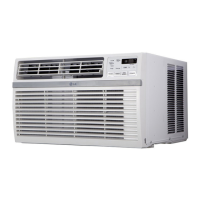
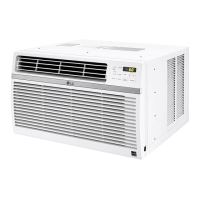
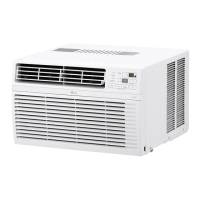
The LG air conditioner is designed to provide cooling and dehumidification for indoor spaces. It operates as a window-mounted unit, drawing in ambient air, cooling it, and circulating it back into the room. The unit features a compressor for refrigeration, a fan for air circulation, and a condenser and evaporator for heat exchange. It is equipped with a slinger fan, which picks up condensed water from the base pan and expels it through the condenser, contributing to increased efficiency. The air conditioner is not intended for use as a precision refrigeration system and should not be used for special purposes such as maintaining pets, food, precision machinery, or art objects.

Usage Features

The air conditioner offers multiple operation modes to suit various needs:

  • Cool Mode: Ideal for quickly cooling and dehumidifying a room on hot days. Users can adjust the desired room temperature and fan circulation speed.
  • Energy Saver Mode: In this mode, the compressor and fan turn off once the set temperature is reached. Approximately every 3 minutes, the fan turns on to allow the unit sensor to accurately determine if more cooling is needed, optimizing energy consumption.
  • Fan Mode: Circulates air without running the compressor, providing ventilation without significant cooling. Fan speed can be set to High, Medium, or Low, but the temperature cannot be adjusted in this mode.
  • Dry Mode: Designed for rainy and damp days to dehumidify the room without cooling it significantly. Humidity is removed through a combination of compressor operation and a fixed Low fan speed. The compressor and fan turn off once the set temperature is reached, and fan speed cannot be adjusted.

The unit features a control panel and a wireless remote control for convenient operation. The remote control allows users to power the unit on/off, set fan speed, adjust temperature, and select operation modes. The control panel includes buttons for these functions, along with a "Clean Filter" LED indicator.

Additional features include:

  • Delay ON/OFF Timer: Allows users to program the unit to automatically turn on or off after a set period (1 to 24 hours). When the unit is off, the Delay ON function can be used to schedule a start time with previous mode and fan settings. When the unit is on, the Delay OFF function can be used to schedule a shut-off time.
  • Temperature Control: The thermostat monitors room temperature and allows users to set a desired temperature between 60 °F and 86 °F (16 °C and 30 °C).
  • Ventilation: A ventilation lever can be pushed in for optimal cooling performance or pulled out to open the vent and draw fresh air into the room.
  • Air Direction Adjustment: Airflow can be adjusted horizontally by moving the levers of the vertical louvers and vertically by touching the horizontal louvers.
  • Auto Restart: In the event of a power outage, the air conditioner will automatically restart with the previously set settings once power is restored.
  • Wi-Fi Connectivity (Wi-Fi Models Only): Enables connection to a home Wi-Fi network, allowing control via the LG ThinQ application.

LG ThinQ Application (Wi-Fi Models Only)

The LG ThinQ application provides smart features for controlling and monitoring the air conditioner via a smartphone.

  • Remote Control: Users can communicate with the appliance from their smartphone, accessing various settings and functions.
  • Smart Diagnosis™: This feature helps diagnose problems with the appliance. If a problem occurs, the unit can transmit troubleshooting data to a smartphone through the LG ThinQ application, guiding users through potential solutions.
  • Settings: The application allows users to configure various options for the appliance and within the application itself.

Maintenance Features

Regular maintenance is crucial for the air conditioner's efficient operation and longevity.

  • Air Filter Cleaning: The air filter should be checked and cleaned at least twice a month, or when the "Clean Filter" LED lights up (after 250 hours of operation). Trapped particles can reduce cooling capacity and cause frost accumulation on the evaporator. To clean, remove the filter from the front grille, wash it with lukewarm water below 40 °C (104 °F), gently shake off excess water, and replace. The filter reset must be done using the control panel.
  • Cabinet Cleaning: The front grille and inlet grille can be wiped with a cloth dampened in a mild detergent solution. The cabinet can be washed with mild soap or detergent and lukewarm water, then polished with liquid appliance wax.
  • Condenser Coil Inspection: The condenser coils (located outside the unit) should be checked periodically and cleaned if clogged with soot or dirt from outside air to ensure continued peak efficiency.
  • General Precautions: The manual advises against using strong cleaning agents or solvents, spraying water directly on the unit, or touching metal parts when removing the air filter. It also recommends disconnecting the power supply before cleaning or maintenance and waiting until the fan stops.

For repairs and maintenance beyond routine cleaning, users are advised to contact an Authorized Service Center.

LG LW8016ER.AC1AUSB Specifications

General IconGeneral
TypeWindow Air Conditioner
Cooling Capacity8, 000 BTU
Energy Efficiency Ratio (EER)12.1
Room Size Coverage350 sq. ft.
Power Supply115V
Energy Star CertifiedYes
Fan Speeds3
Remote ControlYes
Operating Frequency60 Hz
RefrigerantR32
Installation TypeWindow
Noise Level52 dB
Window Size (Width)23 to 36 inches
Window Size (Height)14 inches

Related product manuals