18
• Select Component.
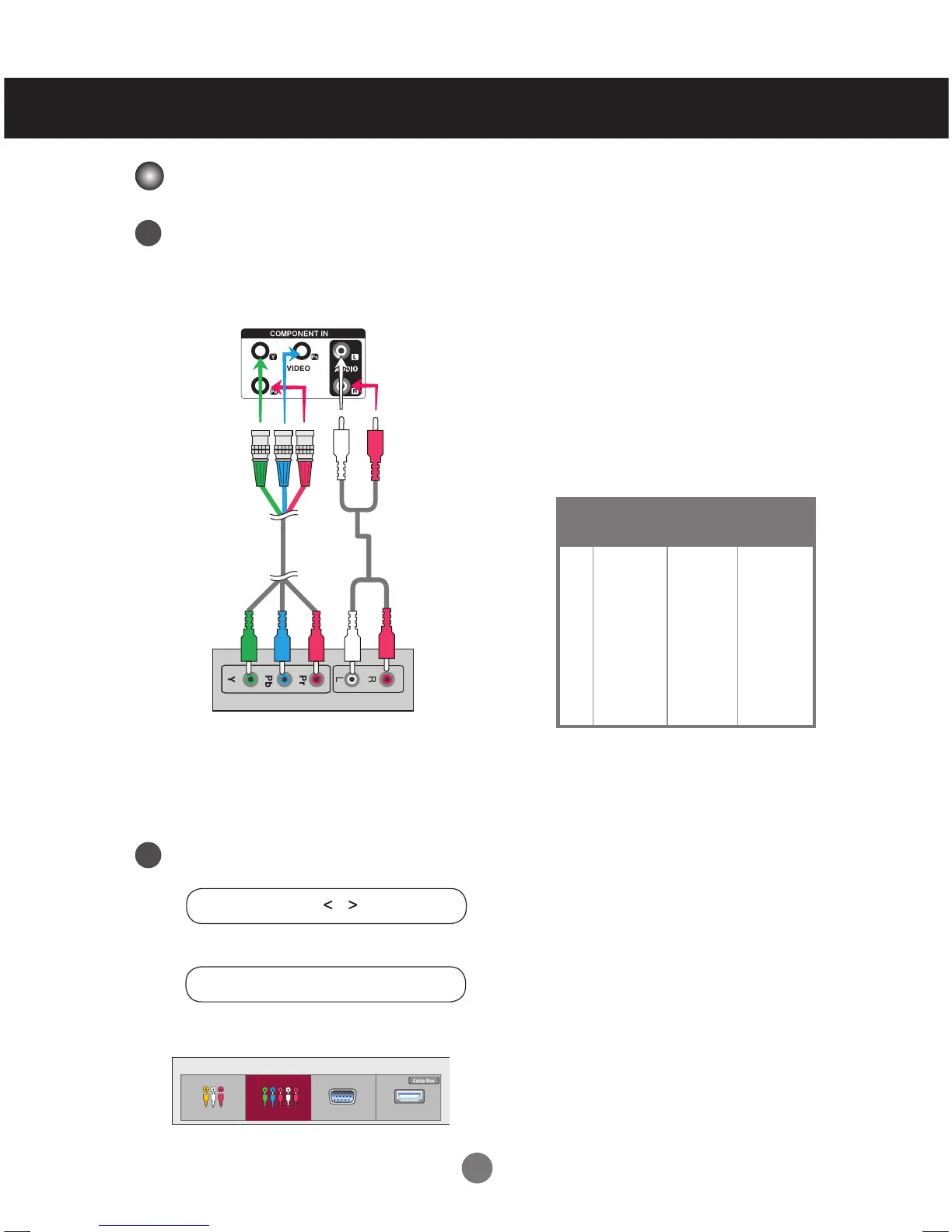
Connect the video/audio cable as shown in the below figure and then, connect the power
cord (See page 12).
• Connect the input terminal with a proper color match.
BNC Cable
(not included)
Product
HDTV Receiver
Audio Cable
(not included)
Connecting to External Devices
Note
- Some devices may require HDCP in order to display HD signals.
- Component doesn't support HDCP.
Component Input (480i/480p/576i/576p/720p/1080i/1080p)
1
2
Input List
AV Component RGB HDMI/DVI
Select an input signal.
Press the INPUT button on the remote control to select the input signal.
Or, press the INPUT button on the back of the product.
INPUT → → OK
INPUT →◄ ► → AUTO/SET
Preset mode
Horizontal
Frequency
(kHz)
Vertical
Frequency
(Hz)
1
2
3
4
5
6
7
8
9
480i
480p
576i
576p
720p
720p
1080i
1080i
1080p
60.00
60.00
50.00
50.00
60.00
50.00
50.00
60.00
60.00
15.63
31.47
15.625
31.25
45.00
37.5
31.25
33.75
67.5
HDTV Mode/YPbPr



 To Next Page