1
2
5
4
7
6
9
8
13
12
11
10
3
1
2
5
3
4
7
6
9
8
13
12
11
10
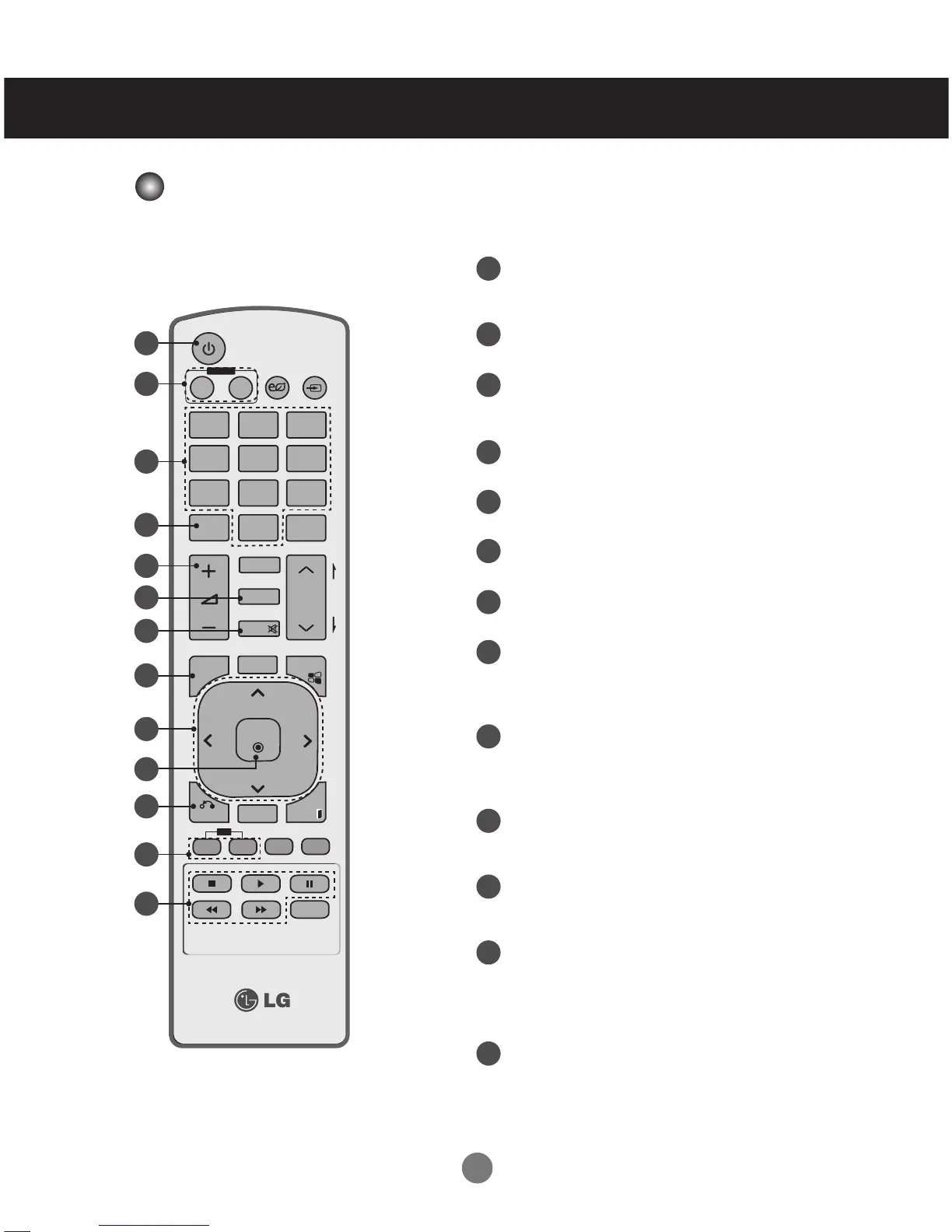
Power On / Off Button
- Switches the set on from standby or off to
standby.
Monitor On / Off Button
- Turn off the monitor and then turn it back on.
Number and Alphabet Buttons
- Type numbers.
- The alphabet selection is not applicable.
1/a/A Button
- This button selection is not applicable.
Volume Up/Down Button
- Adjusts the volume.
PSM Button
- Selects the Picture Status Mode.
MUTE Button
- Switches the sound on or off.
MENU Button
- Selects a menu.
- Clears all on-screen displays and returns to
Set viewing from any menu.
Up/Down/Left/Right Buttons
- Allows you to navigate the on-screen menus
and adjust the system settings to your
preferenc.
OK Button
- Accepts your selection or displays the
current mode.
BACK button
- Allows the user to move
return one step in an interactive application.
ID ON/OFF Button
- When the number of input ID is equal to the
number of ID Mode, you can control the
monitor which you want in the multi display
condition.
USB Menu control buttons
- Adjust the USB menu(Photo List, Music List
and Movie List ).



 To Next Page