ON/OFF
MENU
OK
VOL
PR
1 2 3 46 5
21/29FC82/85 series, 21/29FC8DVE series
10
S VIDEO
L/MONOVIDEO
AUDIO
R
8
7
AV3
9
S VIDEO
L/MONOVIDEO
AUDIO
R
8
7
AV3
9
ON/OFF
MENU
OK VOL
PR
1 2 3 4 56 10
25/29CA45 series
ON/OFF
MENU
OK VOL
PR
1 234 5 6 10
25Q25 series
B VIDEO
L/MONOVIDEO
AUDIO
R
AV3
8
7
9
MENU
OK
ON/OFF
1
3
3
4
21/29FD52/55 series
5 2
106
PR
VOL
S VIDEO
L/MONOVIDEO
AUDIO
R
AV3
8
9
7
MENU
OK
ON/OFF
1
3
4
LVIDEO
AUDIO
R
AV2
8
7
21FA25 series
3
ON/OFF
OKMENU PRVOL
1 2
6
5
10
4
3
21FD25 series
ON/OFF
OKMENU PRVOL
1 2
6
5
10
4
21FE45 series
5 2
10
PR
6
VOL
5
1
2
6
7
8
4
10
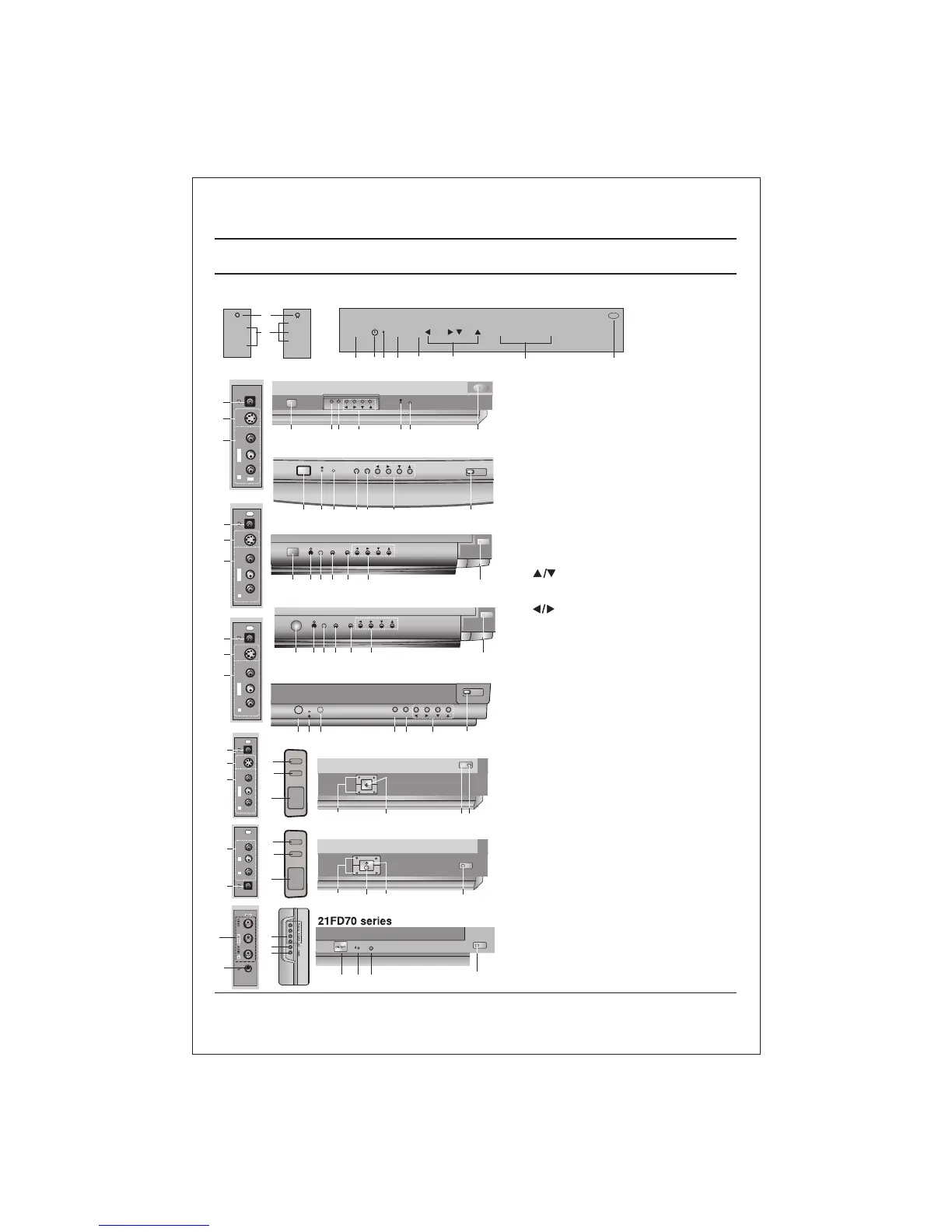
Location and function of controls
1. MAIN POWER
switches the set On or Off.
2. POWER/STANDBY INDICATOR
illuminates brightly when the set is in
standby mode.
dims when the set is switched On.
3. MENU
selects a menu.
4. OK
accepts your selection or displays the
current mode.
5 (Programme Up/Down)
selects a programme or a menu item.
switches the set on from standby.
(Volume Down/Up)
adjusts the volume.
adjusts menu settings.
6. REMOTE CONTROL SENSOR
Note : Only use the supplied remote
control handset. (When you use other,
they'll be not able to function).
7. HEADPHONE SOCKET (option)
Connect the headphone plug to this
socket.
8. AUDIO/VIDEO IN SOCKETS (AV2/AV3)
(Option)
Connect the audio/video out sockets of
External equipment to these sockets.
9. S-VIDEO/AUDIO IN SOCKETS (S-AV)
(option)
Connect the video out socket of an S
VIDEO VCR to the S-VIDEO socket.
Connect the audio out sockets of the
S-VIDEO VCR to the audio sockets as
in AV3.
10. EYE (option)
adjusts picture according to the Surroun-
ding conditions.
Note : Do not place any heavy objects on
the TV set.
FRONT PANEL / SIDE PANEL
Shown below is a simplified representation of front or side panel, here shown may be somewhat different from your set.
7
ON/OFF
MENU
OK VOL
PR
1
2 6
3 5
8
10
VIDEO
(L)-AUDIO-(R)
4
AUDIO
VIDEO
VIDEO
AUDIO
(R)
(L)
I
8
7



 To Next Page