- 24 -
Copyright ©2011 LG Electronics. Inc. All right reserved.
Only for training and service purposes
LGE Internal Use Only
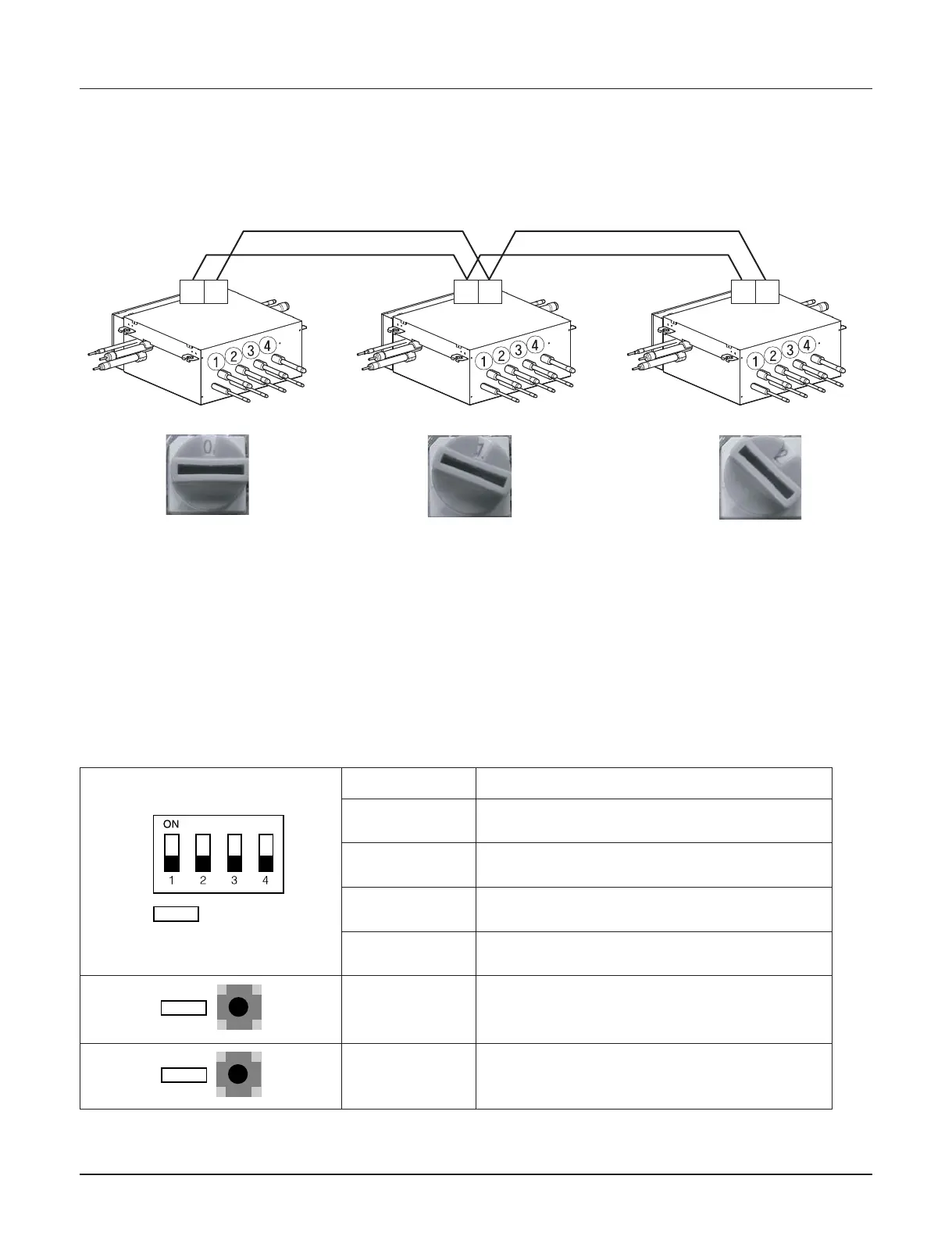
2. SW05M (Rotary switch for addressing HR unit)
Must be set to '0' when installing only one HR unit.
When installing multiple HR units, address the HR units with sequentially increasing numbers starting from '0'.
Ex) Installation of 3 HR units
3. SW01M/SW03M/SW04M (Dip switch and tact switch for manual valve addressing)
1) Normal setting (Non-Zoning setting)
- Used in manual addressing of the valve in the HR unit
- Set the address of the valve of the HR unit to the central control address of the connected indoor unit.
- SW01M: selection of the valve to address
SW03M: increase in the digit of 10 of valve address
SW04M: increase in the last digit of valve address
- Prerequisite for manual valve addressing : central control address of each indoor unit must be preset differ-
ently at its wired remote control.
Switch No. Setup
No.1 Manual addressing of valve #1
No.2 Manual addressing of valve #2
No.3 Manual addressing of valve #3
No.4 Manual addressing of valve #4
SW03M Increase in the digit of 10 of valve address
SW04M Increase in the last digit of valve address


 To Next Page