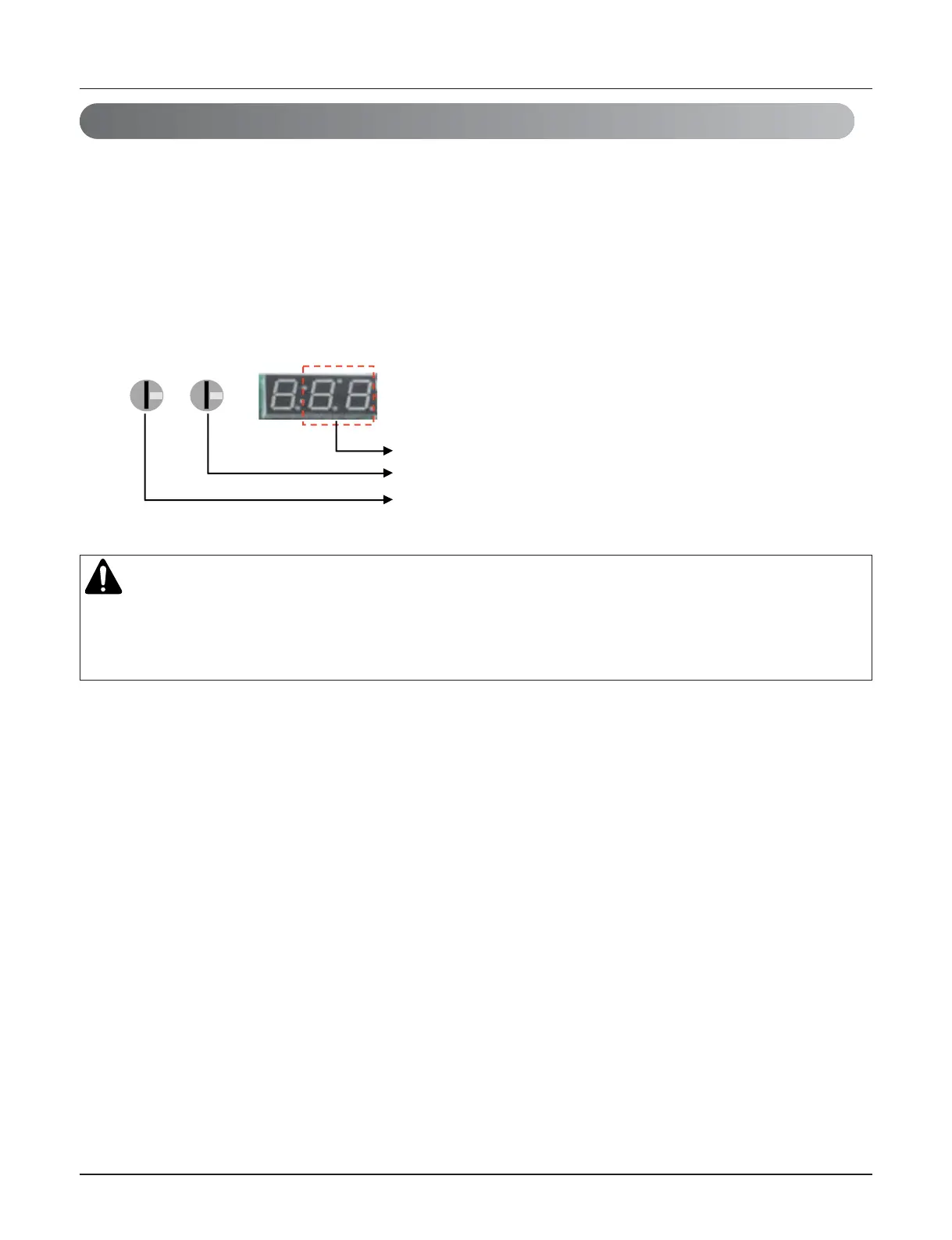
HR Unit PCB
1. Turn dip switch 5,6,10 on at system off.
2. Set the left Ratary switch for HR unit.(Rotary switch No. "0" ➝ HR unit No. "1")
3. Set the right Ratary switch for IDU unit.(Rotary switch No. "0" ➝ HR unit branch No. "1")
4. Display the Master IDU No. of the HR unit on 7segment.(Default display is "00" on 7segment)
5. Press the black button.(The IDU No. increase every 1 second in the zoning )
6. Set the Master IDU(Press the red button during 1.5seconds stop twinkling)
No. of Indoor unit.
No. of HR unit branch.
No. of HR unit.
CAUTION
• Waiting for 80seconds after power on.
• The zoning information and Master IDU information remove from EEPROM after Auto-addressing.
• If there is installed the central control, it is impossible setting of Master IDU in zoning.
9. Setting method of Master indoor unit in zoning
Copyright ©2011 LG Electronics. Inc. All right reserved.
Only for training and service purposes
LGE Internal Use Only
- 34 -


 To Next Page