10
Getting Started
1
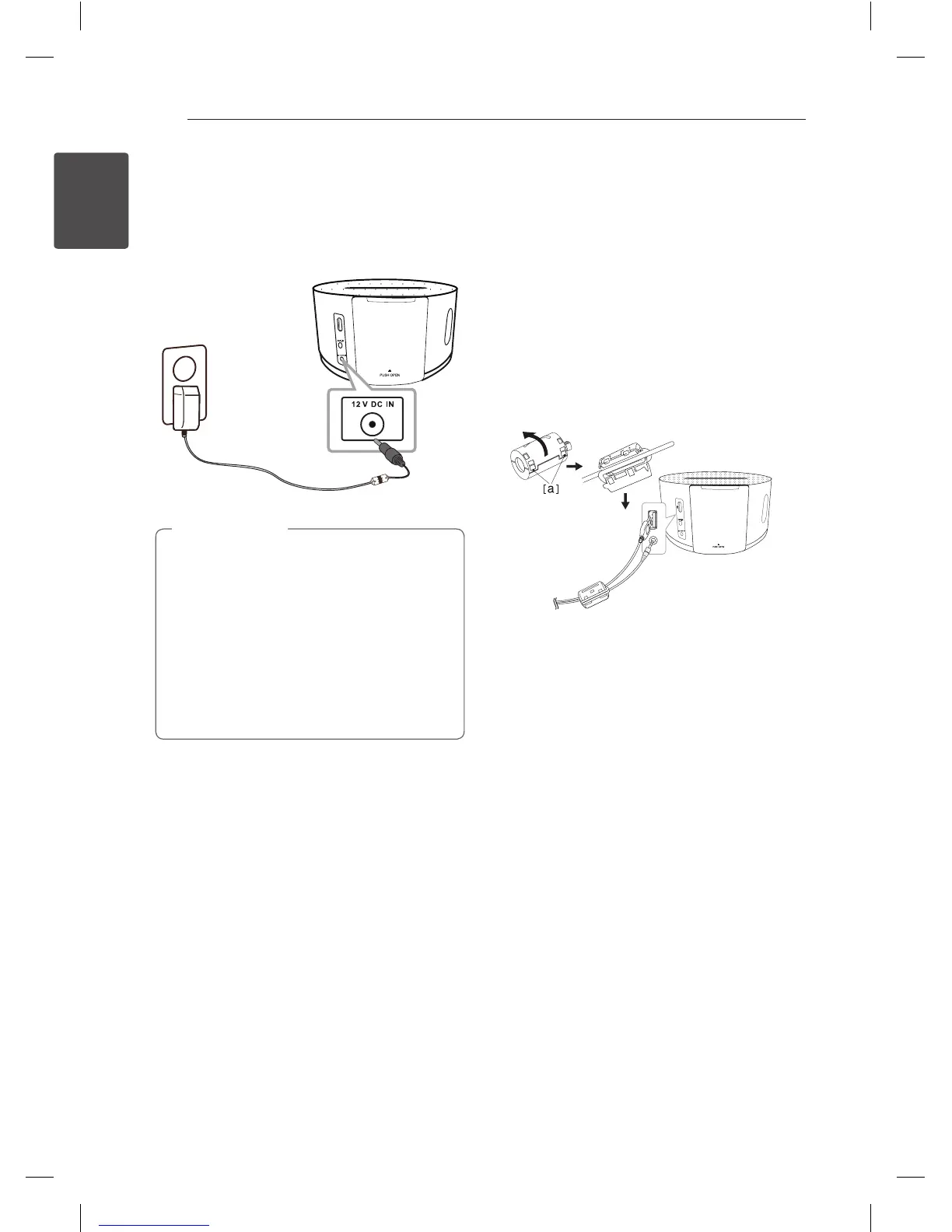
Connecting the AC
Adapter
Plug the AC adapter into an AC outlet.
y
Only use the AC adapter supplied with this
device. Do not use a power supply from
another device or manufacturer. Using any
other power cable or power supply may
cause damage to the device and void your
warranty.
y
Right after change function or volume, if
you plug out adapter without power o
operation, it might not memorize its latest
status.
>
Caution
How to Attach the
Ferrite Core (For EMI
Only)
You must ax the cores (supplied with the model
you purchased) in order to reduce or eliminate
electrical interference.
1. Pull the stopper [a] of the ferrite core to open.
2. Wind the portable cable and USB cable on the
ferrite core.
3. Close the ferrite core until it clicks.
ND1531-BE_ADEULLK_ENG.indd 10 2013-08-23 5:58:13


 To Next Page
 Loading...