EasyManua.ls Logo

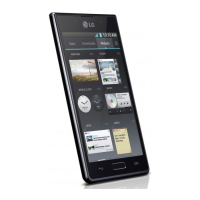
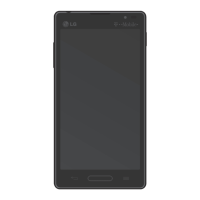
LG P705 - User Manual

LG P705
376 pages
Go to English
Print Icon
To Next Page IconTo Next Page
Loading...
繁體中文
简体中文
ENGLISH
MFL67843736 (1.0) www.lg.com
使用手册使用手册
用户手册用户手册
User GuideUser Guide
LG-P705

Table of Contents

Other manuals for LG P705

Questions and Answers

  • T
    Tiffany GrimesAug 28, 2025
    Why does my LG P705 Cell Phone keep losing network connection?
    • S
      Steven PalmerAug 28, 2025
      If your LG Cell Phone displays a 'No network connection' message or keeps losing network, try moving to a location with a stronger signal, such as near a window or in an open area. Check the network operator coverage map to ensure you are within the service area. If your SIM card is older than 6-12 months, consider replacing it at your network provider's branch. You may also need to contact your service provider to resolve the issue.
  • J
    Jack GomezAug 29, 2025
    How to fix SIM error on LG P705?
    • D
      David WagnerAug 29, 2025
      If your LG Cell Phone displays a SIM error, ensure that the SIM card is correctly inserted.
  • A
    Ashley LeAug 29, 2025
    How to restore sound on LG Cell Phone?
    • C
      Carol TorresAug 29, 2025
      If you are experiencing problems with sound on your LG Cell Phone, check the sound settings to ensure you are not in vibrate or silent mode.
  • N
    Nicole HernandezAug 30, 2025
    Why can't I receive or send SMS & picture on LG P705 Cell Phone?
    • S
      Susan CardenasAug 30, 2025
      If you cannot send or receive SMS and picture messages on your LG Cell Phone, delete some messages from the phone to free up memory.
  • T
    tamara29Aug 25, 2025
    How to fix LG P705 that cannot be switched on?
    • B
      Brandy SmithAug 25, 2025
      If your LG Cell Phone is not turning on, ensure you press the On/Off key for at least two seconds. Also, check if the battery is charged and verify the charging indicator. Clean the battery contacts if necessary.
  • C
    Christopher MillerAug 31, 2025
    What to do if codes do not match on LG P705 Cell Phone?
    • L
      Lindsay FernandezSep 1, 2025
      If your LG Cell Phone displays 'Codes do not match', contact your service provider.
  • D
    Donald ChoiSep 1, 2025
    What to do if there is no voltage in LG P705 charger?
    • A
      Adam SanchezSep 1, 2025
      If your LG Cell Phone charger has no voltage, plug the charger into a different socket.
  • D
    Dylan MartinSep 2, 2025
    Why any application cannot be set on LG P705?
    • L
      Lisa BryantSep 2, 2025
      If any application cannot be set on your LG Cell Phone, contact your service provider.
  • R
    Ruth LewisSep 2, 2025
    What to do if calls not available on LG P705 Cell Phone?
    • A
      Alexandria WoodSep 2, 2025
      If calls are not available on your LG Cell Phone, check for new restrictions and contact your service provider or reset the limit with PIN2.
  • P
    Paula CastilloSep 3, 2025
    What to do if charger defective on LG Cell Phone?
    • M
      Malik BrownSep 3, 2025
      If your LG Cell Phone charger is defective, replace the charger.

Summary

LG-P705 User Guide

Guidelines for Safe and Efficient Use

Exposure to Radio Frequency Energy

Information on SAR values and compliance with radio wave exposure guidelines.

Product Care and Maintenance

Instructions on how to care for and maintain the phone to prevent damage.

Efficient Phone Operation and Road Safety

Tips for optimizing phone performance and safe driving practices.

Hearing Protection and Environmental Warnings

Precautions to prevent hearing damage and warnings for specific environments.

Battery Information and Care

Guidelines for charging, maintaining, and handling the phone's battery.

Getting to Know Your Phone

Phone Memory and Application Management

Managing internal storage and uninstalling applications.

Optimising Battery Life

Tips and procedures for extending the phone's battery life.

Using Folders and PC Software Installation

Organizing apps into folders and installing LG PC Suite.

Hard Reset and Application Management

Restoring the phone and managing running applications.

Device Components and SIM;Battery Installation

Identifying phone parts and installing SIM card and battery.

Charging and Memory Card Usage

How to charge the phone and use memory cards.

Locking and Securing the Screen

Procedures for locking, unlocking, and securing the phone screen.

Your Home Screen

Touch Screen Tips and Navigation

Basic gestures and techniques for using the touch screen interface.

Customising and Managing the Home Screen

Adding, removing, and arranging items on the home screen.

Notifications and Status Bar Information

Accessing notifications and understanding status bar icons.

Onscreen Keyboard Usage

Using the virtual keyboard for text input on the phone.

Google Account Set Up

Connecting to Networks and Devices

Wi-Fi and Bluetooth Connectivity

Connecting to Wi-Fi and pairing Bluetooth devices for wireless communication.

Data Sharing and SmartShare Usage

Sharing internet connection and multimedia content wirelessly.

Calls

Making, Receiving, and Managing Calls

Procedures for initiating, answering, and handling phone calls.

Call Settings and Features

Configuring various call-related options like call forwarding and barring.

Contacts

Managing Contacts: Adding and Searching

Finding contacts and creating new entries with details and photos.

Moving and Organizing Contacts

Transferring contacts and classifying them as favorites.

Messaging

Sending and Receiving Messages

Composing, sending, and organizing SMS/MMS messages.

Message Settings and Emoticons

Customizing message preferences and using emoticons.

E-mail

Email Account Management

Adding, changing, or removing email accounts on the phone.

Composing and Sending Emails

Writing and sending email messages, including attachments.

Camera

Camera Basics and Viewfinder

Understanding the camera interface and taking photos.

Advanced Camera Settings and Photo Options

Adjusting advanced camera settings and managing captured photos.

Video Camera

Video Recording Basics and Viewfinder

Understanding the video camera interface and recording videos.

Advanced Video Settings and Options

Adjusting advanced video recording settings and managing recorded clips.

LG Unique Functions

QuickMemo and LG SmartWorld

Using QuickMemo for notes/screenshots and accessing LG SmartWorld for content.

Multimedia

Gallery, Music, and FM Radio

Viewing media, playing music, and listening to FM radio.

File Transfer and Song Playback

Copying files via USB and controlling music playback.

Utilities

Alarms, Calendar, and Calculator

Setting alarms, scheduling events, and using the calculator.

Polaris Office 4

Using the office suite for viewing documents.

The Web

Internet Browsing and Web Options

Navigating the internet and using browser features.

Settings

Network and Connectivity Settings

Managing Wi-Fi, Bluetooth, and mobile data connections.

Display and Screen Settings

Customizing screen brightness, timeout, and lock screen security.

System, Personal, and Security Settings

Configuring system, account sync, and security preferences.

Phone Software Update

Procedures for updating the phone's firmware.

Accessories

Troubleshooting

Network, SIM, and Call Issues

Resolving problems with network connectivity, SIM cards, and calls.

Phone Power, Charging, and Screen Issues

Steps to resolve power, charging, freezing, and screen activation problems.

Application and File Errors

Addressing issues with applications, file formats, and SD card functionality.

LG P705 Specifications

General IconGeneral
ModelLG P705
Announced2012, February
NetworkGSM / HSPA
2G bandsGSM 850 / 900 / 1800 / 1900
3G bandsHSDPA 900 / 2100
GPRSClass 12
EDGEClass 12
Weight125 g
SIMMini-SIM
Display TypeIPS LCD
Resolution480 x 800 pixels
MultitouchYes
CPU1.0 GHz Cortex-A5
GPUAdreno 200
Internal Storage4 GB
RAM512 MB
Card slotmicroSD, up to 32 GB
Rear Camera5 MP, AF
Video480p@24fps
Front CameraVGA
Alert typesVibration; MP3, WAV ringtones
LoudspeakerYes
3.5mm jackYes
WLANWi-Fi 802.11 b/g/n, Wi-Fi Direct, hotspot
Bluetooth3.0, A2DP
GPSYes, with A-GPS
RadioFM radio
USBmicroUSB 2.0
MessagingSMS(threaded view), MMS, Email, Push Email, IM
BrowserHTML5
JavaYes, via Java MIDP emulator
ColorsBlack, White
StatusAvailable
Display Size4.3 inches
OSAndroid 2.3 (Gingerbread)
SensorsAccelerometer, proximity

Related product manuals