5
Getting Started
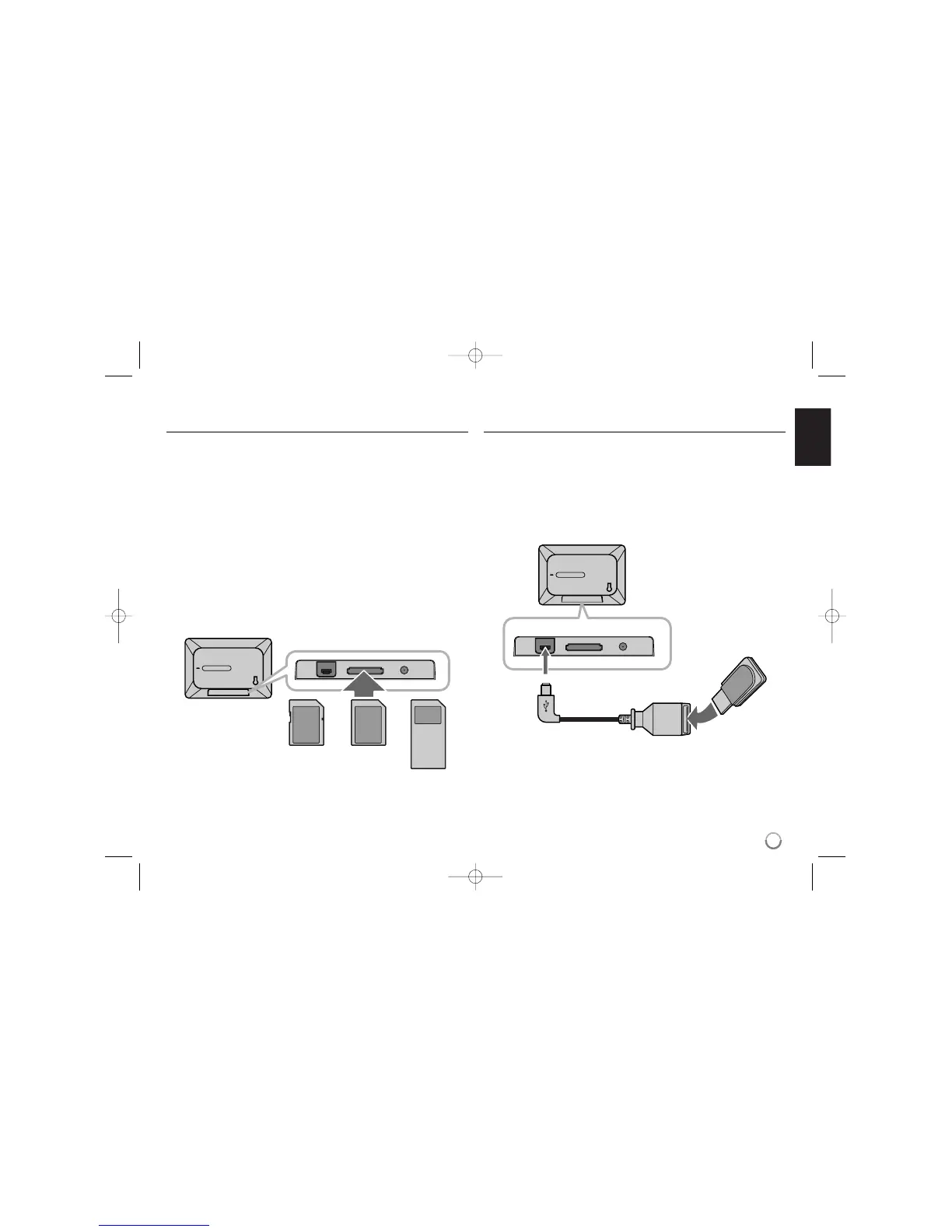
Inserting or removing a memory card
Insert a memory card to the memory card slot as shown below.
To withdraw the memory card from the slot, press on the center of the memory
card then withdraw it carefully.
Compatible memory cards and formats
• Secure Digital Card (SD)
• Multi Media Card (MMC)
• Memory Stick (MS)
• Compatible with: FAT 12, FAT 16, or FAT 32
• Only use the memory cards recommended above.
• The card will only fit in one direction; do not force it.
The card should fit snugly when properly inserted.
• Do not extract the memory card whilst in use, i.e. when accessing photo or
other data.
Regarding Write Protect
For cards that have a write protect switch, it will not be possible to write, erase
or format the card if the write protection switch has been enabled.
Connecting a USB device
Connect the small end of the USB adapter cable to the USB port on the unit.
Connect a USB device and the USB adapter. Use a USB cable, if you need.
• This unit supports only USB devices with FAT16 or FAT32 format.
• Do not extract the USB device during operation (play, copy, etc.).
• USB device: USB device that support USB 1.1 and USB 2.0.
(For example: USB Flash Drive, Memory Card Reader, Digital Camera, etc.)
• Any USB devices which require additional software are not supported by the
PF391.
USB Flash Drive
(For example)
USB Adapter Cable
To USB port



 To Next Page