A-6
MAKING CONNECTIONS
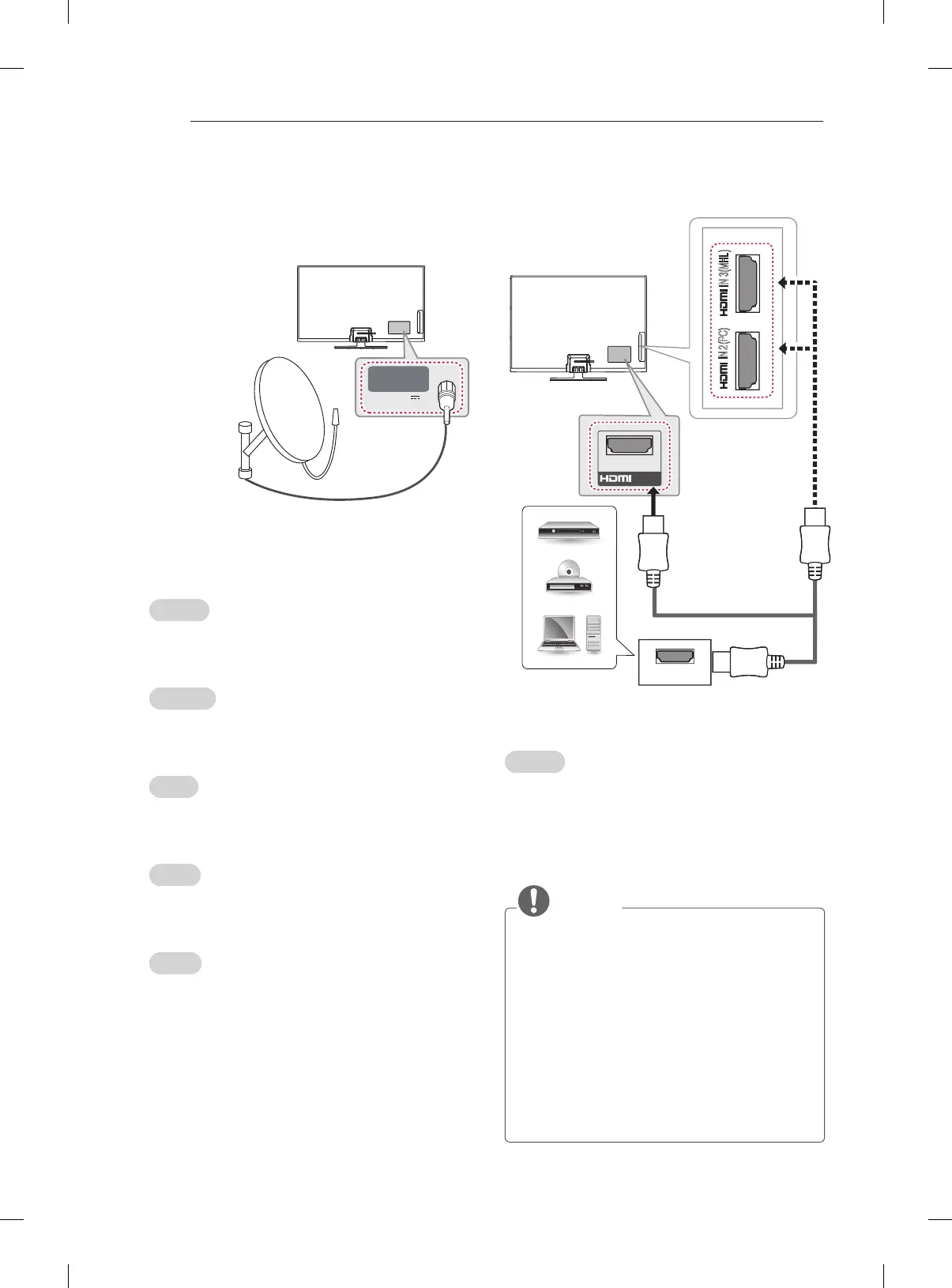
Satellite dish Connection
(Only satellite models)
English
Connect the TV to a satellite dish to a satellite
socket with a satellite RF cable (75 Ω).
Svenska
Anslut TV:n till ett parabolantennuttag med en
satellit-RF-kabel (75 Ω).
Norsk
Koble TV-en til en parabolantenne til en
satellittkontakt med RF-kabel for satellit (75 Ω).
Dansk
Slut TV’et til en parabol og til et satellitstik ved
hjælp af et satellit-RF-kabel (75 Ω).
Suomi
Kytke TV satelliittiantenniin ja satelliittiliitäntään
RF-kaapelilla (75 Ω).
HDMI Connection
English
Transmits the digital video and audio signals from
an external device to the TV. Connect the external
device and the TV with the HDMI cable as shown.
Choose any HDMI input port to connect. It does
not matter which port you use.
NOTE
y
It is recommended to use the TV with the
HDMI connection for the best image quality.
y
Use the latest High Speed HDMI™ Cable
with CEC (Customer Electronics Control)
function.
y
High Speed HDMI™ Cables are tested to
carry an HD signal up to 1080p and higher.
y
Supported HDMI Audio format : Dolby
Digital, DTS, PCM (Up to 192 KHz, 32KHz/4
4.1KHz/48KHz/88KHz/96KHz/176KHz/192K
Hz)
LNB IN
Satellite
13/18 V
700 mA Max
Satellite Dish
IN (ARC)
1
IN 2(PC)
IN 3(MHL)
HDMI
DVD / Blu-Ray / PC
HD Cable Box / HD STB
(*Not Provided)







 To Next Page