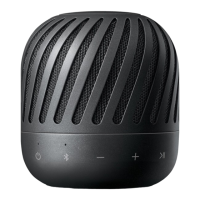
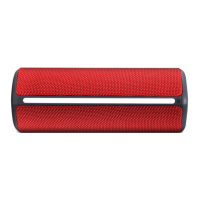
This document is an owner's manual for a portable Bluetooth speaker from LG, with model numbers PJ3 and PJ3B. It provides comprehensive information on safety, operation, features, troubleshooting, and specifications.
Function Description
The LG Portable Bluetooth Speaker is designed for wireless audio playback from Bluetooth-enabled devices and wired playback from external devices. It features a built-in rechargeable battery for portability.
Key Functions:
- Bluetooth Connection: Allows streaming music wirelessly from smartphones, notebooks, and other Bluetooth devices. The speaker supports Bluetooth version 4.2 and the A2DP (Advanced Audio Distribution Profile).
- Portable In: Enables connection to external devices (like smartphones or notebooks) via a 3.5 mm stereo jack for wired audio playback.
- Handsfree Function: Supports receiving and managing incoming calls on a connected Bluetooth smartphone, allowing users to answer, reject, and end calls directly from the speaker. Call volume can be adjusted using the speaker's controls.
- Dual Play (Optional): This feature allows two compatible LG PJ series speakers (models 3, 8, 9) to be connected for stereo sound. One speaker acts as the primary (left channel) and the other as the secondary (right channel).
- Multi Pairing: The speaker can connect to two Bluetooth devices simultaneously, although only one connected device can play and control music at a time.
- Auto Power Down: The unit automatically turns off after 15 minutes of no music playback in Bluetooth mode or after 6 hours of no button operation in portable input mode to save energy.
Important Technical Specifications
- Power Requirements: 5 V ⎓ 1.8 A (AC adapter) with a built-in rechargeable battery.
- Power Consumption: 6 W.
- Dimensions (W x H x D): Approximately 83.5 mm X 102.3 mm X 83.5 mm.
- Operating Temperature: 5 °C to 35 °C.
- Operating Humidity: 5% to 60%.
- Water-proof Rating: IPX7. This means the speaker is water-proof up to 1 meter for 30 minutes. However, ports are not water-proof and must be securely covered for water resistance. The unit should not be used underwater or exposed to water while charging.
- Inputs:
- PORT.IN: 0.5 Vrms (3.5 mm stereo jack).
- USB: Micro USB port for charging the battery.
- Battery:
- Battery Capacity: 1500 mAh.
- Operating Time: Approximately 10 hours (based on a fully charged battery and continuous playback at 50% volume level). Actual operating time may vary.
- Charging Time: Less than 4 hours (with AC Adapter).
Usage Features
Controls and Indicators:
- Power Button (⏚): Turns the speaker on/off.
- Volume Buttons (–, +): Adjust the volume. A beep sound is heard at minimum and maximum volume.
- Playback Control Button (>II): Starts, pauses, or skips playback in Bluetooth mode. Also used for receiving and disconnecting calls.
- Multi Pairing Button (*): Adds a Bluetooth device for multi-pairing (press and hold). In portable mode, it changes to Bluetooth mode.
- Dual Play Button (⊞): Connects two speakers for dual play (press and hold for 2 seconds).
- Microphone: For handsfree calls.
- LED Indicators:
- Power LED: Indicates power status.
- Bluetooth LED: Shows Bluetooth connection status (blinking for searching, steady for connected).
- Dual Play LED: Indicates Dual Play connection status.
- Battery LED: Displays battery charging status (Red for charging, Green for fully charged, Amber for ≥15%, Red blinking for <15%).
Basic Operations:
- Power On/Off: Press the power button.
- Bluetooth Connection: Turn on the unit, enable Bluetooth on your device, search for "LG PJs (xx)" (where xx are the last two digits of the Bluetooth address), and select to pair. The Bluetooth LED will turn on when connected.
- Charging: Connect the supplied USB cable to the speaker's USB port and an AC adapter (not supplied) to an AC outlet. The Battery LED indicates charging status.
- Checking Battery Status: Press any button on the speaker or change function to see the Battery LED status. For iOS devices, battery status can also be checked on the smartphone.
- Portable Mode: Connect an external device via the Portable In connector. The speaker automatically switches to portable mode. In this mode, Bluetooth connection is limited to prevent unintended connections.
Advanced Features:
- Multi Pairing: Press and hold the multi pairing button for 2 seconds to enter multi-pairing mode, then connect a second Bluetooth device.
- Dual Play Connection: Press and hold the Dual Play button on each speaker for 2 seconds. Once connected, one speaker becomes primary (left channel) and the other secondary (right channel). Multi-pairing is not supported in Dual Play mode.
- Resetting: In case of malfunction or freezing, press the reset hole using a thin pin.
Maintenance Features
- Shipping: Retain the original shipping carton and packing materials for maximum protection if the unit needs to be shipped.
- Cleaning: Use a soft, dry cloth to clean the player. For extremely dirty surfaces, use a soft cloth lightly moistened with a mild detergent solution. Avoid strong solvents like alcohol, benzine, or thinner, as they can damage the surface.
- Surface Care: Do not use volatile liquids (e.g., insecticide spray) near the unit. Avoid wiping with strong pressure. Do not leave rubber or plastic products in contact with the unit for extended periods.
- Battery Removal: For safe disposal and environmental protection, old batteries or battery packs should be removed following reverse assembly steps and placed in appropriate collection containers. They should not be exposed to excessive heat.
- Power Cord Protection: Protect the power cord from physical or mechanical abuse (twisting, kinking, pinching, closing in a door, or walking upon). Regularly inspect the cord for damage.
- Ventilation: Do not block ventilation openings. Ensure proper ventilation if the unit is placed in a confined space.
- Water-proof Maintenance: Always close the port cover securely from left to right to maintain water-proof effectiveness. Do not expose the unit to water while charging. If exposed to water, wipe with a soft dry cloth.
This manual emphasizes safety warnings, including precautions against electric shock, fire hazards, and proper handling of the power cord and battery. It also provides troubleshooting steps for common issues like no power, sound distortion, and Bluetooth pairing problems.

 Need help?

 To Next Page

 General