Getting Started 7
Getting Started
1
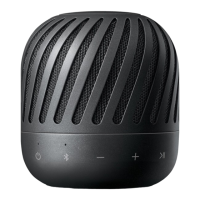
Speaker
b
i
c
j
d
g
k
e h
lm n
o
f
a
a
Microphone
b
Power LED
c
Bluetooth LED
d
Dual Play LED
e
1
Turns On / Off : Press it.
f
j
- Adds a Bluetooth device for multi pairing.
(Press and hold
j
)
- Changes to Bluetooth mode in portable mode.
(Press
j
)
* When you connect the portable cable, the
function is changed to portable in mode
g
p
: Turn down the volume.
h
o
: Turn up the volume.
i
T
- Starts, pauses or skip playback on the
Bluetooth mode. (Page 11)
- Receives a call on the Bluetooth device.
(Page 12)
- Mutes the sound on the portable.
j
Connects two speakers for dual play.
(Page 17)
k
Battery LED
l
Reset hole
m
USB port for charging
n
Portable In connector
Listens to music from your portable device.
o
Port cover
Because the button of speaker is not touch
system, press button to use speaker.
,
Note


 To Next Page