Need help?
Do you have a question about the LG PK3W and is the answer not in the manual?
This document is an owner's manual for a portable Bluetooth speaker, models PK3 and PK3W, manufactured by LG Electronics Inc. It provides comprehensive instructions on operating, maintaining, and troubleshooting the device.
The LG portable Bluetooth speaker is designed for wireless audio playback and hands-free communication. It connects to smart devices via Bluetooth technology, allowing users to stream music and manage calls. The speaker also features a "Portable In" mode for wired connection to external audio devices using a 3.5mm stereo cable. A key feature is its water-proof design, rated IPX7, meaning it can withstand immersion in up to 1 meter of water for 30 minutes. However, the port cover must be securely closed to maintain water resistance, and the ports themselves are not waterproof.
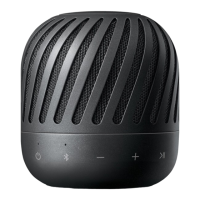
The speaker includes several control buttons on its front panel for various functions. These include a power button, volume controls (+/-), playback controls (play/pause, skip forward/backward), a Bluetooth pairing button, and an "ENHANCED BASS" button for sound effect adjustments. A microphone is integrated for hands-free calls and voice command activation. LED indicators provide visual feedback on battery status, power, Bluetooth connection, and the active sound effect.
Power and Charging: The speaker is equipped with a built-in rechargeable battery. It is charged via a USB port using an AC adapter (not supplied, but a 5V AC adapter approved by LG Electronics Inc. with more than 1.8A is recommended). The Battery LED indicates charging status: red for charging, green for fully charged. The speaker has an approximate operating time of 12 hours on a full charge, depending on volume level and equalizer settings. It also features an auto power-off function to conserve energy, turning off after 15 minutes of inactivity in Bluetooth mode or 6 hours in portable input mode without button operation.
Audio Playback: Users can control music playback (play, pause, skip) directly from the speaker's buttons or via the connected Bluetooth device. The volume can also be adjusted using the speaker's +/- buttons.
Sound Effects: The speaker offers two sound effects: "Enhanced Bass" and "Standard." These are tuned by MERIDIAN, an audio company, to provide a wide sound field and rich bass. The "ENHANCED BASS" button toggles between these modes, with an LED indicating the active effect. The last used sound effect is retained when the speaker is turned back on.
Hands-free Function: When connected to a smartphone via Bluetooth, the speaker can be used to receive, end, or reject calls using the playback button. It also allows toggling between the speaker and the phone during a call. Call volume can be adjusted with the speaker's volume buttons. This function is only available for smartphones.
Voice Command: The speaker supports voice command functionality, allowing users to activate their smart device's voice assistant (e.g., Google Assistant, Siri) through the speaker's microphone. This is activated by pressing the voice command button.
Portable In Mode: For non-Bluetooth devices, the speaker can be connected via a 3.5mm stereo cable to the "PORT.IN" jack. When a portable cable is connected, the speaker automatically switches to portable mode, and the Bluetooth LED turns off. In this mode, Bluetooth connection is limited to prevent unintended connections.
Water-proof (IPX7): The speaker is designed to be water-resistant. It is crucial to ensure the port cover is securely closed to maintain this protection. If the speaker is exposed to water, it should be wiped with a soft, dry cloth and thoroughly dried before further use. Charging should not occur when the unit is wet.
Cleaning: For general cleaning, a soft, dry cloth is recommended. For dirtier surfaces, a soft cloth lightly moistened with a mild detergent solution can be used. Strong solvents like alcohol, benzine, or thinner should be avoided as they can damage the surface.
Resetting: In case of malfunction or freezing, the speaker can be reset by pressing the "RESET" button (located under the port cover) with a thin pin. This will turn off the speaker, after which it can be turned back on using the power button. The reset function does not work during charging.
Shipping: It is recommended to save the original shipping carton and packing materials for potential future shipping, ensuring maximum protection for the unit.
 General
| Brand | LG |
|---|---|
| Model | PK3W |
| Speaker Type | Portable Bluetooth Speaker |
| Output Power | 16W |
| Power Source | Battery, USB |
| Battery Life | 12 hours |
| Water Resistance | IPX7 |
| Bluetooth Version | 4.2 |
| USB | Yes |
| Speakerphone | Yes |
| Colors | Black, White |


 To Next Page