4
Front of the Front Panel
Installation of Human Detection Sensor Kit
▶Make sure that you install the Human Detection Sensor kit before installing the front panel.
- If the front panel has already been installed, you cannot install the Human Detection Sensor
kit. In such a case, separate the front panel, install the kit, and re-install the front panel.
- You can operate the kit using remote controls described in the Components of Human Detec-
tion Sensor Kit section (page 3).
- A protective film is attached on the exterior of the Human Detection Sensor kit. Make sure that
you remove the protective film after installation is completed.
Caution
!
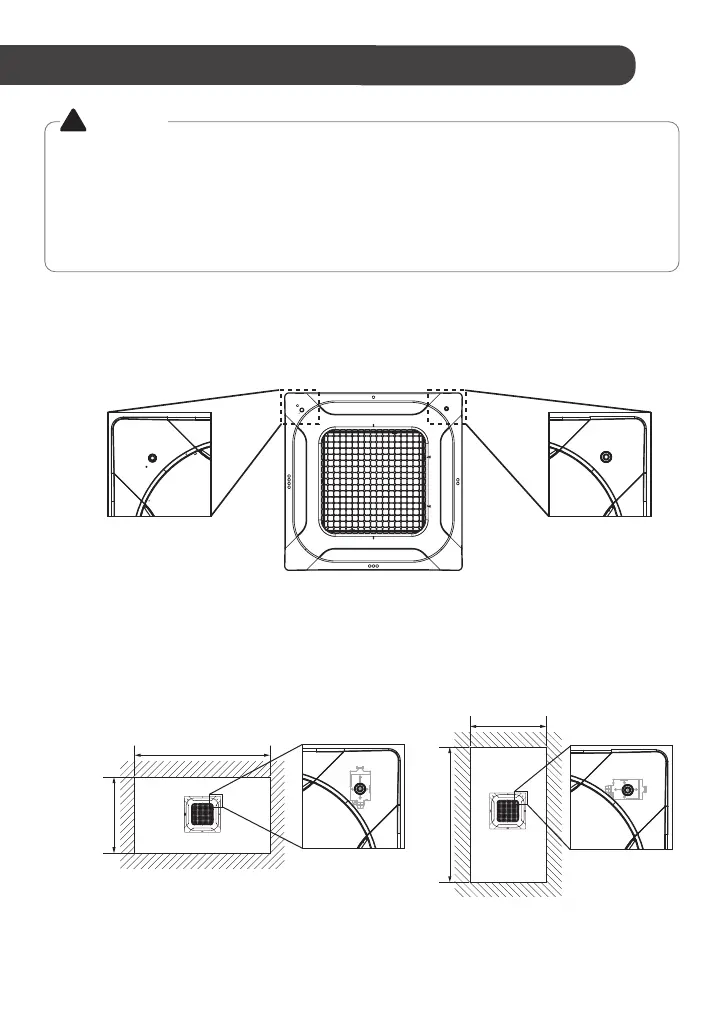
1. Check the mounting direction of the Human Detection Sensor kit.
(Install it on the right corner of the front panel when seen from the display PCB.)
There is no available installation location other than this, and installing the product in
another location may cause product malfunction or damage.
1-1. Determine the installation direction of the sensor kit based on the conditions of the site
where the air conditioner is to be installed.
- When the horizontal width is longer: General installation
- When the vertical width is longer: 90-degree rotated installation
(Installation Examples)
The horizontal width is longer than the
vertical width.
The vertical width is longer than
the horizontal width.
Display PCB Human Detection
Sensor Kit
Front of the Front Panel
Front of the
Front Panel
90-degree
Rotated Installation
General
Installation
Installation Space
Installation Space



 To Next Page